New Instagram Account Restricted for Automation Before Posting
A brand-new account flagged for automation before your first post is usually a Meta Business or ad account restriction, not an Instagram DM block. Here is how to tell and what to do.

When a new Instagram account is restricted for automation before you posted anything, the restriction usually sits on the Meta Business portfolio or an auto-created ad account, not on your Instagram profile, and it is typically triggered by a young account that grants permissions to a tool and starts generating API activity right away, according to Metricool's help center. It is usually fixable by requesting a review where the restriction actually lives, and creating a second Business Manager to get around it tends to make things worse.
One caveat before the fixes. Instagram's Terms of Use forbid "creating accounts or accessing or collecting information in an automated way without our express permission", so the job here is to separate a false flag on a clean new account from a flag that is accurate.
This guide covers the brand-new account case only: flagged on day one, before any posts or DMs. If your account was restricted after weeks of outreach, the guides on how Instagram detects automated DMs, restrictions that hit hand-typed DMs and why outreach accounts die after two weeks are the better fit.
Why is my new Instagram account restricted for automation before I posted?
Because the automated checks do not need posts to judge you. They look at what the account does in its first hours, and a fresh business setup does a lot in its first hours.
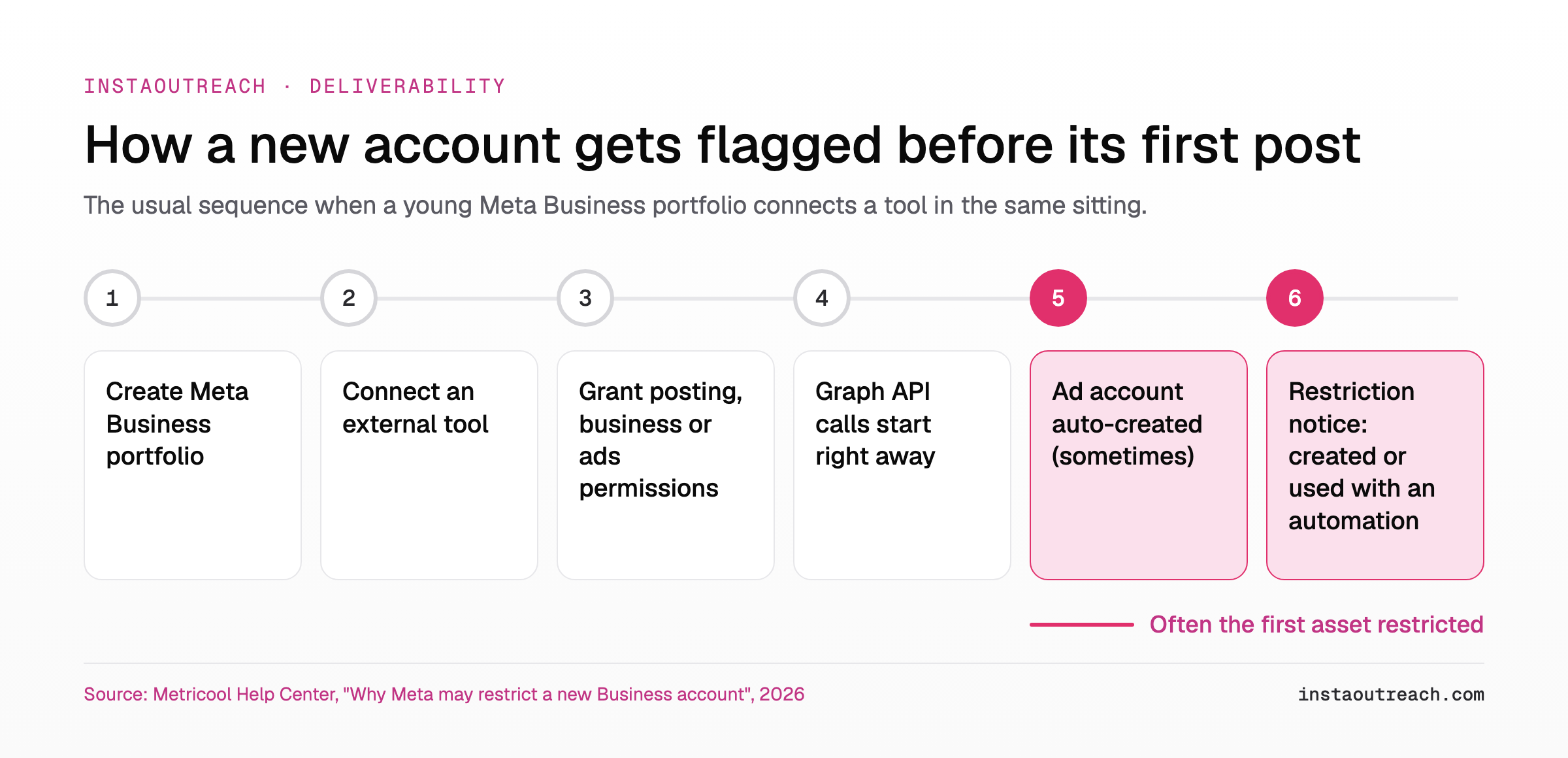
Metricool describes the pattern in plain terms: "Meta's automated anti-fraud system can flag a new or recently created Meta Business account when it grants permissions and starts generating Graph API activity without an established usage history." The triggers it lists:
- The Meta Business account is new or has little prior activity.
- You grant permissions such as posting, business management or ads management when connecting an external tool.
- The account begins making Graph API calls right away, which Meta can treat as automated activity on a young account.
- If there was no ad account yet, Meta sometimes creates one automatically when it detects the connection, and that new ad account is often the first asset restricted.
Superchat's help center says the same thing from the WhatsApp side: "Brand-new accounts with little to no history are more likely to get flagged by these automated checks, even when there's nothing actually wrong with the account or the business behind it."
Meta's own policy explains why speed matters. Its Spam standard prohibits "creating accounts, Groups, Pages, Events or other assets, either manually or automatically, at very high frequencies", and adds that Meta "may place restrictions on accounts that are acting at lower frequencies when other indicators of Spam ... or signals of inauthenticity are present." A new person who creates a portfolio, a Page, an Instagram link and an ad account in one sitting, then connects two tools, looks a lot like that from the outside.
Where does the restriction actually live? Instagram vs Business portfolio vs ad account
Most wasted days come from appealing in the wrong place. There are three places a "new account" restriction can sit, and each has its own screen and its own review button.
| Where | Typical wording | Where to check | Appeal path | What it blocks |
|---|---|---|---|---|
| Instagram profile | Features restricted for not following Community Guidelines or Terms of Use | Account Status in the Instagram app | "Request a Review" from Account Status (Instagram) | The specific features listed there |
| Meta Business portfolio or ad account | "It looks like this account was created or used with an automation that doesn't follow our rules" (Metricool) | Meta Business Suite, Account Quality | Select the restricted asset, then request a review (Meta Business Help) | Ads, audiences, portfolio creation (TimeToPost) |
| The connected app | Connection errors or missing permissions inside the tool | The tool's settings and Business Integrations | Fix the asset restriction first, then reconnect | Whatever that tool was doing through the API |
Check all three in this order: Instagram Account Status first, Account Quality second, the tool last. One limitation: Meta says Account Status shows "some restrictions your account might have", not all of them. A clean Account Status does not prove the portfolio is clean, which is why the second check matters.
Tip: Screenshot each screen before you appeal. If a review comes back and the wording changes, you will want to know which asset moved.
Is it a ban? What the "created or used with an automation" notice blocks
Usually not a ban, at least not of your Instagram profile. Per Metricool, the notice typically lists limits such as "can't create or run ads" and "can't share or use audiences", and the reason line is "Meta's generic message for unusual activity." TimeToPost, writing from a developer's experience, puts the scope this way: "The restriction is scoped to ads and portfolio creation." It also notes the same flag "blocks you from creating a business portfolio at all", which can stall anything that needs a verified business.
That is a different animal from the in-app Instagram warning "We suspect automated behavior on your account." CreatorFlow describes that one as "a warning", shown "to prevent the account from being temporarily restricted or permanently disabled", and usually tied to an app holding your password, fast liking or following, or a browser extension acting for you. The first is about Business assets; the second is about how the Instagram account itself behaves.
Read the notice twice: note which asset it names (portfolio, ad account or Instagram account) and which actions it lists. Anything not listed is not covered by that notice, but confirm in Instagram Account Status before you assume your profile is fine.
How to appeal a new Business account restriction (and how long it takes)
Appeal on the asset that is restricted, once, with accurate information. The steps:
- Open Meta Business Suite and go to Account Quality.
- Select the restricted asset (often the ad account first, per Metricool), then request a review through Meta's business help flow.
- Fill in the business details truthfully and match them to what is on the Business profile.
- If Instagram Account Status also shows a restriction, hit "Request a Review" there as well, which Instagram says you can do "directly from your Account Status."
- Do not disconnect and reconnect tools or create new assets while the review is open.
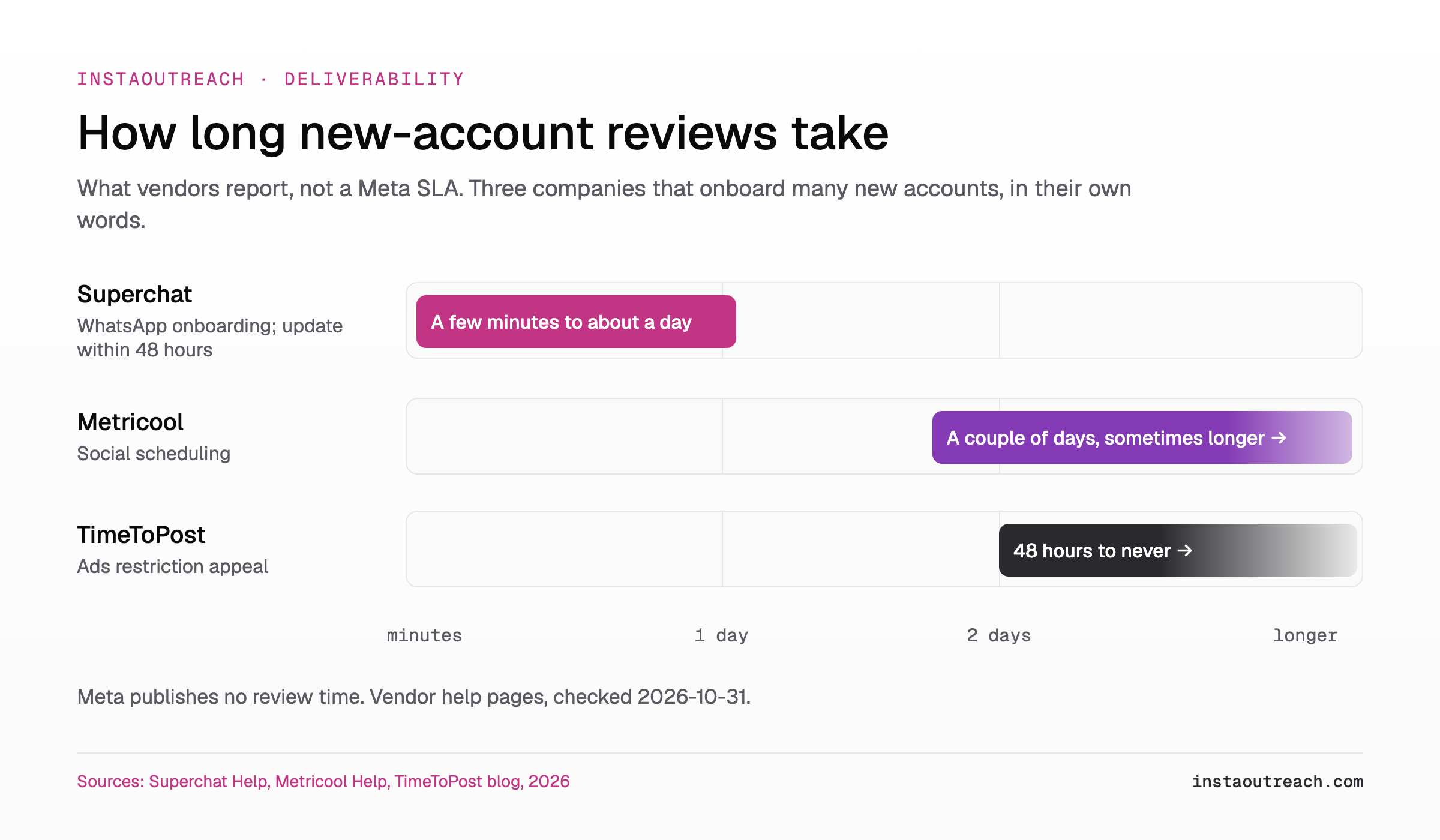
On timing, Meta publishes no service level for these reviews. What exists are vendor reports, and they vary widely:
- Metricool: "It commonly takes a couple of days, and sometimes longer."
- Superchat: resolution "can take anywhere from a few minutes to about a day", with an update "within the next 48 hours" after a request.
- TimeToPost: "48 hours to never" for an advertising-restriction appeal.
Treat those as anecdotes from three companies that onboard many new accounts, not as Meta's promise. If a review clears but features still do not come back, the guide on a restriction that lingers after Meta says it is lifted covers the next steps.
Should you create a new Business Manager or Instagram account instead?
No. Metricool is direct about it: "Do not create a new Meta account or Business Manager to work around the restriction. Meta tends to detect this and may restrict both the original and the new account."
Policy points the same way. Instagram's Terms of Use say "You can't attempt to create accounts or access or collect information in unauthorized ways", and Meta's Inauthentic Behavior standard targets the creation or use of assets meant to deceive Meta about "the identity, or origin of an audience or the entity that they represent." A fresh outreach account is not a deception network, but a second portfolio spun up minutes after the first was restricted, from the same device, gives the systems a reason to look. If you plan to run more than one Instagram account anyway, read the guide on running multiple accounts on one device first.
| Situation | Do | Don't |
|---|---|---|
| Ad account restricted, Instagram Account Status clean | Request review on the ad account, keep posting manually | Create a new ad account or portfolio |
| Portfolio restricted, cannot create another | Appeal the existing portfolio, complete business details | Ask a friend to create a portfolio for you |
| Instagram features restricted in Account Status | "Request a Review" in Account Status | Open a second Instagram account to keep working |
| Review rejected | Check the business info matches, wait, use the next appeal option offered | Spam repeated appeals or reconnect tools to test |
Note: "Make a new one" feels faster for about a day. If Meta links the two, you now have two restricted assets instead of one.
How to set up a new outreach account so it doesn't get flagged on day one
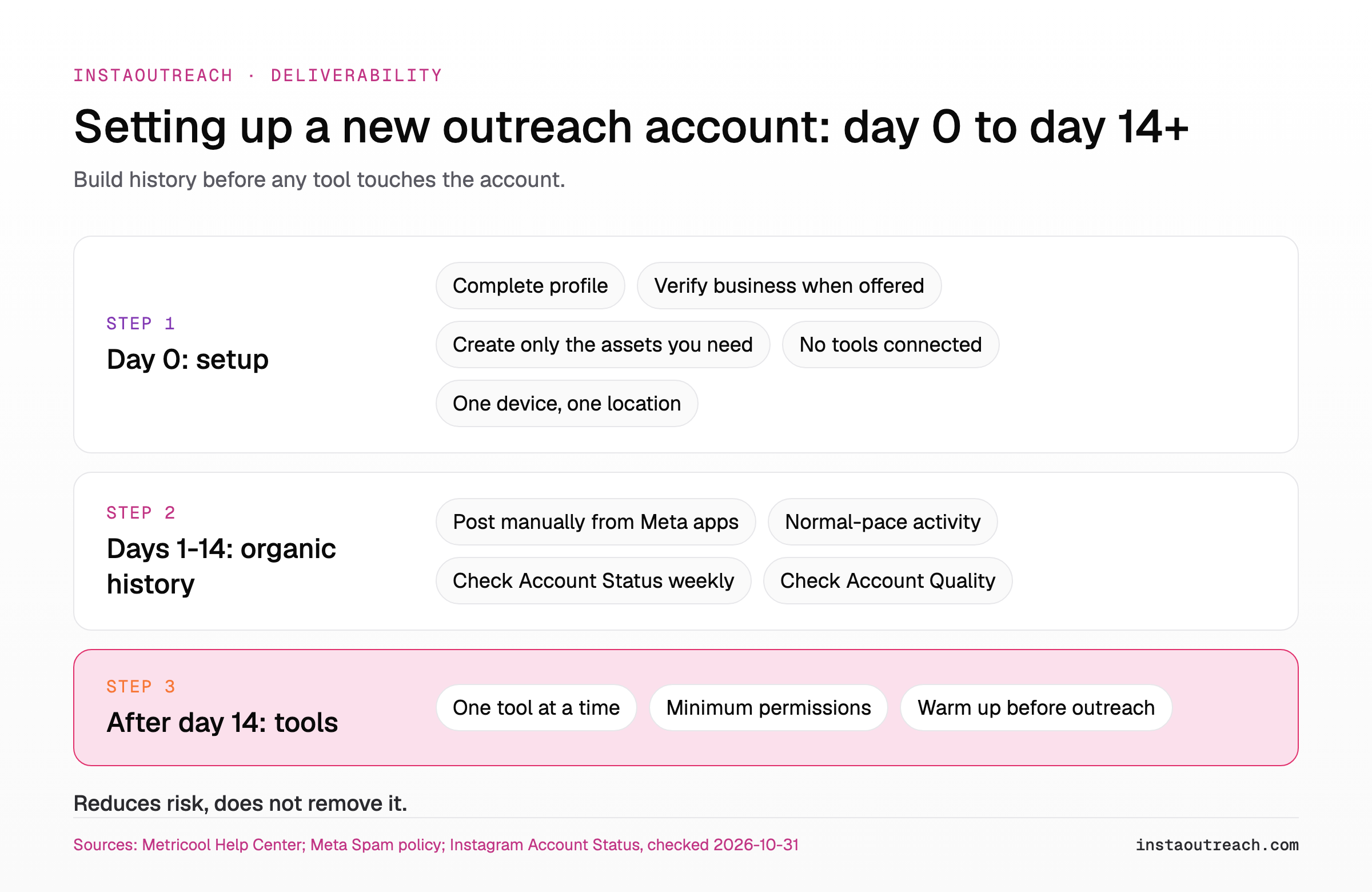
Nothing below guarantees a clean account. It reduces the signals the sources above describe: a young account, a burst of new assets, and API activity from day one. Metricool frames its own prevention steps the same way: they do not "eliminate every Meta review, but it reduces the chance that a young account is flagged the moment external API activity starts."
Day 0: setup
- Create the Instagram account on the phone you will keep using, from your normal connection.
- Fill in the profile fully: name, photo, bio, link, category.
- In Meta Business Suite, complete the Business profile and verify the business when Meta offers that option (Metricool).
- Create only what you need today. No extra Pages, portfolios or ad accounts in the same session, given Meta's spam rule on creating assets "at very high frequencies".
- Do not connect any scheduling, analytics or DM tool yet.
- Log in from one device and one location.
Days 1 to 14: build organic history
- Post manually from Meta's own apps. Metricool suggests doing this "for a few weeks so the account has organic activity."
- Use the account like a person: view stories, reply to comments, follow a few relevant accounts at a normal pace.
- Check Instagram Account Status once a week, as Instagram recommends.
- Open Account Quality in Business Suite and confirm no asset is restricted.
After day 14: connect tools carefully
- Connect one external tool at a time.
- Grant only the permissions that tool needs; skip ads management if you do not run ads.
- If the tool posts via the API, note that TimeToPost reports Advanced Access to publishing permissions has required an app connected to a verified business "since February 2023".
- Before any outreach, follow a day-by-day warmup schedule rather than jumping to full DM volume.
When a new-account flag is real: automation, outreach and the Terms of Use
Sometimes the flag is right. If the account was created specifically to run cold DM automation, Instagram's Terms of Use are clear that automated access "without our express permission" is not allowed, and Instagram says it has limits in place "to stop direct messages that people may not want to get, like spam." A review will not change that. The official route has its own constraints, covered in what the official API can and cannot send.
Restrictions that show up after outreach starts are a separate problem with separate causes, and these guides cover them:
| What you are seeing | When it shows up | Guide |
|---|---|---|
| Business portfolio or ad account restricted for automation | Day one, before posting | This article |
| DMs blocked even though you type them by hand | After a burst of manual outreach | Restrictions that hit hand-typed DMs |
| Warnings about automated behavior while sending DMs | During automated outreach | How Instagram detects automated DMs |
| Account disabled after a couple of weeks | Weeks 2 to 3 of outreach | Why outreach accounts die after two weeks |
If you are choosing an outreach tool for a new account, the practical question is how it touches Instagram: through Graph API permissions on a Business portfolio, a cloud server with your password, or your own browser. The tool comparison lays out how the common options run, and the pricing page shows what a trial includes before you commit an account. InstaOutreach runs as a Chrome extension or Mac app in your own browser session and does not request Graph API permissions or create Business assets, so it is not the trigger Metricool describes, but it is still Instagram automation and still carries risk.
FAQ
Why was my Meta Business account restricted if I never used a bot?
Automated checks judge new accounts on early signals, not on proven bot use. Metricool's help center says Meta's anti-fraud system can flag a new Business account when it grants permissions and starts generating Graph API activity "without an established usage history", which is exactly what happens when you connect a scheduler or inbox tool on day one. Superchat adds that brand-new accounts get flagged "even when there's nothing actually wrong with the account or the business behind it." The notice wording, "created or used with an automation", is described by Metricool as Meta's generic message for unusual activity. Request a review on the restricted asset rather than assuming you did something wrong.
How long does a new account restriction last?
Meta does not publish a review time, so any number is a vendor report. Metricool says a review "commonly takes a couple of days, and sometimes longer." Superchat says new-account blocks it sees resolve in "a few minutes to about a day", with an update "within the next 48 hours" after a request. TimeToPost lists "48 hours to never" for advertising-restriction appeals. In practice: appeal once, keep using the account manually, check Account Quality and Instagram Account Status every few days, and avoid creating new assets while you wait, since that can extend the problem instead of shortening it.
Will the Business restriction affect my Instagram profile or DMs?
Often not directly. TimeToPost describes the new-portfolio flag as "scoped to ads and portfolio creation", and Metricool lists limits such as running ads and using audiences. Your Instagram profile can still have its own separate restriction, though, so do not guess. Open Account Status in the Instagram app: Instagram says it shows when features "may be restricted" and lets you request a review. Keep in mind Meta says Account Status shows "some" restrictions, not necessarily all. If both Account Status and Account Quality look clean, the profile itself is probably not limited by this notice.
Can I just make a new Business Manager?
It is the most common reaction and the one most likely to backfire. Metricool's help center warns: "Do not create a new Meta account or Business Manager to work around the restriction. Meta tends to detect this and may restrict both the original and the new account." Instagram's Terms of Use also prohibit creating accounts "in unauthorized ways", and Meta's spam policy covers creating assets at very high frequencies. A second portfolio made minutes after the first was flagged, from the same device and login, is easy to link. Appeal the original asset instead and wait for the outcome.
Is "We suspect automated behavior" the same thing?
No. "We suspect automated behavior on your account" is an in-app Instagram warning. CreatorFlow describes it as "a warning", shown to prevent the account from being temporarily restricted or permanently disabled, and usually linked to an app that still has your password, liking or following at a pace that looks automated, or a browser extension acting for you. The "created or used with an automation that doesn't follow our rules" notice is different: Metricool ties it to Meta Business assets, typically ads and audiences, on young accounts that just connected a tool. One is about behavior on Instagram, the other about Business setup.
Should I wait before connecting scheduling or DM tools to a new account?
Yes, if you can. Metricool's prevention advice is to complete and verify the Business profile, then "post manually from Meta's own apps for a few weeks so the account has organic activity" before external API activity starts, while noting this reduces rather than removes the chance of a review. For outreach specifically, warm the account up gradually before the first cold DM instead of starting at full volume. Connect one tool at a time, grant only the permissions it needs, and confirm Account Quality is clean before you add the next.