Instagram Account Banned After 2 Weeks? Why Outreach Accounts Die
A 7-day warmup and a static residential proxy do not stop a week 2-3 ban. The usual killer is what changes when warmup ends: volume, templates and reports. Here is the post-mortem.
An Instagram account banned after 2 weeks of outreach is almost never killed by the proxy or by a short warmup. It dies from what changes the day warmup ends: daily cold DMs jump, one template goes to hundreds of strangers, and reports and ignored requests pile up. Meta's spam policy says it can restrict accounts "acting at lower frequencies when other indicators of Spam (e.g., posting repetitive content) or signals of inauthenticity are present" (Meta Community Standards: Spam), so a clean IP does not protect a pattern that already looks like spam.
The useful question is not "which proxy next" but "what did the account start doing on day 8". This post is the post-mortem: the timeline, the seven usual causes ranked by the evidence they leave, a worksheet to run on the dead account, and a checklist before you launch the replacement.
One honest note up front: automating Instagram DMs is against Instagram's Terms of Use, which ban "creating accounts or accessing or collecting information in an automated way without our express permission" (Instagram Terms of Use). No setup makes an outreach account safe. What follows reduces the obvious mistakes; it does not remove the risk.
Why does an Instagram account get banned after 2 weeks of outreach?
Meta's spam policy has two triggers. The first is activity "either manually or automatically, at very high frequencies" (Meta Community Standards: Spam). The second, the lower-frequency clause quoted above, is the one that catches outreach accounts. Meta publishes no number for "very high". So there is no safe volume to hide under if the content and behavior already look like a campaign.
That explains the timing. During a 7-day warmup the account scrolls, likes, follows a few people and sends a handful of messages, often to accounts that know it. Few spam signals exist yet. In week 2 the account switches to its real job: cold DMs to strangers, usually from one template, usually at a higher pace. Every signal Meta names starts accumulating at once. By week 3 there is enough of a pattern to act on.
Operators in r/InstagramMarketing describe a similar pattern: a static residential proxy, a 7-day warmup, and an account lost in week 2 or 3. The setup was not the weak point. The week after the setup was.
If you have not planned the warmup itself yet, the day-by-day warmup schedule covers it. This post starts where that one ends.
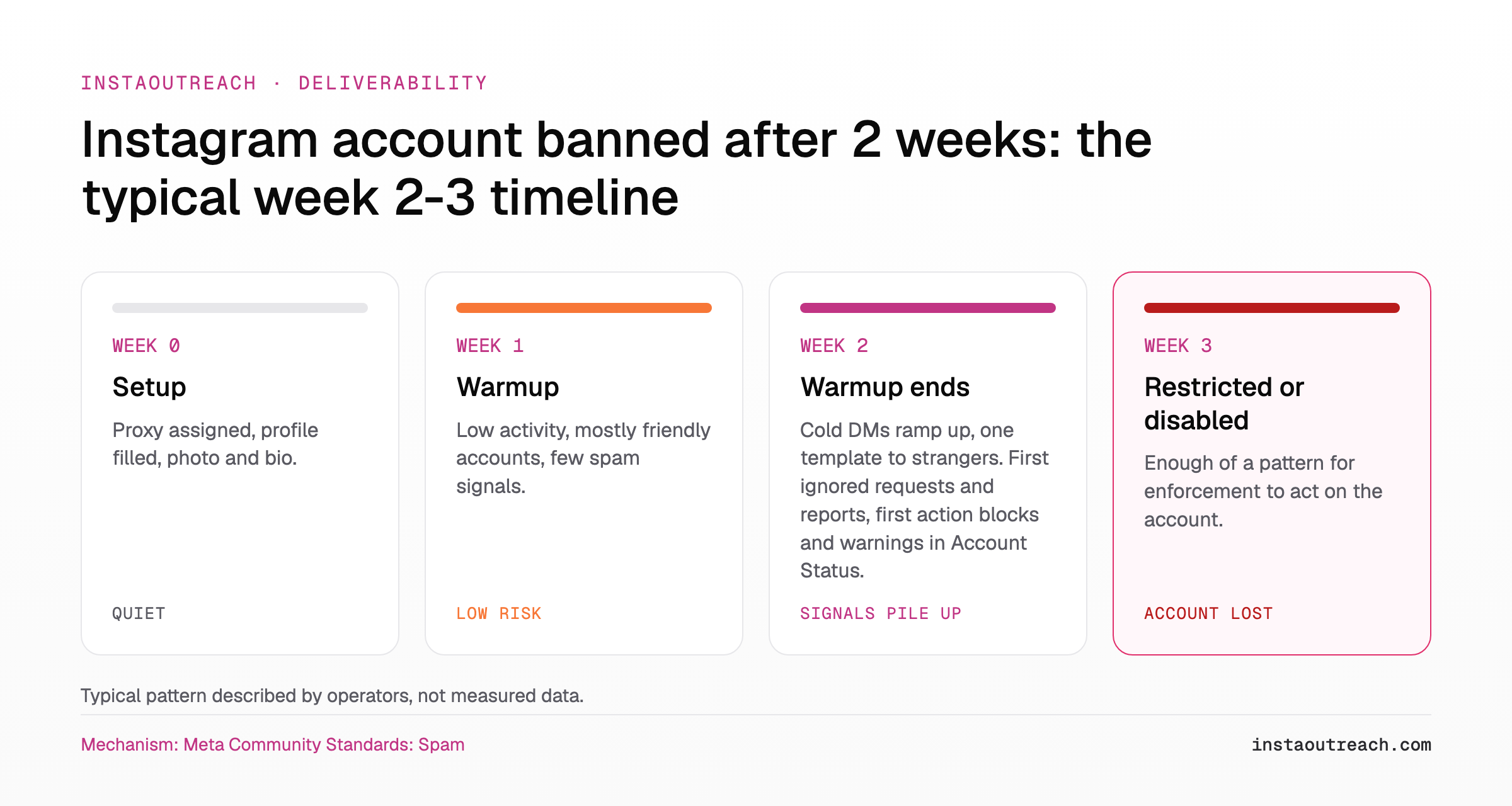
What changed between warmup and the ban?
The short answer: on day 8 the account stopped looking like a user and started looking like a sender. Most operators treat the end of warmup as a switch. Instagram sees the switch.
Worked example (assumptions, not a sourced limit): during warmup the account sends 5 DMs a day, mostly replies to people who follow it. On day 8 the campaign starts at 50 cold DMs a day. That is 50 / 5 = 10x the volume overnight, and close to 100% of those messages now go to people who never interacted with the account. A gradual ramp, for example 10, 15, 20, 25 over the following weeks, changes the volume curve but not the other signals in the table below. Instagram publishes no daily DM cap, so treat any number you see as a report, not a rule; the DM numbers operators report are collected in a separate post.
| Signal | Warmup week (example) | First outreach week (example) |
|---|---|---|
| DMs per day | 5 | 50 |
| Recipients | Followers, people who engaged first | Strangers from a scraped list |
| Message text | Varied, written by hand | One template with a first-name merge |
| Inbound replies | Most messages get one | Most messages get none |
| Reports and ignored requests | Near impossible | Possible on every message |
| Links | None | Often a link in bio or in DM 1 |
The volume change is the one people notice. The recipient, text and reply changes are the ones that match "repetitive content" and "signals of inauthenticity" in Meta's policy.
Do residential proxies stop Instagram bans?
No. A proxy changes one input, the network the account connects from. Everything Meta's policy describes (frequency, repetitive content, inauthenticity) happens above the network layer.
The clearest statement comes from a company that sells proxies. Databay writes that "there is no platform-approved account-to-IP ratio", that proxies are "a poor answer to a security challenge, disabled feature, rate limit, CAPTCHA, or account restriction", and that "Instagram still uses account and device context" (Databay, Instagram automation proxies). Genviral, which sells warm-up tooling, argues that "device identity, IP quality, account-creation method, content timing, and early engagement patterns all feed that judgment" (Genviral warm-up guide). Both are vendor opinions, but they point the same way: the IP is one input among many.
Proxies can still hurt you. Databay's own advice is to avoid rotating an authenticated session per request, moving it "between distant regions", or switching addresses "in response to a challenge", and to "keep device, language, time zone, and account settings accurate" (Databay). A US proxy on a phone set to another language and time zone, or one login from home Wi-Fi in the middle of the campaign, is a mismatch the proxy created.
| What a proxy changes | What Instagram still sees |
|---|---|
| The IP address and its region | The device and browser the session runs on |
| Whether the IP is shared with other accounts | Language, time zone and account settings |
| Connection type (residential, mobile, datacenter) | How many DMs go out and how fast |
| Whether the messages are the same text | |
| Whether recipients reply, ignore or report | |
| Logins from other places, tools and devices |
If you do run proxies, the outreach proxies guide covers setup, and the antidetect browser comparison covers the device side. Whether you need a proxy at all is mostly a tool-choice question: cloud tools route your account through their proxies, other tools run on your own device and connection. The tool comparison shows which is which.
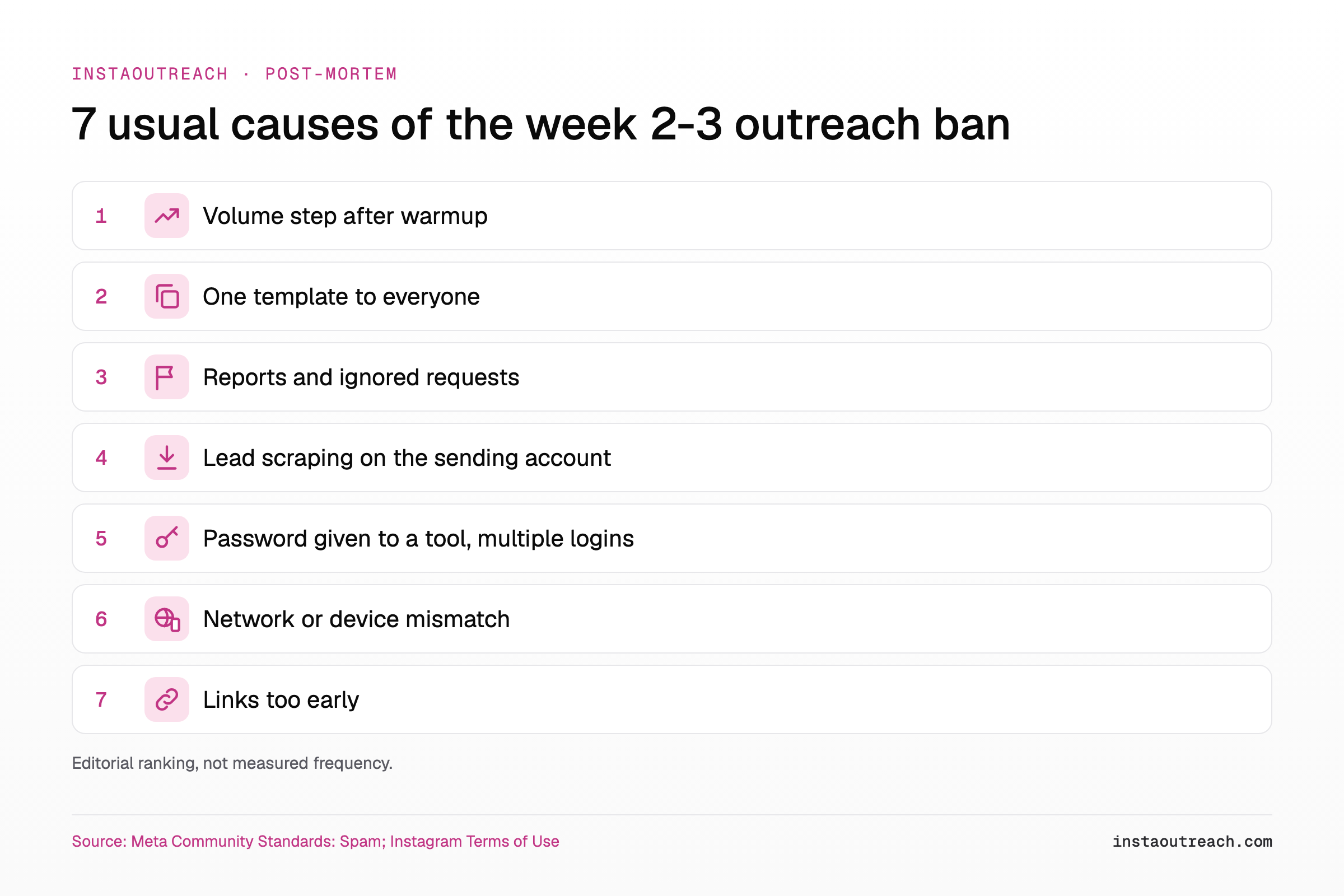
The 7 usual causes, ranked by the evidence they leave
This is the core of the post-mortem. The order is our editorial ranking of how often each cause fits the week 2-3 pattern and how easy it is to confirm, not a measured frequency. No citable source publishes ban rates by cause, so there are no percentages here.
| # | Cause | Evidence trail you can check | Fix for the next account |
|---|---|---|---|
| 1 | Volume step after warmup | Daily send log: a jump from single digits to the full campaign pace in one day | Ramp in small weekly steps and keep the daily limit well below what you think the account can take |
| 2 | One template to everyone | Sent folder: the same text with only the first name changed. Meta lists "posting repetitive content" as a spam indicator (Meta) | Real variation per message, not swapped synonyms. See message variation beyond spintax |
| 3 | Reports and ignored requests from cold targeting | Low reply rate in week 2, requests left unseen, a list scraped from one hashtag or one competitor | Tighter targeting and fresh audiences. See list burn and niche saturation |
| 4 | Lead scraping on the sending account | A scraper or follower exporter logged in as the same account. Instagram's help page on scraping restrictions lists "collecting information in an automated way without our permission" as a reason (Instagram Help) | Never scrape with the account that sends |
| 5 | Password given to a third-party tool, multiple logins | Login activity shows several devices or locations. Instagram lists providing "your username and password to a third-party app or website" as a reason (Instagram Help) | One session, one place, as few tools with the password as possible |
| 6 | Network or device mismatch, session switching | Proxy region, phone language and time zone disagree; IP changed mid-session or after a challenge (Databay) | Match region, language and time zone; never switch IP in response to a challenge |
| 7 | Links too early | A bio link from day 1, or a link in the first DM. Genviral's view: "no bio link until roughly Day 30+, not Day 8" (Genviral) | No links in DM 1. See links in cold Instagram DMs |
Most dead accounts show more than one row. A volume step plus one template plus a cold scraped list is a combination operators describe often, and it maps directly onto the lower-frequency clause in Meta's policy.
Did Instagram warn you before the ban?
Probably. Instagram's help center says that "in most cases, you'll get a warning before losing access to your account", and Account Status lists the "Features you can't use" with a way to act on each (Instagram Help: Account Status).
In week 2 those warnings usually look like a temporary action block, a "try again later" message, or a DM feature that quietly stops working. Each one is the account telling you the pattern has been noticed. The usual week 2 mistake is to wait out the block, resume at the same pace and template, and treat the next block as bad luck. That is how week 2 becomes week 3.
Genviral's advice for a block is to "stop all activity for 48-72 hours, then resume at half the volume that triggered the block" (Genviral). That is a vendor rule of thumb, not an Instagram rule. The full sequence for a live block is in the action block recovery playbook, and if a restriction will not clear, see what to do when a restriction is not lifted.
Check first: open Account Status before you touch anything else on a blocked or dead account. Screenshot every warning, the date, and every item under "Features you can't use". Menu names vary by app version, so search Settings for "Account Status" if you cannot find it. These screenshots are the first rows of your post-mortem.
How to run a post-mortem on a dead outreach account
Run this before you open the replacement account. It takes roughly half an hour (estimate) with the send log and the phone in front of you. Answer each question for your account; the "What it means" column tells you which cause it points to.
| Question | Where to look | What it means |
|---|---|---|
| What day did the first block or warning appear? | Account Status, your screenshots, tool log | A block within a few days of the ramp (our rule of thumb) points to cause 1 |
| How many DMs went out on each day of week 2? | Tool send log or Sent folder | A one-day jump points to cause 1; sending through blocks points to ignored warnings |
| What share of messages used the same template? | Sent folder, sample of 20 messages | Most of them identical except the name = cause 2 |
| How many messages got a reply, how many sat unseen? | Inbox and message requests | Mostly unseen or no reply = cold targeting, cause 3 |
| Were links sent in bio or DM 1? | Profile history, first messages | Yes = cause 7 |
| Did any scraper or exporter log in as this account? | Your tool list, connected apps | Yes = cause 4 |
| Which devices and locations logged in? | Login activity in Accounts Center | More than one place, or a tool with the password = cause 5 |
| Did proxy region, language and time zone match? | Proxy panel, phone or browser settings | Mismatch or IP switches = cause 6 |
| What did Account Status say, and how did the appeal go? | Account Status, email from Instagram | Names the policy area; a lost appeal means the account is gone |
When the worksheet is done, write one sentence: "This account died because ___". If the answer is behavior (causes 1-4 or 7), a new proxy will not help. If it is setup (causes 5-6), fix the setup and the behavior anyway, because a setup problem is rarely the only cause with a yes.
Will the replacement account die the same way?
Yes, if the cause stays. A new username on the same plan of 50 identical cold DMs a day from day 8 recreates the same signals on the same schedule.
There is a second risk. Genviral argues that "Meta connects accounts through device-level fingerprints far better than people assume" and that "changing the email, name, and phone number does not fix the underlying fingerprint" (Genviral). That is a vendor's claim, not a Meta statement, but it is a reason not to launch the replacement on the same device and session minutes after the ban. Spreading volume over several accounts only helps after the behavior is fixed; the setup for that is in running several outreach accounts, and the cost side of burning accounts is in sender account economics.
| Before you launch the replacement | Done? |
|---|---|
| Post-mortem worksheet filled and the cause written in one sentence | ☐ |
| Ramp plan written per week, starting low after warmup, no one-day jump | ☐ |
| Several genuinely different opening messages written, not synonym swaps | ☐ |
| New lead list from a different source than the one that burned | ☐ |
| Scraping moved off the sending account | ☐ |
| One login place; region, language and time zone matching | ☐ |
| No links in bio or first DM during the first weeks | ☐ |
None of this makes outreach safe: automated DMs remain against the Instagram Terms of Use, and any account can be restricted. If you would rather not manage proxies at all, InstaOutreach runs through a Chrome extension in your own browser session, only while the browser is open, with a rising pace and a daily limit you set (pricing); it is still automation, and the Terms risk above still applies.
FAQ
Why was my new Instagram account banned after a few weeks?
Usually because its behavior changed once warmup ended. In the first week a new account acts like a person, then in week 2 it starts sending many similar cold DMs to strangers who do not reply. Meta's spam policy allows restrictions even at "lower frequencies" when repetitive content or inauthenticity signals are present (Meta), so the account does not need to hit a high volume. The signals from the first outreach week accumulate, warnings appear, and if the pattern continues the account is restricted or disabled in week 2 or 3.
Do residential proxies prevent Instagram bans?
No. A residential proxy changes the IP address, not the behavior Instagram judges. Even a proxy vendor, Databay, writes that proxies are "a poor answer to" an account restriction and that "Instagram still uses account and device context" (Databay). A proxy can prevent one problem, many accounts sharing one IP, and it can create others, such as a region that does not match the phone's language and time zone or an IP that changes mid-session. Volume, templates, reports and logins matter whatever the proxy is.
How long should I warm up an Instagram account before cold DMs?
Instagram publishes no warmup period, so any number is a practitioner habit. Many guides, such as Genviral's, use a 7-day warmup (Genviral), but the length matters less than what follows it. A 7-day warmup followed by full campaign volume on day 8 is the classic week 2-3 failure. Treat warmup as the start of a slow ramp that continues for weeks, with varied messages and careful targeting. The day-by-day plan is in our warmup schedule.
Can I get a disabled outreach account back?
Sometimes. Open Account Status, which shows the features you lost and lets you act on them, for example by appealing content that was removed (Instagram Help). Appeal once, clearly, and stop all automation while it is pending. Be realistic: if the account was disabled for automation or scraping, which Instagram's Terms prohibit (Instagram Terms), the appeal is arguing against what the account did. Run the post-mortem worksheet either way, so the next account does not repeat it.
Will a new account on the same phone or IP get banned too?
It can. Instagram does not publish how it links accounts, but vendors argue that device-level linkage is strong and that "changing the email, name, and phone number does not fix the underlying fingerprint" (Genviral). Treat that as a vendor claim, not a confirmed Meta rule. The bigger risk is behavioral: a new account running the same volume, template and list will produce the same signals on the same timeline. Fix the cause from the post-mortem first, then decide about the device.
How many DMs can a new Instagram account send per day?
There is no official number. Meta's spam policy prohibits activity "at very high frequencies" without defining it, and it also allows restrictions at lower frequencies when other spam signals are present (Meta). Any figure you see in a tool or a forum is a setting or a report, not Instagram's limit. For a new account, start well below what operators report, raise it slowly, and watch for blocks. The numbers operators report are collected in our DM limits post.