Instagram Multiple Accounts, Same Device: Does One Ban Kill All?
Running several Instagram accounts on one laptop and Wi-Fi does not get them banned by itself, but it links them. Here is how IP, device and browser signals connect accounts and when one ban spreads.

Sharing one laptop or one Wi-Fi network does not ban your Instagram accounts on its own, but it gives Meta the signals to link them, and Meta's Account Integrity policy says it may restrict or disable accounts "owned by the same person or entity as an account that has been disabled." So the risk is not the shared device itself: it is that one account breaking the rules hard enough to be disabled can pull its linked siblings into the same review.
That is the real shape of an Instagram multiple accounts same device ban. Linking and banning are two different steps. Shared IP, hardware and browser data connect your accounts; behavior (automation, spam patterns, evasion) is what triggers enforcement, and once one account is disabled, the links decide how far the review spreads.
One caveat up front: Meta does not publish how it links accounts or how it weights each signal. Everything below rests on Meta's own policy text and privacy disclosures, not vendor folklore.
Does Instagram ban multiple accounts on the same device?
No rule bans you for owning several accounts on one device. Instagram's own app lets you add and switch between accounts, and nothing in the Account Integrity policy treats a shared laptop or router as a violation by itself.
What the policy does describe is linkage as a reason to act once something else has gone wrong. Meta writes that it "may restrict or disable accounts" that are owned by the same person as a disabled account, and accounts that "demonstrate" a "close linkage with a network of accounts or other entities that violate or evade our policies" (Meta Transparency Center).
Two words in that text matter for operators:
- "May." There is no automatic cascade written into the policy. Meta reserves the option.
- "Proportional." Meta says its enforcement is "designed to be proportional to the severity of the violation, the history of violations on the account, and the risk or harm posed to the community" (Meta Transparency Center). A sibling with a clean history is in a different position from one with prior restrictions.
| What you share | What it means | What actually triggers enforcement |
|---|---|---|
| Same Wi-Fi / IP address | Weak link. Households, offices and mobile carriers put many people on one IP. | Nothing by itself. Adds weight when combined with other signals. |
| Same laptop or phone | Stronger link. Meta collects identifiers that tell devices apart. | Nothing by itself. Raises the odds a review of one account looks at the others. |
| Same browser profile | Strong link. Same cookies and the same browser fingerprint. | Nothing by itself. Makes accounts look like one operator. |
| Same email, phone or recovery details | Direct ownership link. | Matches the policy's "owned by the same person" clause once one account is disabled. |
| Same behavior (script, templates, targets) | Looks like coordination. | The part that most often turns a link into a ban: "coordination within a network" is named in the policy. |
How does Instagram link accounts? IP vs device vs browser fingerprint
Meta's Privacy Policy (section "App, browser and device information") lists the data it collects from the devices you use. In summary, it covers device characteristics and software, identifiers that distinguish your device from other people's, device signals, information about the network you connect to including your IP address, data from cookies and similar technologies, and activity signals such as whether your mouse is moving, which Meta says can help tell humans from bots. The same policy says this information is used to detect and stop violations of its terms, investigate suspicious activity and detect spam.
That gives you three technical layers, plus one identity layer that is not technical at all.
1. Network layer (IP address). Every device on your Wi-Fi exits to the internet through your router's public IP. Five accounts logged in from one home network all show the same IP. A VPN or proxy changes this layer, and only this one.
2. Device layer (hardware and operating system). The privacy policy describes identifiers that tell your device apart from other users' devices. On a laptop, that means everything the browser and apps can see about the machine and its software. Every account used on that laptop shares this layer unless something deliberately masks it.
3. Browser layer (cookies and fingerprint). Cookies tie sessions together directly: log two accounts into the same Chrome profile and they share one cookie jar. On top of cookies sits the browser fingerprint. The Electronic Frontier Foundation defines it as "a list of characteristics that are unique to a single user, their browser, and their particular hardware setup" (EFF Cover Your Tracks). The EFF also notes that every browser sends information about itself, including "the browser name and version," so that pages load correctly.
4. Identity layer (email, phone, recovery details, behavior). The same recovery email across accounts is the most direct ownership signal there is, and it maps straight onto the policy's "owned by the same person or entity" wording. Behavior belongs here too: the same templates, the same lead list and the same active hours make accounts look like one operator even across different hardware.
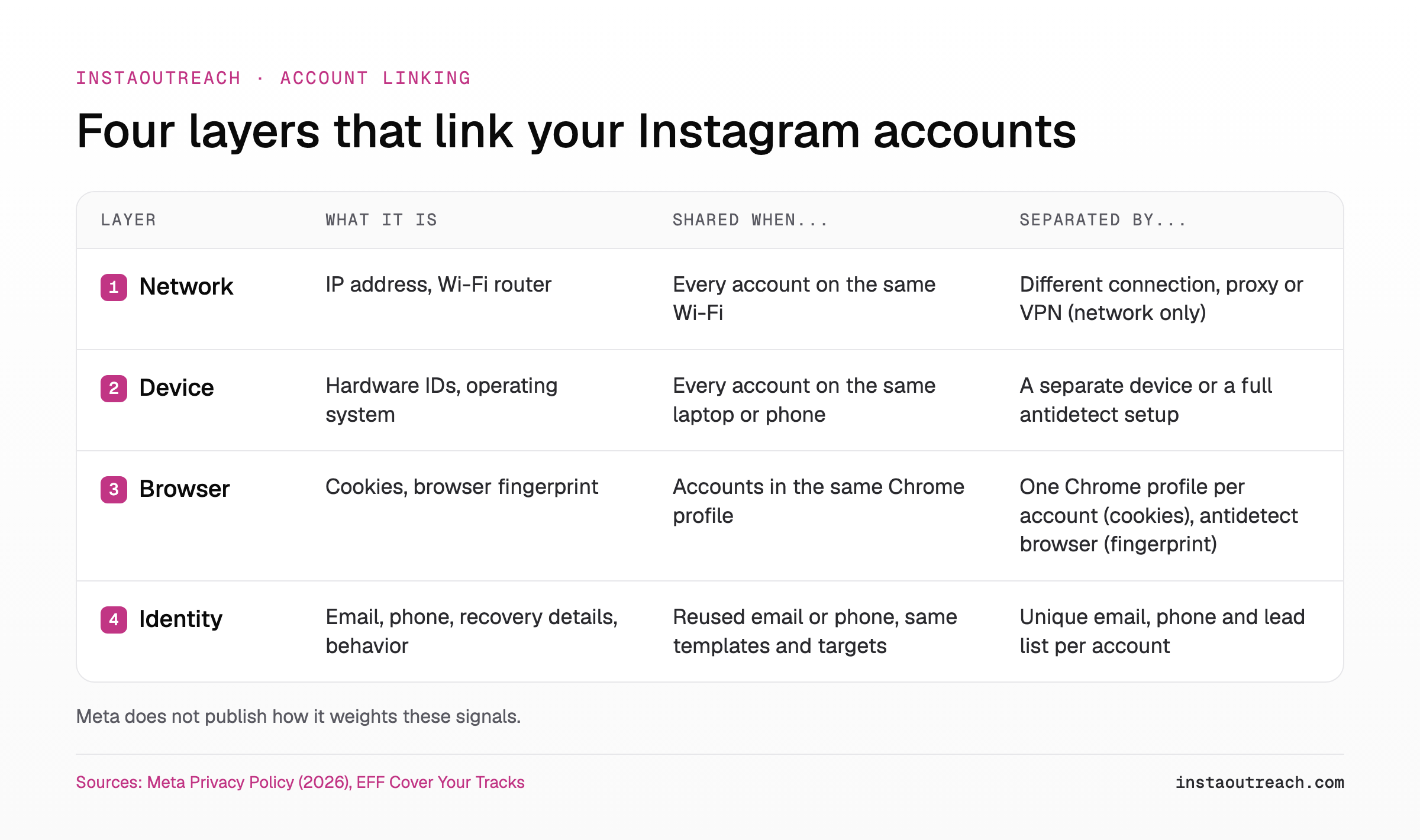
Meta discloses what it collects, not how it combines it. Any vendor table that assigns a percentage of risk to each signal is a guess dressed up as data.
Same Wi-Fi, different phones: are the accounts linked?
Partly. The IP address is the weakest of the layers because so many unrelated people share one. Families, coworking spaces and mobile carriers all produce shared IPs that are not one person running a network.
The IP becomes meaningful when it lines up with other signals. Social media tool socialk.it describes "rapidly logging in and out of many accounts from a single IP, or cycling through a dozen profiles on one phone in an hour" as "a classic spam-network signal" (socialk.it). Treat that as a practitioner's view, not a Meta statement, but the logic holds: shared IP plus synchronized behavior reads very differently from shared IP alone.
A VPN or proxy only replaces layer one. Your device identifiers, your Chrome profile and your recovery email stay the same. For a full breakdown of what a proxy does and does not hide, see our guide on what proxies do and don't hide for Instagram outreach.
| Setup | Network (IP) | Device | Browser (cookies + fingerprint) | Identity |
|---|---|---|---|---|
| Same Wi-Fi, same laptop, one Chrome profile, switching accounts | Shared | Shared | Shared | Depends on your emails and phones |
| Same Wi-Fi, same laptop, one Chrome profile per account | Shared | Shared | Cookies separate, fingerprint largely shared | Depends on your emails and phones |
| Same Wi-Fi, separate phones or laptops | Shared | Separate | Separate | Depends on your emails and phones |
| Separate connections, separate devices, separate identities | Separate | Separate | Separate | Separate, but behavior can still match |
The last row is what most guides skip: even with every layer separated, accounts that send the same script to the same audience at the same hours still look coordinated.
If one Instagram account gets banned, will the others be banned too?
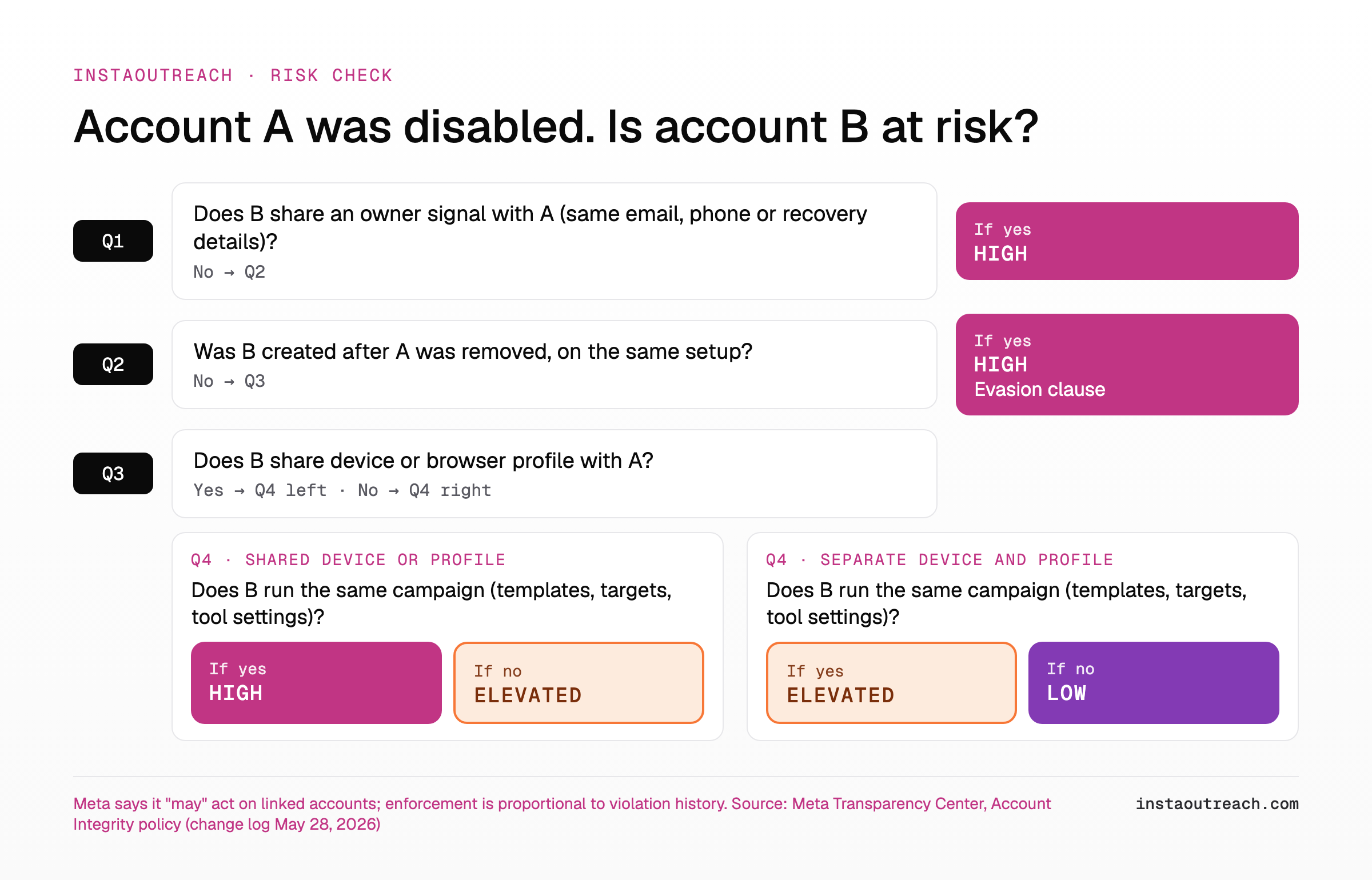
Not automatically, but they can be. Walk through the clauses in the Account Integrity policy and you get four distinct routes from one disabled account to its siblings:
- Same owner. Meta may act on accounts "owned by the same person or entity as an account that has been disabled." Shared recovery details are the clearest evidence of this.
- Network linkage. Accounts that show "close linkage with a network of accounts or other entities that violate or evade our policies" are in scope.
- Coordination. The policy names "coordination within a network of accounts or other entities that persistently or egregiously violate our policies." Running one campaign across five accounts is what that looks like from the outside.
- Automation review. Meta says it may request additional information about an account created or used "through automated means, such as scripting (unless the scripting activity occurs through authorized routes and does not otherwise violate our policies)." Automating cold DMs is against Instagram's Terms of Use, so this clause applies directly to outreach operators.
In practice, a sibling usually goes down when it shares the behavior that got account A disabled (same tool settings, same templates, same lead source) on top of the technical link. The link widens the review; the behavior is what the review finds. If your accounts tend to die around the same point in their life rather than all at once, that is a different pattern, covered in why outreach accounts die in weeks two and three.
Antidetect vendors state the cascade as fact: "one ban investigation can cascade to all linked accounts" (send.win). That comes from a company selling the fix, with no source, and Meta's own wording is "may," not "will."
Can Instagram detect a new account made on a banned device?
This is where linkage stops being a gray area. The policy lists accounts "created or repurposed to evade a previous account or entity removal, including those assessed to have common ownership and content as previously removed accounts or entities" as accounts Meta may restrict or disable (Meta Transparency Center). A fresh account on the same laptop, same Wi-Fi and same browser, running the same outreach, is the textbook case of "common ownership and content."
Warning: Meta's policy treats an account "created or repurposed to evade a previous account or entity removal" as a violation in its own right. Spinning up a replacement on the same setup does not reset anything; it hands the system a fresh link to an account it already removed.
The better order of operations:
- Appeal the disabled account first, through the official in-app flow. Our action block and ban recovery playbook walks through the steps.
- If a restriction is still showing after the stated period, check why an Instagram restriction is not lifted before touching other accounts.
- Pause automation on every sibling account while the appeal runs. A coordinated burst from linked accounts during a review is exactly the "network" behavior the policy describes.
How to run several outreach accounts on one laptop with less linkage
You cannot make accounts on one laptop and one connection invisible to each other. What you can do is remove the avoidable links, so a problem on one account has less to grab onto. Here is the full checklist.
| Layer | What to separate | Cheap way | Full way |
|---|---|---|---|
| Browser | Cookies and sessions | One Chrome profile per account. Never switch accounts inside one profile. | An antidetect browser that also varies the fingerprint per profile. |
| Identity | Email, phone, recovery details | A unique email and phone number for every account, never reused as recovery. | Same, plus separate payment details for anything tied to the account. |
| Behavior | Templates and targets | Different lead lists and message variations per account. | Different niches or offers per account. |
| Behavior | Timing | Stagger active hours so accounts do not start and stop together. | Separate schedules with their own daily rhythm. |
| Behavior | Volume | Respect per-account daily limits and warm up each account. | Ramp each account on its own schedule. |
| Device | Hardware identifiers | Accept it is shared on one laptop. | Separate devices, or a full antidetect setup. |
| Network | IP address | Accept it is shared on one Wi-Fi. | A dedicated connection or proxy per account (network layer only). |
Step by step, in the order that removes the most risk for the least money:
- Give every account its own Chrome profile. This separates cookies and logged-in sessions. It does not change your IP or hardware.
- Untangle identities. Unique email, unique phone, no shared recovery details. This removes the most direct "same owner" signal.
- Split your messaging. Use different templates and openers per account; our guide to spintax and message variation for cold DMs shows how.
- Split your lead lists. Two accounts messaging the same prospects on the same day is coordination you can see from space.
- Stagger hours and respect limits. Keep each account inside sensible daily DM and action limits and run a proper warmup schedule on each new account.
- Decide whether you need fingerprint separation. If you do, start with choosing an antidetect browser for Instagram; this post will not repeat that comparison.
- Pick a sending stack that fits. Browser automation, emulators and cloud phones link accounts in different ways; see browser automation vs emulators vs cloud phones, and for scaling beyond a few accounts, scaling multi-account outreach without a ban wave.
When you weigh tools for this, look at how cold DM tools run, side by side: whether they run in your browser, on emulators or in the cloud decides which layers your accounts share. Then check per-account cost, because separation multiplies with every account you add.
None of this removes risk. Automating DMs is against Instagram's Terms of Use, and a well-separated setup running spammy behavior still gets flagged. Separation limits the blast radius, nothing more.
InstaOutreach runs inside your own browser as a Chrome extension (or as the Mac app), on your own connection, with one Instagram account per Chrome profile, and it pauses when the browser closes (InstaOutreach FAQ); separate Chrome profiles split cookies, not your IP or hardware.
FAQ
Can Instagram tell if two accounts are on the same device?
Very likely, yes. Meta's Privacy Policy says it collects identifiers that tell your device apart from other people's devices, along with device characteristics, network information including your IP address, and cookie data, and that it uses this to detect violations and spam. Meta does not publish how it matches accounts. The safe working assumption is that accounts logged in on the same laptop or phone, especially in the same browser profile, can be tied together. Being linked is not a violation in itself.
Will all my Instagram accounts get banned if one is banned?
Not automatically. Meta's Account Integrity policy says it "may" restrict or disable accounts owned by the same person as a disabled account, or accounts with close linkage to a violating network. "May" means there is no automatic cascade. In practice, siblings are most at risk when they share owner details (email, phone, recovery info) with the banned account, or when they run the same behavior that got it banned, such as the same script, templates and lead list.
Does Instagram ban by IP address?
There is no public evidence that Instagram bans accounts purely for sharing an IP address, and Meta's policy does not describe IP bans. IP is a weak signal on its own because households, offices and mobile carriers put many unrelated users on the same address. Meta's Privacy Policy confirms it collects network information including your IP, so it can be one input among many. The risk comes when a shared IP lines up with stronger signals: the same device, the same browser profile, the same recovery email or synchronized behavior across several accounts at once.
Is it safe to use multiple Instagram accounts on the same Wi-Fi?
For normal personal use, yes: Instagram's app lets you add and switch between accounts, and sharing a home network is common. For automated outreach, "safe" is the wrong word, because automating DMs is against Instagram's Terms of Use regardless of network. Same Wi-Fi means your accounts share the network layer, which is a weak link on its own. Keep the other layers separate where you can: a Chrome profile per account, unique emails and phones, different lead lists and staggered hours. That way a problem on one account has fewer links to the rest.
Can I create a new Instagram account on the same phone after a ban?
You technically can, but Meta's policy lists accounts "created or repurposed to evade a previous account or entity removal" as accounts it may restrict or disable, including ones assessed to have "common ownership and content" with removed accounts. A new account on the same phone, network and identity, doing the same thing as the banned one, fits that description closely. Appeal the original account first through the official flow. If you start fresh later, do not reuse the old email, phone or content, and do not resume the behavior that caused the ban.
Does a VPN or proxy stop Instagram from linking my accounts?
Only partly. A VPN or proxy changes the IP address Instagram sees, which is the network layer. It does nothing to the device layer (hardware and software identifiers), the browser layer (cookies and browser fingerprint) or the identity layer (shared emails, phones and recovery details). A proxy can be one part of a separation setup, but on its own it hides the weakest link and leaves the strong ones in place.