Instagram Restriction Not Lifted After Meta Said So: Why It Lingers
Meta says your Instagram restriction is lifted, but DMs, follows or comments still fail. Here is why a lift and a working account are not the same thing, and the order to check things in.

A "restriction lifted" notice clears one specific enforcement action, not every limit on your account, and Meta itself says Account Status shows only "some restrictions your account might have". If your Instagram restriction is not lifted in practice, you are usually looking at a separate per-feature limit, a stale app session, an appeal that covered different content, or a fresh trigger from going straight back to full volume.
This guide covers only the state after the lift notice. If you are still inside an active action block, start with the full action block recovery playbook instead, which covers restriction levels and re-warmup in depth. Here we work out which of five causes you have, in the order that wastes the least time.
Why is my Instagram restriction not lifted when Meta said it was?
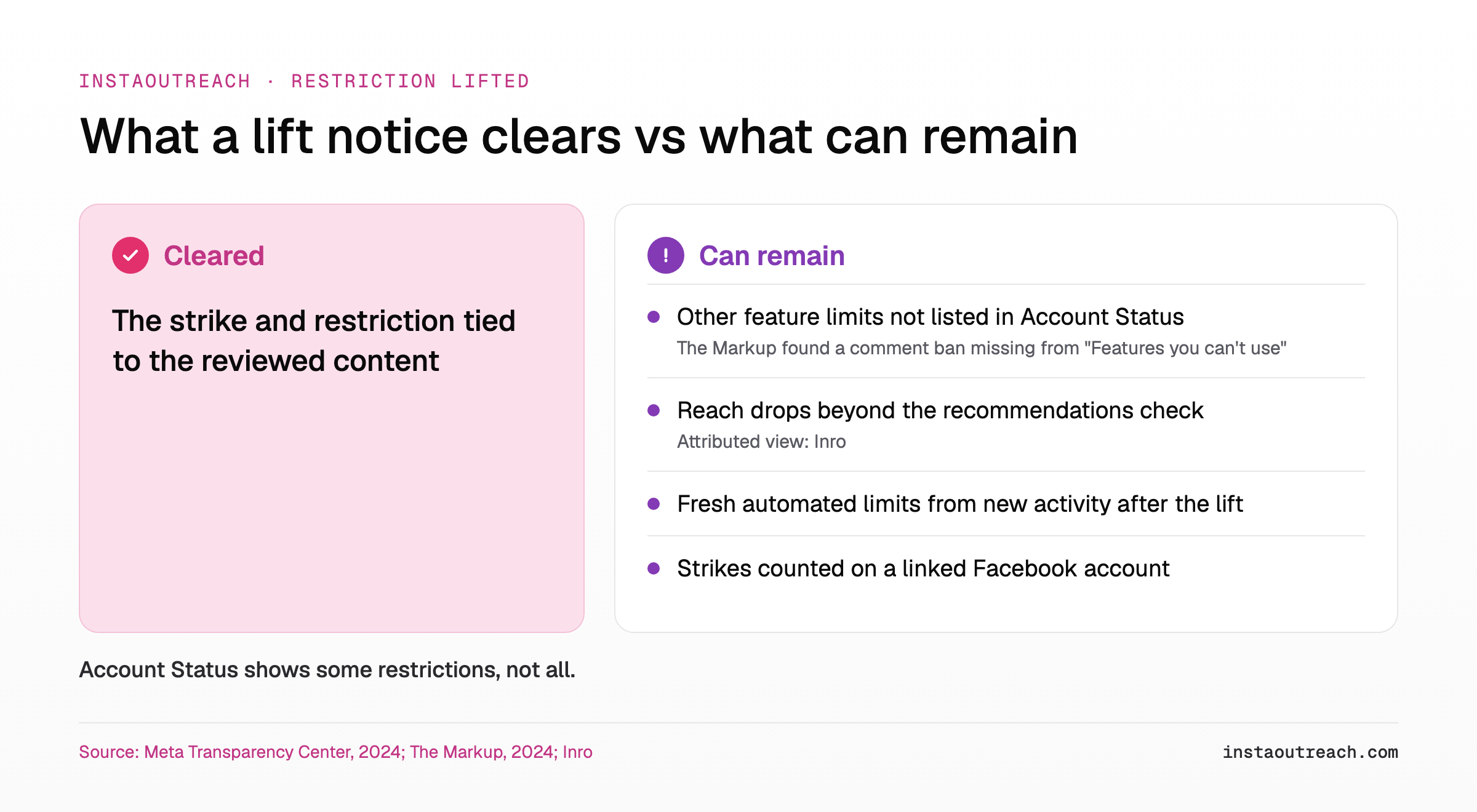
Meta's own wording is the first clue. Its Transparency Center says you can see your history of violations, "some restrictions your account might have and how long they'll last" in Account Status (Meta Transparency Center, updated Nov 12, 2024). Some, not all. A lift notice tells you one listed item is gone. It says nothing about items that were never listed.
Independent testing backs this up. The Markup found that "what shows up under Account Status isn't the complete picture" and that certain restrictions, "such as banning a user from being able to comment, did not show up under 'Features you can't use'" (The Markup, Feb 2024). So you can get a clean-looking screen and a lift notice while a comment, follow or messaging limit keeps running in the background.
Reach is a third layer. Inro, a tool vendor, writes that "reduced distribution to non-followers is often silent" (Inro). Instagram says Account Status shows whether your content and account can be recommended to non-followers (Instagram), so open that section after a lift. Treat Inro's point as an attributed view: not every drop in reach shows up there.
The fourth layer is new activity. Lifting a restriction does not freeze how Instagram judges what you do next. Meta says future violations bring "additional strikes" and you "may lose access to some features for longer periods of time" (Meta). If you resumed your old pace the same day, the block you see now may be a new one.
Account Status says no restrictions but I'm still blocked: what now?
Check every place Instagram records enforcement, not just the first screen. Account Status moves around between app versions. Instagram's December 2022 instructions were "Settings, tapping Account, and then tapping Account Status" (Instagram), and Inro notes that searching "account status" in the Settings search bar is more reliable because the menu gets relocated (Inro).
Instagram's October 2025 update recommends "regularly checking Account Status to see if there are any limits to your account and review any violations" (Instagram). Do that, then keep going down this list. The Markup found removed content missing from "Removed content" that sometimes appeared under "Violations" via Settings > Help > Support Requests (The Markup).
| Where to look | What it can tell you | What it can miss |
|---|---|---|
| Account Status (search "account status" in Settings) | Listed violations, some restrictions and their end dates | Limits Meta does not list there |
| Features you can't use (inside Account Status) | Feature-level limits Instagram chose to show | A comment ban, per The Markup |
| Help > Support Requests > Violations | Removals that did not appear under Removed content | Silent reach limits |
| Linked Facebook account | Facebook-side strikes and restrictions; Meta counts strikes on both Facebook and Instagram (Meta) | Instagram-only feature limits |
| The exact error text in the app | Which action is blocked (DM, follow, comment, like) | Why it is blocked |
Write down the exact error wording and which action triggered it. "Try again later" on a follow and a failed send on a DM to a non-follower point to different causes, and you will need that detail for the decision tree below.
Is it a stale session or a real block?
Sometimes the app is simply holding an old state. Before you assume a hidden enforcement, rule out the cheap explanation: a cached session that has not picked up the lift yet. Elfsight's fix for Instagram loading glitches is to "clear your app's cache, or restart your device" (Elfsight). That fixes a display problem. It does not fix an enforcement, so use it as a test, not a cure.
Test: Run this 3-step isolation test with one ordinary action, such as replying to a friend's existing DM thread. 1) Update the official Instagram app, log out, log back in and retry. 2) Retry the same action on a second device using the official app. 3) Retry it on instagram.com in a normal browser. If it works anywhere, you likely have a session or app issue on the first device. If it fails everywhere, the limit sits on the account, so move to the appeal and re-trigger checks.
Keep the test small. Do not fire off ten cold DMs to "see if it works". Every failed attempt is more activity on an account that is already being watched, and a burst of retries is exactly the pattern you want to avoid right now.
Did my appeal actually cover this restriction?
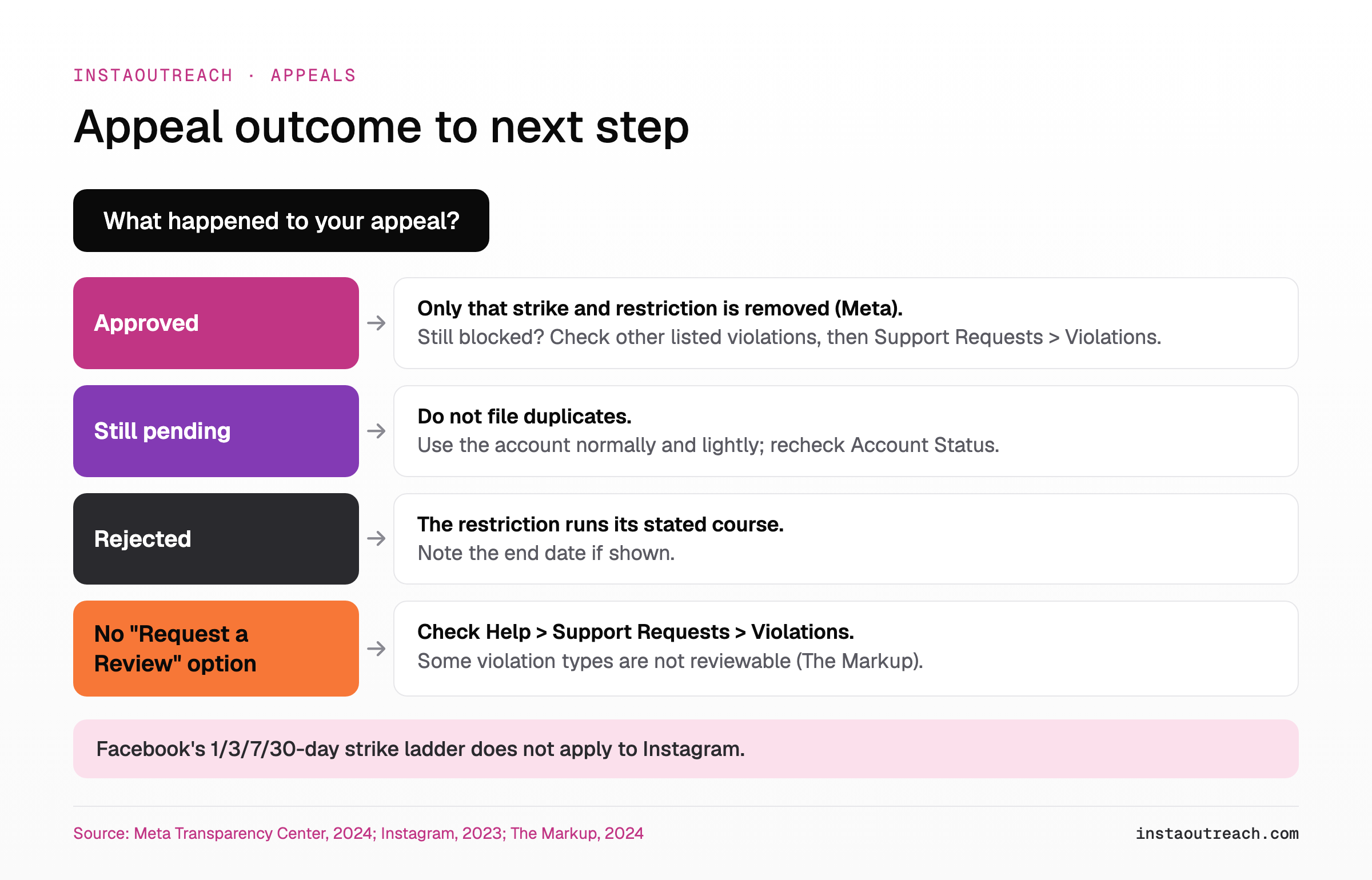
An approved appeal is narrower than it feels. Meta's wording: if your content did follow the Community Standards, "we'll put the content back" and "remove the strike and restriction so that it won't count against you in the future" (Meta). That is the strike and restriction for that content. Any other violation on the account stands until it expires or is reviewed on its own.
Check what the appeal was about. If you appealed a removed post but your DMs are the thing that fails, the win did not touch the messaging limit. Instagram says you can appeal by hitting "Request a Review" directly from your Account Status (Instagram), and Instagram told The Markup a review is available "for the vast majority of violation types" except "extreme safety concerns" (The Markup).
One common mistake: predicting your timeline from the strike ladder people quote online. Meta does list one-day, 3-day, 7-day and 30-day content restrictions at seven, eight, nine and ten or more strikes, but adds that "these restrictions only apply to Facebook accounts" (Meta). It is not Instagram's schedule. Inro puts it bluntly: "Anyone quoting you exact recovery timelines is guessing" (Inro).
Got restricted again right after the restriction was lifted?
For outreach accounts, a common cause is going straight back to full volume. The lift goes through, the account resumes the same daily DM and follow pace that caused the first block, and a new limit can land soon after. Meta says further violations bring additional strikes and longer feature loss (Meta), so the second restriction can be worse than the first.
Instagram publishes no official DM or action cap, so nobody can give you a safe number. For realistic ranges that operators report, see our breakdown of realistic daily DM and action ranges, and for building volume back up, the day-by-day warmup schedule. The example below is about the order of activities after a lift, not volume.
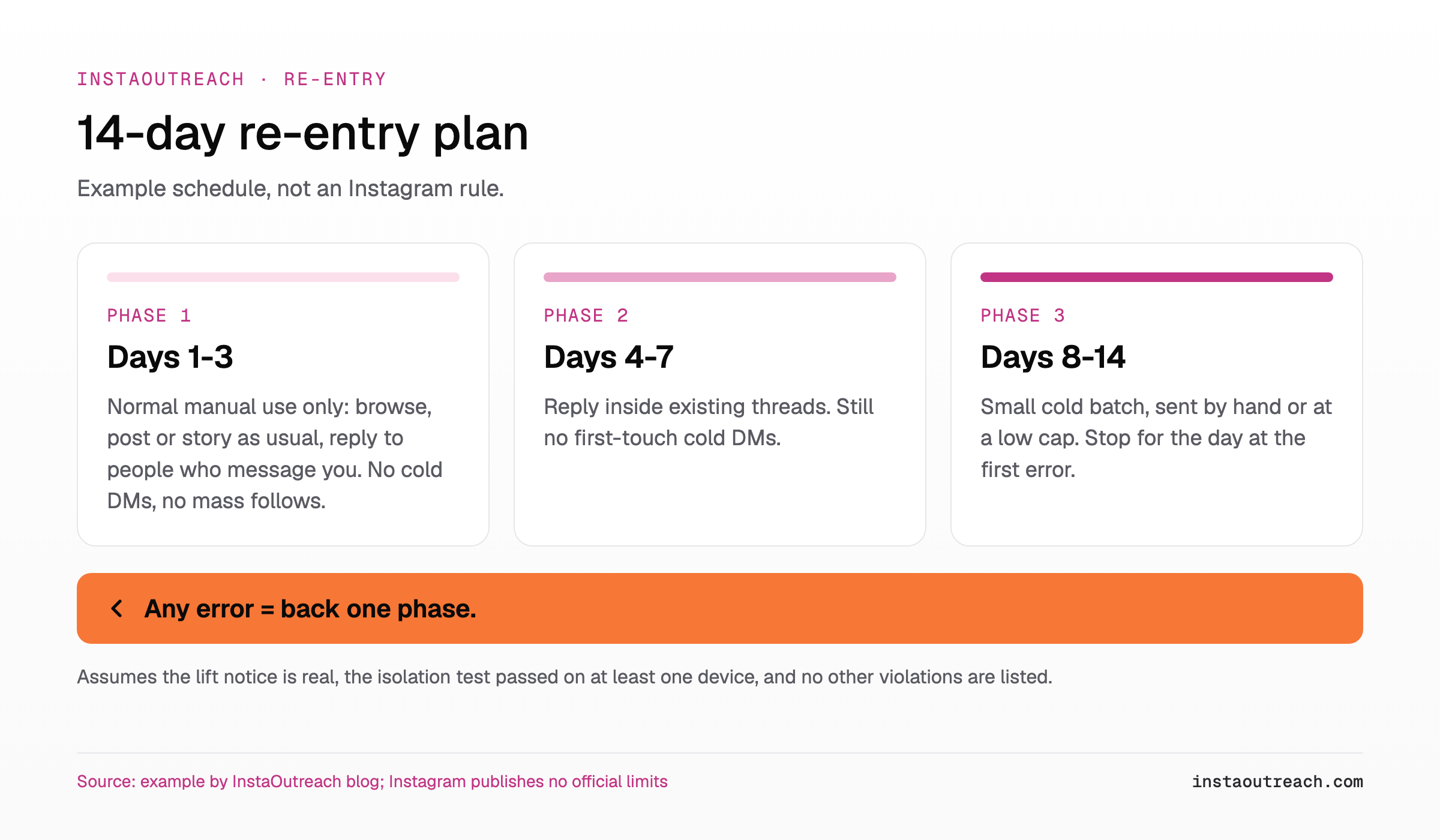
The point of the example is the sequence. Organic, two-way activity first, then threads that already exist, then new conversations. If any phase produces an error, you have learned the account is not ready, at the cost of one action instead of fifty.
Which of the 5 causes do you have? A decision tree
Match your symptom to the row, then take the action in the last column. Work top to bottom and stop at the first match.
| Symptom | Likely cause | What to do |
|---|---|---|
| Works on web or a second device, fails in one app | 1. Stale session or cache | Update the app, log out and in, reinstall if needed. Retry one ordinary action. |
| Only one action fails (comments, or follows), the rest works | 2. Per-feature limit not listed in Account Status | Check Features you can't use, then Help > Support Requests > Violations. Pause that action fully. |
| Only DMs to non-followers fail or go unseen | 2. Messaging limit, or messages landing in hidden requests | Read why cold DMs land in hidden requests. Check if replies to existing threads still send. |
| Appeal approved, but a different feature is still blocked | 3. Appeal covered other content | Find the other violation in Account Status or Violations and request a review of that one. |
| Everything was fine for a few days, then a new block | 4. Re-trigger from new activity | Stop outreach. Restart from phase 1 of the re-entry example. See the full action block recovery playbook. |
| Every action fails on every device and on web | 5. Account-level restriction still active | Recheck Account Status and Violations for an end date. Use Request a Review if offered. |
| Error says you can't interact with certain accounts | Targeted interaction limit | See the "you can't interact with certain accounts" error. |
Keep a screenshot of the lift notice and of each error with its date. If you end up asking for a review, a dated record of "lifted on X, blocked again on Y doing Z" is far easier to act on than a general complaint.
What to change before you scale DMs again
Be clear about the baseline: automating Instagram always carries some risk of restriction (FAQ), and no tool or setup removes it. Instagram says it may restrict features if an account "is not following Community Guidelines or our Terms of Use" (Instagram). What you can change is how your activity looks.
If the account was blocked while running a tool, look at how that tool sends before you turn it back on. Our comparison of browser automation vs emulators vs cloud phones covers the trade-offs, and you can compare tools on how they send or browse alternatives by sending method if you are switching.
| Sending setup | Where it runs | What to check after a restriction |
|---|---|---|
| Manual in the app | Your phone | Your own pace; the re-entry example still applies |
| Browser automation | Your browser session, your connection | Daily cap, active hours, whether it stops when you take over |
| Cloud-hosted tool | A vendor server or proxy | Login location, proxy quality, whether you can set a low cap |
Cost is the other question when you add caution, because lower volume per account often means more accounts. Check what an account costs to run on the pricing page: InstaOutreach lists $29 a month for the first account and $14.50 for each extra, with a 14-day free trial on one account (pricing). If you do resume with it, it runs only while your browser or Mac app is open, with a default limit of 40 DMs, a hard cap of 75 a day per account and a recommended 7 or 14 day warmup you can switch on, which gives you pacing control, not protection (FAQ).
FAQ
How long does an Instagram restriction last?
There is no public Instagram table of restriction lengths. Account Status shows "how long they'll last" for some restrictions only (Meta), so check there first for an end date. The 1, 3, 7 and 30-day ladder that circulates online is Meta's strike system for Facebook, and Meta states those restrictions "only apply to Facebook accounts". Inro notes Instagram gives a duration for some feature restrictions and not for others (Inro). If no date is shown, assume nothing and ease back in slowly rather than waiting for a fixed day.
Does an approved appeal remove all restrictions?
No. When Meta finds your content did follow its standards, it restores the content and removes "the strike and restriction" tied to it (Meta). Other violations on the account are separate and keep running until they expire or are reviewed individually. If your appeal was about a removed post and your DMs still fail, the approval did not cover the messaging limit. Look in Account Status and in Help > Support Requests > Violations for any other listed item, and request a review of that one if the option appears.
Why does Account Status show nothing when I'm still blocked?
Because Account Status is not a complete list. Meta describes it as showing "some restrictions your account might have" (Meta), and The Markup found a comment ban that did not appear under "Features you can't use" (The Markup). Inro says some reach drops are silent, so check the recommendations section too. Check Help > Support Requests > Violations, your linked Facebook account and the exact error text, then run the isolation test on a second device and on the web.
Can clearing the cache fix an Instagram restriction?
Only if the problem is a stale session, where the app has not picked up that the restriction ended. Clearing the cache, updating the app or logging out and back in can fix that display issue. It cannot remove an enforcement action that is still active on the account. That is why it works best as a test: if an action succeeds after a fresh login or on another device, it was the session. If it fails everywhere, the limit is real and you need to check Account Status, Violations and your appeal state instead.
Can I get restricted again right after the restriction was lifted?
Yes. A lift does not give the account a grace period. New activity is judged as it happens, and Meta says further violations bring additional strikes and "you may lose access to some features for longer periods of time" (Meta). A pattern to avoid is returning to the previous DM and follow pace on day one. Restart with normal two-way activity, then existing threads, then a small cold batch, and stop for the day at the first error.
Should I contact Instagram support about a lingering restriction?
Use the in-app routes. Instagram says you can appeal with "Request a Review" directly from Account Status (Instagram), and Help > Support Requests is where violations and earlier requests are recorded. Before you submit, collect a screenshot of the lift notice, screenshots of each new error with dates, and which action failed. A specific report of "lifted on this date, comment still blocked on these dates" gives the reviewer something concrete. Avoid filing many duplicate requests while one is still pending.