You Can't Interact With Certain Accounts on Instagram: The Fix
Instagram says you can't interact with certain accounts? It is a temporary limit on follows, likes or comments, or the other account's settings. Here is how to tell, how long it lasts and what to pause.

A setter warms up a new outreach account, follows a batch of prospects from a niche list and likes a few posts on each. On the next follow, a pop-up says "You can't interact with certain accounts right now." Old DM threads still send and posting works. A typical case, with one question: is the account in trouble, or is it the people on the list?
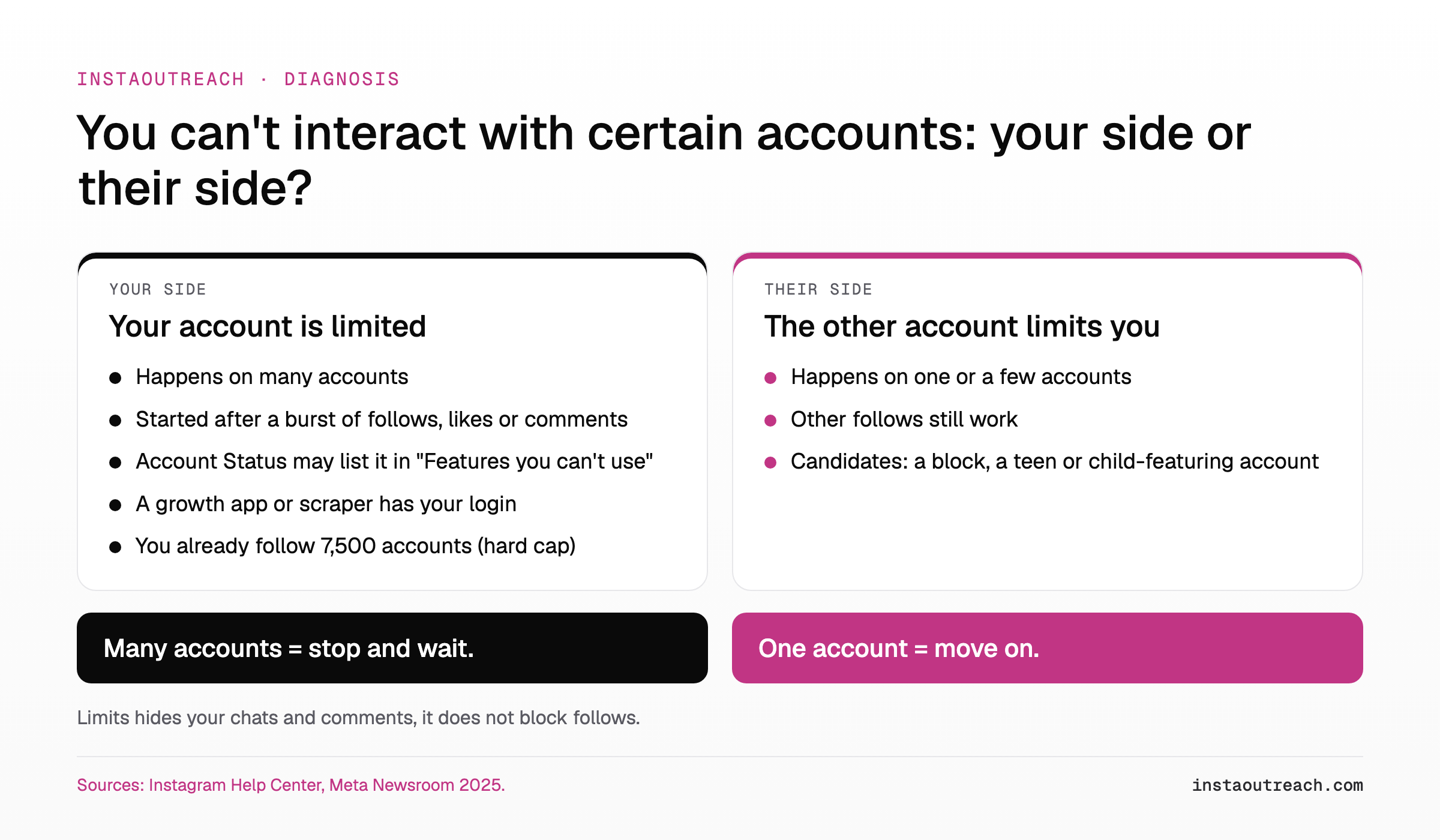
When Instagram says you can't interact with certain accounts, user reports describe a temporary, narrow limit on your interactions: mostly on follows, sometimes on likes and comments (user tutorial). It matches how Instagram describes its DM spam controls: a warning, then a feature removed "for a period of time" (Instagram Help Center). Less often, the cause sits on the other account's side: a block or teen protections.
Instagram publishes no duration for this notice. Right now: stop the action that triggered it, check Account Status, and do not retry, switch tools or move your list to another account.
What does "you can't interact with certain accounts" mean on Instagram?
Instagram has no Help Center article for this exact notice: we searched on October 9, 2026, and found nothing with this wording. Users report it when following (most often), liking or commenting, often next to "we added restrictions to your account" (tutorial, April 2025) or "you can't follow accounts right now" (tutorial, April 2025).
The official frame it fits is Meta's spam policy. Meta prohibits engaging with content "either manually or automatically, at very high frequencies", and may restrict accounts at lower frequencies "when other indicators of Spam (e.g., posting repetitive content) or signals of inauthenticity are present" (Meta Community Standards: Spam). Instagram also warns that accounts using growth apps "may notice that certain parts of their Instagram account are limited" (Instagram Help Center).
Our reading of "certain accounts": the limit is scoped to one action or to targets you have no connection with, not to the whole account, which is why posting and existing chats usually keep working.
One naming trap: Instagram's Restrict feature is something another person turns on. It is silent: your chat moves to their Message Requests and they can read it without you knowing (Instagram Help Center). It does not explain a pop-up on your side. When Instagram limits your account, that appears in Account Status (Instagram Help Center).
Sibling notices: "We restrict certain activity to protect our community" looks like the same family of limits (our inference). For restriction tiers and re-warmup, see the action block recovery playbook.
Why does Instagram say I can't interact with certain accounts?
The causes on your side map to published rules. In outreach terms: a run of follows and likes on strangers, the same comment on every post, and often a tool holding the login.
| Trigger | What Instagram or Meta says | Typical outreach version |
|---|---|---|
| Bursts of follows, likes or comments | Engaging "manually or automatically, at very high frequencies" is not allowed (Meta) | Working through a whole lead list in one sitting |
| Repetitive content | Restrictions can apply at lower frequencies when content is repetitive (Meta) | The same comment or the same opener on every prospect |
| Engagement exchanges | Selling, buying or "exchanging for engagement, such as likes, shares, views, follows" is prohibited (Meta) | Follow-for-follow, engagement pods, paid likes |
| Growth apps | Accounts that keep using them "may notice that certain parts of their Instagram account are limited" (Instagram) | A follower-growth service connected to the sending account |
| Third-party logins, automation, scraping | Accounts can be restricted for automated access or for giving "your username and password to a third-party app or website" (Instagram) | A lead scraper or bot logged into the account you send from |
| Flipping public and private | Switching "too many times" brings temporary limits, such as on approving follow requests (Instagram) | Toggling the account private while you set it up |
Often confused with a cause: a login from an unrecognized device or browser limits "certain security and account settings for a few days" (Instagram Help Center). That limits settings, not follows or likes.
Plainly: Instagram's Terms of Use prohibit accessing or collecting information "in an automated way without our express permission" (Instagram Terms of Use). Any tool that follows, likes or DMs for you carries that risk, however it is paced.
Is it you or them? A 60-second check
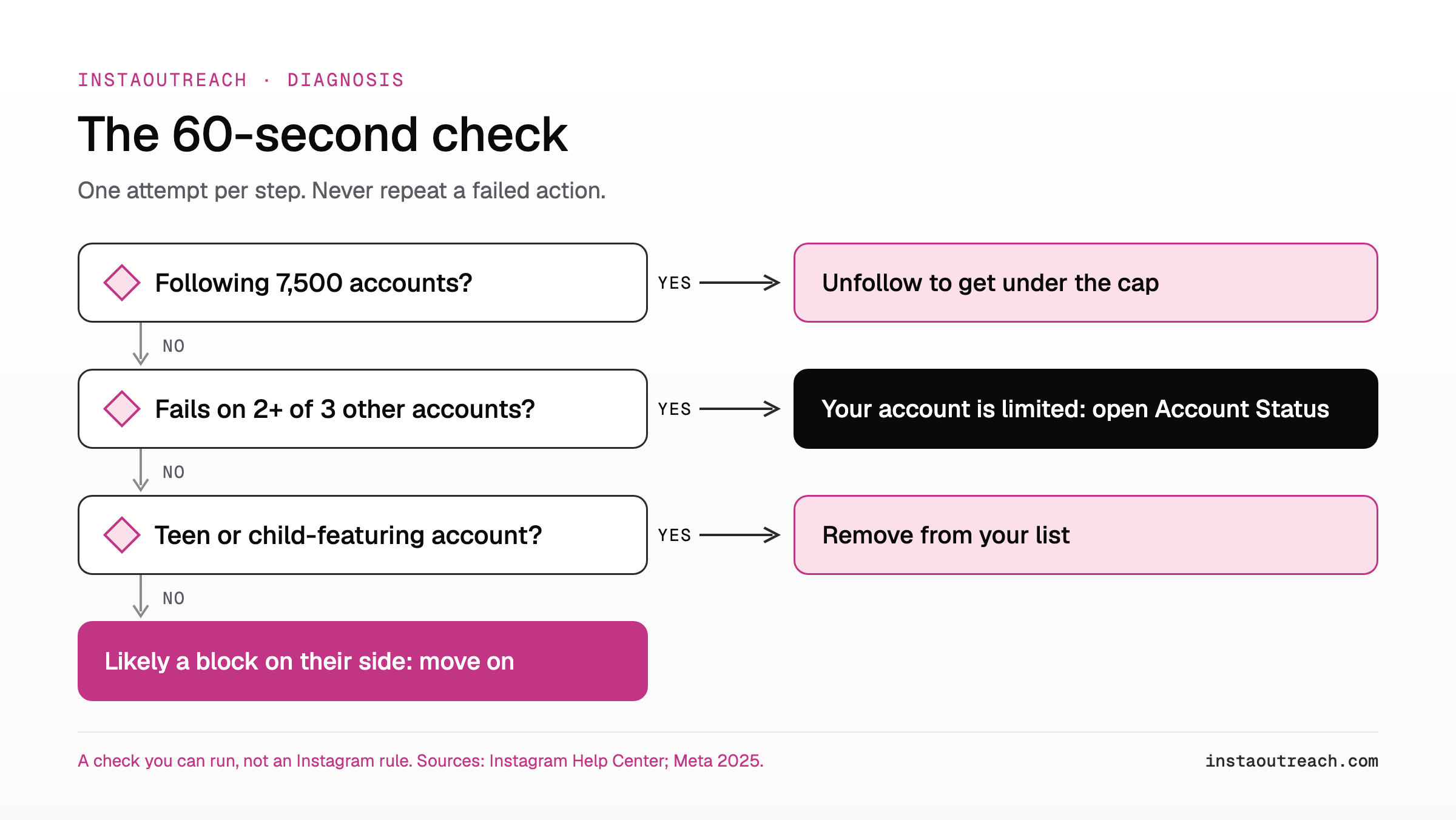
A check you can run (our protocol, not Instagram's). Make one attempt per step and never repeat a failed action.
- Check your following count (7,500 cap). Nobody can follow more than 7,500 people, and anyone who tries "will see an error message" (Instagram Help Center). It is a total, not a daily limit: at the cap every follow fails.
- Try once on three other accounts you haven't tried yet: one public, one private, one that already follows you. Fails on two or three: your account is limited. Fails on one: probably their side.
- Open Account Status and look for "Features you can't use" (Instagram Help Center). On a computer: More, Settings, Account Status. Menu names vary by app version.
- Check connected apps and logins. Remove apps you don't use and logins you don't recognize (Instagram Help Center).
What the other side can do:
- Limits. A person can limit "Everyone but close friends", recent followers (last week) or accounts that don't follow them, for "up to four weeks at a time", extendable. The limited accounts' new chats and comments get hidden, and those accounts can't reply to the person's stories, tag or mention them (Instagram Help Center). Limits does not stop follows; if a comment, tag or story reply to a non-follower fails, Limits is a likely reason, and Instagram shows its own message for it.
- Blocks. "People aren't notified when you block them" (Instagram Help Center).
- Teen and child-featuring accounts. Meta avoids recommending them to "potentially suspicious adults" and makes them harder to find in Search (Meta Newsroom, July 2025). Teen Accounts only receive messages from accounts they follow or have connected with (Instagram Help Center), and in August 2026 The Verge reported Meta will keep making it "more difficult for adults to find, follow, or interact with young users". That these protections show this exact notice is our inference.
Their side means nothing to fix: drop the lead. If you prospect creators or kids' brands, filter out teen-run and child-featuring accounts before you start.
How long does "you can't interact with certain accounts" last?
Instagram gives no duration for this notice. Its closest page, on DM limits, says only that you may lose a feature "for a period of time" (Instagram Help Center).
The 1, 3, 7 and 30-day ladder that circulates online is Meta's Facebook strike table, and Meta states that "these restrictions only apply to Facebook accounts" (Meta Transparency Center). Other figures you will see, from "a few hours" to "a month", cite no source.
What Meta does say: Account Status shows "some restrictions your account might have and how long they'll last", and if you think Meta got it wrong, "you can let us know in the app" (same page). Account Status has shown restricted features, with an appeal option, since June 2023 (Instagram).
What makes it longer: Instagram's own sequence for DMs is a warning, then a lost feature if you continue (Instagram Help Center), and Account Status notes that "in most cases, you'll get a warning before losing access" (Instagram Help Center). Our reading is that retrying, adding a second tool or logging in from new devices all count as continuing.
| Claim you will see | Where it comes from | Verdict |
|---|---|---|
| "1, 3, 7 or 30 days" | Meta's strike table (Meta) | Facebook only |
| "3-7 days, up to a month" | A fix guide, no source (Socialtipspro) | Unverified |
| "A few hours to a few days" | wikiHow, about the sibling notice "We restrict certain activity", no source (wikiHow) | Unverified |
| "Up to four weeks, extendable" | Instagram Limits (Instagram) | Real, but it is the other person's setting |
| "However long Account Status says" | Meta (Meta) | The only official answer |
Rule of thumb: no stated end date means treat it as open-ended. Stop the action, check Account Status once a day, and resume only when the action works on a single normal manual try.
Does "can't interact with certain accounts" hurt your reach?
Instagram documents no reach penalty for an interaction limit. Reach to non-followers depends on recommendation eligibility, and Instagram tries not to recommend accounts that "recently violated Instagram's Community Guidelines", "repeatedly engaged in misleading practices to build followings, such as purchasing 'likes'", or "have been banned from running ads on our platforms" (Instagram Recommendations Guidelines). If your account is not eligible, "none of your content will be recommended", but "your content can still show up for your followers" (Instagram Help Center).
How to check: on a professional account, Account Status shows whether your content may be eligible to be recommended (same page), including for Search and Suggested Accounts since April 2023 (Instagram).
Some operators report reach dipping after an account is flagged more than once; Instagram documents no direct link, but repeated flags are exactly the history that can cost recommendation eligibility.
For a sending account, reach matters less than trust: prospects tap your name after your message lands, so put the effort into what prospects see on your profile.
How to fix "you can't interact with certain accounts" step by step
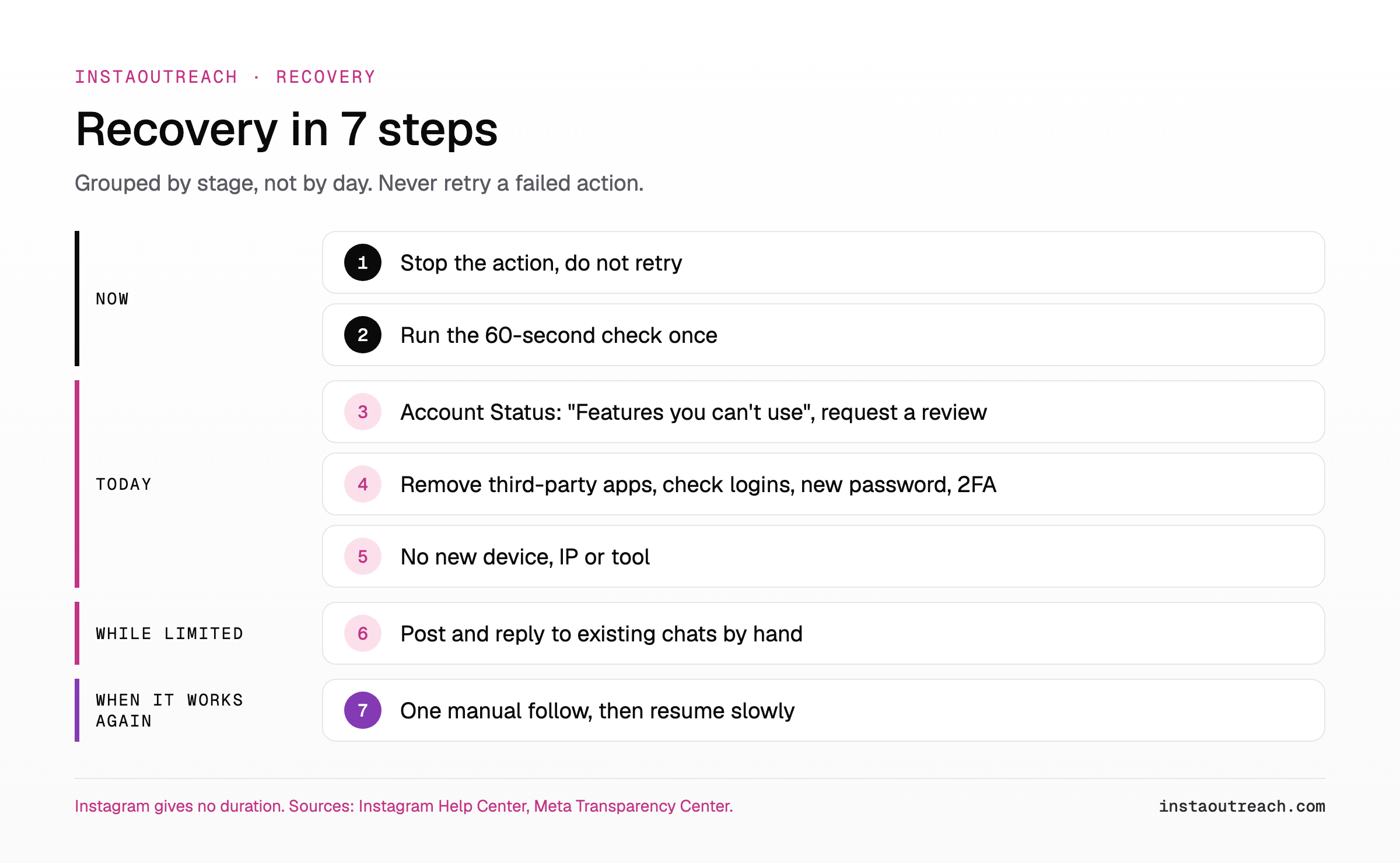
The order matters more than any single step:
- Stop the action that triggered it. Do not retry on the same account: Instagram warns first, then removes a feature if you continue (DM limits, Account Status).
- Run the 60-second check once: three single tries on other accounts, nothing more. Fails on only one account: drop that lead, you are done.
- Open Account Status. Look under "Features you can't use" and request a review if it is a mistake (Instagram Help Center, Meta).
- Cut off third parties. Remove growth apps and any app holding your login, check login activity, change your password, turn on two-factor authentication (Instagram Help Center).
- Don't route around it. No new device, IP or tool to get past the limit; a new device also limits your settings for a few days (Instagram Help Center).
- Use the account lightly, by hand. Post as usual and reply to existing chats.
- Test with one manual follow on a normal day. If it works, resume slowly with the day-by-day warmup schedule; if the limit returns, use the action block recovery playbook.
Skip these "fixes": unblocking and reblocking and "verify your email" circulate in tutorials with no Instagram source. Clearing cache or reinstalling only fixes app glitches: if the notice also appears on instagram.com in a browser, it is not your phone.
What to pause in Instagram outreach while you can't interact with certain accounts
This notice hits the engage-before-you-DM steps of most funnels: follow, like, comment. If you run comment-to-DM warm entry, that stage is now off.
| Outreach step | Pause or keep | Why |
|---|---|---|
| Follows of new prospects | Pause | The limited action; continuing after a warning costs features (Instagram) |
| Likes and comments on prospects' posts | Pause | Same family: engaging "at very high frequencies" (Meta) |
| Copy-paste comments or openers | Stop for good | Repetitive content triggers restrictions at low volume too (Meta) |
| New cold DMs from this account | Pause until follows work | Our reading: a limited account is flagged; protect the sending lane. See how Instagram rate-limits DMs and when DMs start failing too |
| Replies in existing conversations | Keep, by hand | Normal use (our reading) |
| Scrapers or growth apps logged in | Disconnect | A listed restriction cause (Instagram) |
| Same list and template on another account | Don't | Repetitive content and inauthenticity signals (Meta). See running several outreach accounts |
| Posting and stories | Keep, normal pace | Keeps the account looking used (our reading) |
Prevention, once the account works again:
- Spread follows and likes across the day, never a whole list in one sitting.
- Write every comment and opener fresh.
- No growth apps, no shared logins.
- One device and one stable IP per account.
- Never flip the account between public and private.
- Check Account Status regularly, as Instagram recommends; weekly is a simple cadence (our suggestion).
- Stay well under the 7,500-follow total.
If you run outreach through software, InstaOutreach sends every follow, like, comment and DM through per-account rate caps, spacing and active windows, and when Instagram answers with an action block it stops that account for a human instead of retrying.
FAQ
What does "you can't interact with certain accounts right now" mean on Instagram?
Users report a temporary limit, mostly on follows, also on likes and comments. Instagram has no Help Center article for this wording, but it matches Meta's spam rules against engaging "at very high frequencies" or posting repetitive content (Meta). Sometimes the cause is the other account: a block or teen protections. Check that you follow fewer than 7,500 accounts, then test once on three other accounts; if two or three fail, check "Features you can't use" in Account Status (Instagram Help Center).
How long does "you can't interact with certain accounts" last?
Instagram publishes no duration; its DM limits page says only "for a period of time" (Instagram Help Center). The 1, 3, 7 and 30-day ladder quoted online is Meta's Facebook strike table, which Meta says applies only to Facebook accounts (Meta). The only official pointer is Account Status, which can show some restrictions and how long they last. Until one manual try works, treat the limit as open-ended and do not retry the action.
Why can I follow some accounts but not others on Instagram?
If only a few accounts fail, the cause is usually on their side: they may have blocked you, which is silent (Instagram Help Center), or the account may be a teen or child-featuring account, which Meta deliberately makes harder for unknown adults to reach (Meta). Instagram's Limits setting does not stop follows, but it hides new chats and comments from non-followers (Instagram Help Center). If most new accounts fail, the limit is on yours. Also check your total: nobody can follow more than 7,500 people. Some users report public accounts failing while private ones work (Socialtipspro); Instagram does not explain that.
Does an Instagram interaction limit hurt reach or mean a shadowban?
Instagram documents no reach penalty for an interaction limit. What cuts reach to non-followers is losing recommendation eligibility, which Instagram ties to recent guideline violations, misleading follower-building such as buying likes, or an ads ban (Instagram). Even then, followers can still see your content. On a professional account, Account Status shows your eligibility (Instagram Help Center). Repeated flags are the history that can cost eligibility, so stop the triggering activity instead of pushing through.
Can I appeal "you can't interact with certain accounts"?
Yes, if the limit is listed. Open Account Status, go to "Features you can't use" and choose the option to appeal or request a review (Instagram Help Center). Meta says that if it made a mistake, you can let it know in the app (Meta). If nothing is listed, there is nothing to appeal: wait, don't retry, and remove any third-party app holding your login (Instagram Help Center). Appeal turnaround times quoted online are user claims, not Instagram figures.
Is it the same as "we restrict certain activity to protect our community"?
Not word for word, but it is a sibling notice from the same family of activity limits (our inference; Instagram documents neither wording). Instagram publishes no duration for it either. The steps are the same: stop the action, check "Features you can't use" in Account Status (Instagram Help Center), and remove third-party apps holding your login. Recovery tiers: the action block recovery playbook.
Sources
All pages read October 9, 2026.
- Instagram Help Center (undated): message limits, growth apps, data scraping, Account Status, Recommendations Guidelines, recommendation eligibility, Limits, following cap, follow requests, limited settings, Teen Accounts, blocking, Restrict.
- Instagram: Outages and Account Status, updated October 14, 2025; Terms of Use, effective January 1, 2025.
- Meta Transparency Center: Spam policy, changed June 26, 2024; Restricting accounts, updated November 12, 2024.
- Meta Newsroom: Teen Account protections, July 23, 2025.
- The Verge: Instagram and Facebook changes for teens, August 26, 2026.