Email warmup tools in 2026: do they work, and which to use?
Warmup tools still help a new mailbox look normal, but they cannot fix bounces, complaints or missing DNS. What Gmail, Yahoo and Outlook require, 8 tools priced, and a 14-day setup.

A typical case: an agency owner books calls from Instagram DMs and adds cold email for leads who ignore message requests. Four new mailboxes go into a popular email warmup tool, whose dashboard reports near-perfect inbox placement for three weeks. Then the first campaign gets a handful of replies, and a spam test shows half the sends in junk.
Email warmup tools still do one useful thing in 2026: they give a new mailbox a steady, low-volume sending history while you wait. That is close to the ramp Google itself recommends: "Start with a low sending volume to engaged users, and slowly increase the volume over time" (Google).
They do not fix what now decides placement: authentication (SPF, DKIM, DMARC, reverse DNS, TLS), a complaint rate under 0.3% at Gmail and Yahoo, and list quality. Use warmup as a cheap timer, ideally your sender's built-in one, and spend your attention on DNS, lists and complaints.
Still deciding on email? Read Instagram DM vs cold email vs LinkedIn.
Does email warmup still work in 2026?
A warmup tool connects to your mailbox (OAuth or SMTP/IMAP), then trades automated messages with other mailboxes in its network, which open, reply and pull them out of spam while the tool ramps volume. Front describes warmup as sending "a large number of automated messages" to inboxes that open or reply (Front).
It helps with three things: a brand-new mailbox with zero history, a steady daily pattern between campaigns, and an early alarm when even friendly network inboxes start spam-foldering you.
It cannot fix bounces from an unverified list, complaints from real recipients, missing DNS, a blocklisted domain, or content that spam filters flag. Pools also police their own members: Instantly disables warmup for accounts that bounce warmup emails, and says missing DNS records cause bounces and disconnects.
Why do so many operators say warmup is broken? Our reading: the dashboard inbox rate is measured inside the vendor's network, between mailboxes programmed to engage. Real prospects never joined that program.
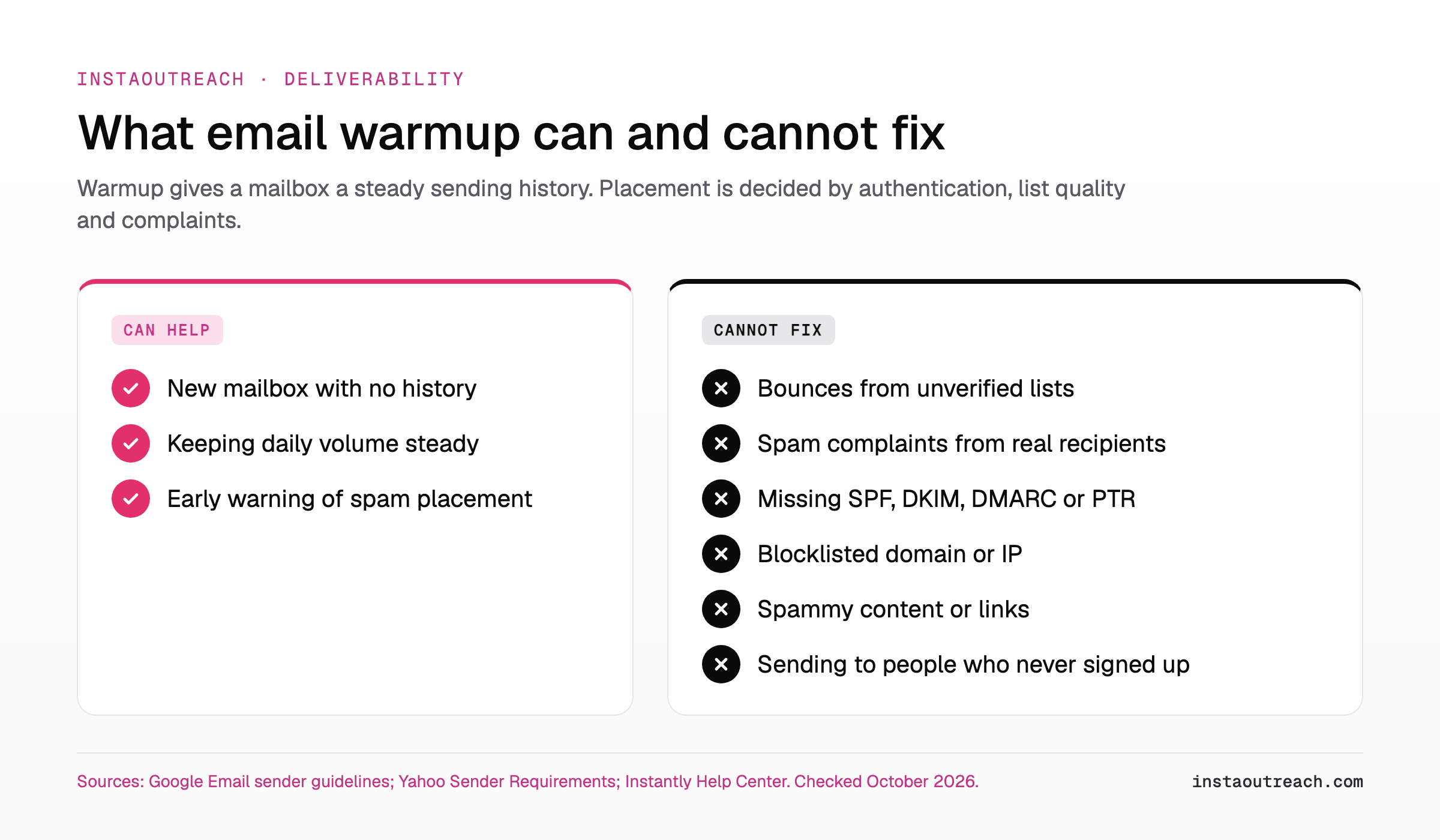
Short answer: warmup buys time and a sending history, not deliverability. Authentication, list quality and complaint rate decide that.
What Gmail, Yahoo and Outlook actually require from senders
The three big providers publish short rule pages; none mentions warmup. What does appear is a slow ramp of real mail (Google).
Three details most guides skip:
- Gmail now rejects. From November 2025, Gmail is "ramping up its enforcement on non-compliant traffic," including temporary and permanent rejections (Google FAQ).
- Google's rules cover personal Gmail only. They "don't apply to messages sent to Google Workspace accounts" (same FAQ). Our reading: Workspace inboxes still run Gmail's spam filtering plus each admin's own settings. No public rulebook does not mean an easier target.
- Outlook.com rejects too. Since May 5, 2025, domains sending over 5,000 emails a day to hotmail.com, live.com and outlook.com that fail authentication get "550; 5.7.515", per Microsoft's April 29, 2025 update to the post (Microsoft). Microsoft 365 business tenants are out of scope.
| Requirement | Gmail | Yahoo | Outlook.com |
|---|---|---|---|
| Applies to | Personal Gmail (not Workspace recipients) | Yahoo mailboxes | hotmail.com, live.com, outlook.com |
| Bulk threshold | Close to 5,000/day per primary domain, subdomains included; once you qualify, bulk status is permanent | Not specified | Over 5,000/day per domain |
| SPF and DKIM | SPF or DKIM for all; both for bulk | SPF or DKIM for all; both for bulk | Both must pass |
| DMARC | p=none minimum, aligned (bulk) | p=none minimum, must pass, aligned (bulk) | p=none minimum, aligned |
| PTR and TLS | Both required, all senders | Valid reverse DNS required | Not in the post |
| Spam rate | Below 0.3%, aim below 0.1% | Below 0.3% | No number published |
| One-click unsubscribe | Bulk marketing mail; honor in 48 hours | Bulk marketing mail; honor in 2 days | Functional unsubscribe recommended |
| If you miss | Failure codes or spam folder; stricter since Nov 2025 | Enforced since Feb 2024; penalty not detailed | Rejected with 550 5.7.515 (Microsoft's April 29, 2025 update) |
| Source | Guidelines, FAQ | Requirements, FAQ | Microsoft post |
A small cold setup (for example, 6 mailboxes x 30 emails = 180 a day) sits far below 5,000. Meet the bulk rules anyway. DMARC and alignment cost nothing, and Yahoo will not say where bulk starts ("We will not specify a volume threshold," Yahoo FAQ).
Google also says "Don't send messages to people who didn't sign up" (Google). Cold email runs against that, which is why your complaint rate, not your warmup tool, decides how long a cold domain lives.
Is email warmup against Google's terms of service?
In 2023 GMass, Saleshandy and Growbots each said Google had told them their warmup violated its terms, and each switched it off for Google accounts:
- GMass ended warmup on January 31, 2023: Google told it to stop "or we'd lose our Gmail API access", and moving to IMAP would not help because Google does not "want warmup taking place at all" (GMass).
- Saleshandy ended warmup for all Google accounts in February 2023 after "a notice from Google" saying its service "violates their terms of service" (Saleshandy).
- Growbots disabled Gmail warmup from June 1, 2023, citing API-connected warmup. It noted some tools moved Gmail to SMTP/IMAP, the route GMass says does not escape the issue (Growbots).
Front also prohibits warmup on any inbox connected to it (Front). We found no public Google policy page that names warmup; the evidence is vendors' accounts. Many tools still list Gmail (Warmbox lists "Gmail - Gsuite inbox (OAuth)" on its pricing page); we make no claim about their compliance. Treat Gmail warmup as a terms risk you own.
Best email warmup tools compared (prices checked October 2026)
Built-in warmup ships inside a sending platform; a standalone email warmup service does only warmup, sometimes plus testing. Alphabetical within each family, no ranking.
| Tool | Type | Pricing model | Entry price (as listed) | Entry plan includes |
|---|---|---|---|---|
| Instantly | Built in | Flat, unlimited mailboxes | $47/mo (Growth) | Unlimited accounts and warmup, 5,000 emails/mo, 1,000 uploaded contacts, 14-day trial |
| lemlist (lemwarm) | Built in | Flat plan (card: unlimited users; FAQ: priced by users) | $69/mo, $55 billed yearly | lemwarm in all plans, 50,000 emails/mo |
| Smartlead | Built in | Flat, unlimited mailboxes | $39/mo (Base), 17% off yearly | Unlimited accounts and warmup, 6,000 sends/mo, 2,000 contacts; pool quality tiered by plan |
| MailReach | Standalone | Per mailbox, volume tiers | $25/mailbox/mo (1-5 mailboxes; EUR shown in Europe) | Up to 100 warmup emails/day, 20 spam test credits |
| TrulyInbox | Standalone | Per warmup email, unlimited accounts | Free for 1 account; $29/mo, $22 billed yearly | Free: 10 warmup emails/day. Paid: 200/day |
| Warmbox | Standalone | Tiers by inbox count | $19/mo, $15 billed yearly (Solo) | 1 inbox, 50 warmup emails/day |
| Warmup Inbox | Standalone | Per inbox, volume discount | $19/inbox/mo, $15 billed yearly | 75 warmup messages/day, 7-day trial |
| Warmy | Standalone | Plan builder or custom | From $49/mo | 7-day trial; per-inbox price not public |
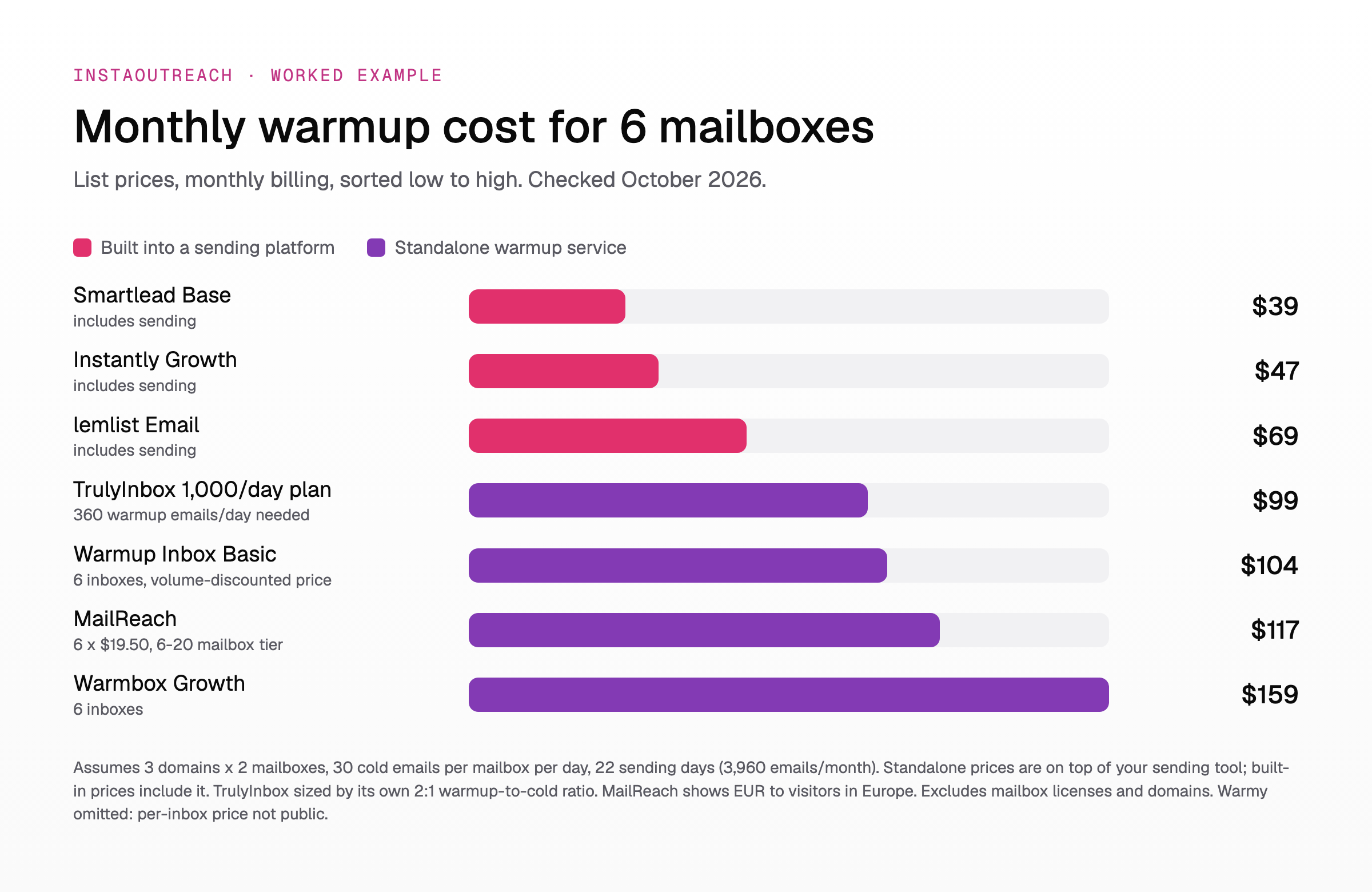
Worked example, our assumptions: 3 secondary domains x 2 mailboxes = 6 mailboxes, 30 cold emails per mailbox per day, 22 sending days, so 6 x 30 x 22 = 3,960 cold emails a month. Monthly billing; mailboxes and domains excluded.
Smartlead Base ($39, 6,000 sends) and Instantly Growth ($47, 5,000 emails) cover 3,960 with unlimited warmup if those emails go to roughly 1,000-2,000 contacts in multi-step sequences (Instantly Growth allows 1,000 uploaded contacts, Smartlead Base 2,000). lemlist Email is $69. TrulyInbox's 2:1 rule (two warmup emails per cold email) means 60 x 6 = 360 warmup emails a day, so the 1,000/day plan: $99. Warmup Inbox Basic for 6 inboxes is about $104 (its volume-discounted list price), MailReach 6 x $19.50 = $117 (its 6-20 mailbox tier), Warmbox Growth $159. Standalone prices are on top of whatever you send from; the built-in prices already include the sending tool.
| Situation | Pick | Why |
|---|---|---|
| You already send from Instantly, lemlist or Smartlead | Its built-in warmup | No extra cost; stops when the plan stops (Instantly) |
| Your sender has no warmup and you want placement tests | A standalone with test credits, e.g. MailReach | Entry plan includes 20 spam test credits (MailReach) |
| Many mailboxes, low budget | A flat built-in plan (Instantly, Smartlead), or TrulyInbox as a standalone | Unlimited mailboxes; TrulyInbox prices by warmup emails, not accounts (TrulyInbox) |
| One mailbox, testing the channel | A manual ramp or a free tier | Google's own low-volume ramp (Google); TrulyInbox is free for 1 account at 10 warmup emails/day |
For the Instagram side of the budget, see what an Instagram sender seat really costs.
How to warm up a new email domain: a 14-day checklist
Fourteen days is our minimum before a first small cold send, not "fully warmed". Each step is gated on a check, not a date. Volumes are our example, not a provider rule.
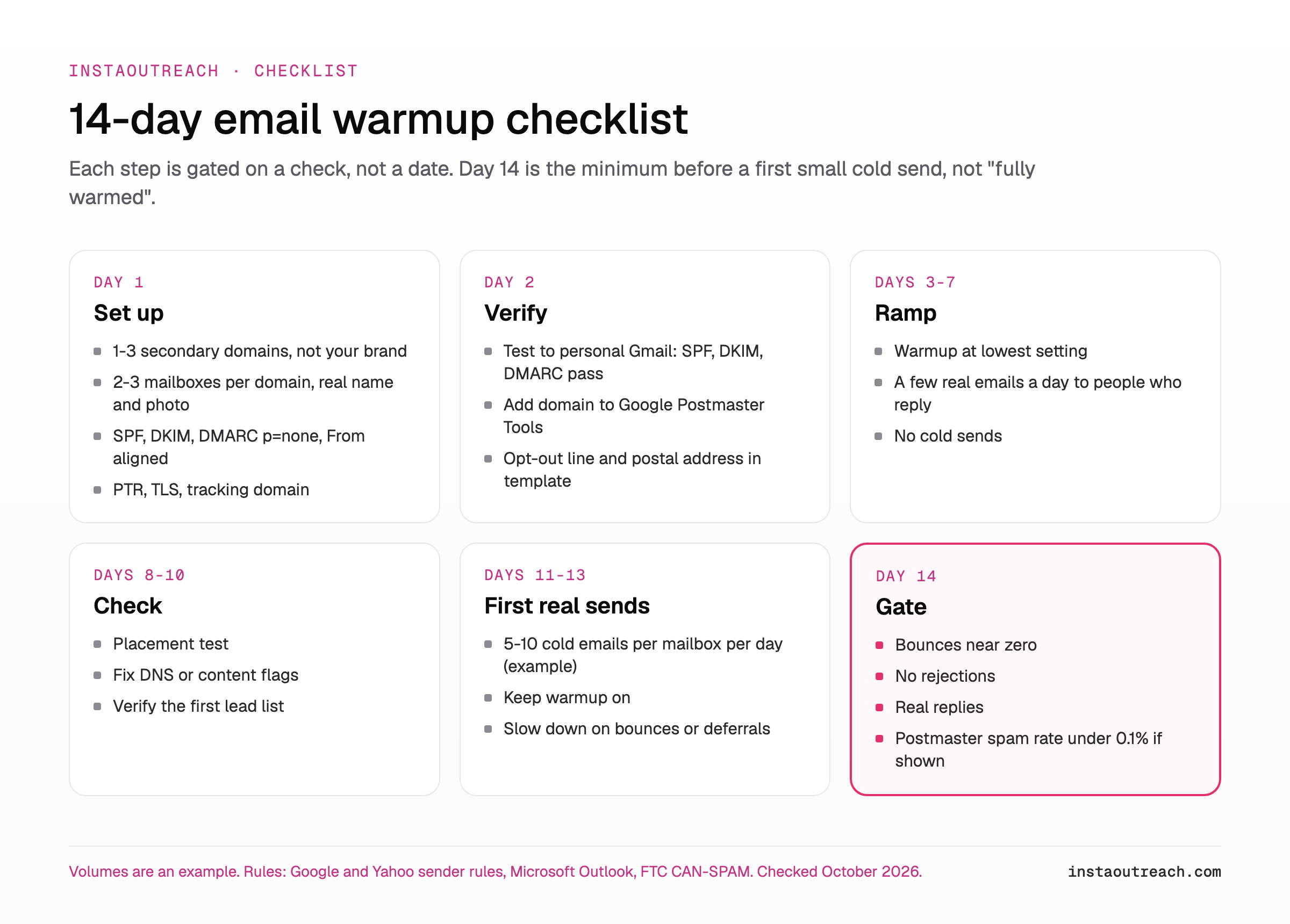
Day 1: set up
- Buy 1-3 secondary domains that are not your brand domain.
- Create 2-3 mailboxes per domain, each with a real name and photo.
- Publish SPF, DKIM and DMARC (p=none to start), From domain aligned with SPF or DKIM (Google, Yahoo). SPF and DKIM values come from your mailbox provider's admin console; publish exactly those. Starter DMARC (Google's Set up DMARC guide):
_dmarc.yourdomain.com TXT "v=DMARC1; p=none; rua=mailto:[email protected]". - Confirm your provider gives valid reverse DNS (PTR) and TLS; Google requires both.
- Use a custom tracking domain (one of GMass's post-warmup fixes) or turn tracking off (our advice).
Day 2: verify
- Send a test to a personal Gmail address, open "Show original" and confirm SPF, DKIM and DMARC say PASS.
- Add the domain to Google Postmaster Tools.
- Add an opt-out line and your postal address to the template. CAN-SPAM "makes no exception for business-to-business email" and requires opt-outs honored within 10 business days (FTC). Other markets: the cold outreach compliance map.
Days 3-7: ramp
- Turn on warmup at its lowest setting.
- Send a few real emails a day to people who will reply: Google's low-volume, engaged-users ramp.
- No cold sends yet.
Days 8-10: check
- Run a seed placement test (MailReach's entry plan includes 20 test credits; Warmy and others sell tests) and note where it lands at Gmail, Outlook and Yahoo.
- Fix any DNS or content flags before going further.
- Verify your first lead list. Yahoo: "Remove invalid recipients from your list promptly."
Days 11-13: first real sends
- Send 5-10 cold emails per mailbox per day to verified best-fit leads (our example).
- Keep warmup running.
- If bounces or deferrals appear, cut volume until errors drop, then increase slowly (Google's advice).
Day 14: gate
- Go up only if bounces are near zero (our target; no provider publishes one), logs show no rejections, real people reply, and Postmaster, if it shows data, reads under 0.1% spam.
- If any check fails, hold volume and fix the cause.
Tip: keep cold email off your brand domain (our advice); a subdomain is not separation. Google counts subdomain mail toward the primary domain's 5,000-a-day bulk threshold, and Postmaster's compliance dashboard reports on primary domains only (Google FAQ, Postmaster help), so
mail.yourbrand.comis not a separate sender profile.
How to tell if email warmup is working (and when to stop paying)
A warmup dashboard is the vendor grading its own network. Trust provider and recipient signals instead.
| Signal | Where you read it | What it proves |
|---|---|---|
| Warmup "inbox rate" | Your warmup tool | The vendor's network is not spam-foldering you; not proof for real prospects (our inference). |
| Seed placement test | MailReach, Warmy and similar | Where a sample lands across providers at one moment. |
| User-reported spam rate | Google Postmaster Tools | Gmail complaints; Google says spam rate is calculated daily. |
| Delivery errors | Postmaster; your sending logs (5.7.26 at Gmail, 550 5.7.515 at Outlook.com) | Authentication or reputation problems. Hard evidence. |
| Bounce rate | Your sending tool | List quality. Yahoo says to monitor hard and soft bounces. |
| Real replies | Your inbox | The only outcome that pays. |
Postmaster data "might be missing if the total number of messages for a given day is too low" (Google). At 180 cold emails a day you may see nothing, so bounces, logs and replies become your signals. Log them per mailbox, like the numbers to log for a cold campaign.
When to stop paying for a standalone email warmup service (our advice): after a few weeks of real cold volume with clean signals, it mostly buys a dashboard. If signals go bad, lower volume first, as Google advises.
Adding email next to Instagram DMs without burning either channel
Instagram warmup and email warmup share only a word. One is account behavior on one platform (see the day-by-day Instagram account warmup schedule); the other is a domain's reputation across providers.
| Instagram account warmup | Email warmup | |
|---|---|---|
| What is warmed | One Instagram account | A domain and its mailboxes |
| Who judges you | Gmail, Yahoo, Outlook.com, corporate filters | |
| Published rules | No official DM cap | The sender requirements above |
| What burns it | Action blocks, restrictions | Complaints, bounces, failed authentication |
| Recovery | Pause and rebuild activity | Lower volume, fix DNS and list, new domain if needed |
On the Instagram side, the closest thing to the spam folder is hidden requests (see why cold DMs die in hidden requests).
Rules for a DM-first operator (our advice):
- Separate domains, so an email burn never touches your brand.
- Only email leads you already researched for a DM. Relevance keeps complaints down.
- Stop both channels on any reply, as in the two-channel DM plus email sequence.
- Budget it: warming 6 mailboxes costs $39 to $159 a month in the worked example, before mailboxes and domains.
If the Instagram side of that plan is the part you want automated, InstaOutreach runs each outreach account on its own warmup schedule in the cloud; your email warmup still lives in your email tool.
FAQ
Does email warmup actually work?
Partly. A warmup tool gives a new mailbox a steady sending history and an early alarm when even friendly inboxes start spam-foldering you. It does not fix authentication, list quality or complaints from real recipients, and its dashboard inbox rate is measured inside the vendor's own network. Google's own advice is a slow ramp of real mail to engaged users (Google).
How long does it take to warm up an email account?
No mailbox provider publishes a number. Our checklist gates the first small cold sends at about 14 days, and only if DNS checks pass, a placement test looks clean and the first list is verified. Google says the more you send, the more slowly you should increase, and that you can move faster when you send daily rather than weekly (Google).
What is the best email warmup tool?
There is no single winner; it depends on what you send from. On Instantly, lemlist or Smartlead, start with the built-in warmup that comes with the plan (Instantly, Smartlead). If your sender has no warmup, pick a standalone service, ideally one with spam placement tests, such as MailReach's entry plan with 20 test credits (MailReach). Compare pricing models before features. Prices checked October 2026.
Can I warm up an email account for free?
Yes, in two ways. The first is the manual ramp Google describes: a few real emails a day to people who will reply, raising volume slowly (Google). The second is a free tier, such as TrulyInbox's single account at 10 warmup emails a day (TrulyInbox). Instantly also includes warmup in its 14-day free trial, so check whether your sending platform already covers it.
Do I need a separate warmup tool if I use Instantly or Smartlead?
Usually not. Both include unlimited warmup on every plan (Instantly, Smartlead), and lemlist includes lemwarm in all plans. A standalone service makes sense when your sender has no warmup or you want spam placement tests, like the credits MailReach bundles. Built-in warmup is tied to the subscription: Instantly needs an active plan to keep warmup running after the trial (Instantly Help Center).
Can I send cold emails without warming up my email account?
Technically yes; nothing blocks the first send. But a new mailbox has no history, and Google advises starting with a low volume to engaged users and increasing it slowly (Google). A safer start (our example): finish DNS setup, then send 5-10 cold emails per mailbox per day to verified leads, watch bounces and replies, and raise volume gradually. Warmup can run alongside, not instead.
Sources
All checked October 2026.
- Google: sender guidelines, FAQ, Postmaster dashboards, Postmaster setup, DMARC setup.
- Yahoo: requirements, FAQ.
- Microsoft: Outlook high-volume sender rules, April 2025.
- FTC: CAN-SPAM guide.
- Warmup notices: GMass (Jan 2023), Saleshandy (Feb 2023), Growbots, Front, Instantly Help Center.
- Pricing pages: linked in the tools table above.