Instagram Message Requests Not Showing? Every Cause and Fix
Requests empty, a badge with nothing behind it, or a folder that will not load? Every place Instagram hides a message request, the setting behind each one, and what it means for cold DMs.
Here is a typical case. A coach sees the red badge on the paper-plane icon, opens Requests, and the list is empty. The laptop shows the same empty folder, while a client insists she sent a message yesterday.
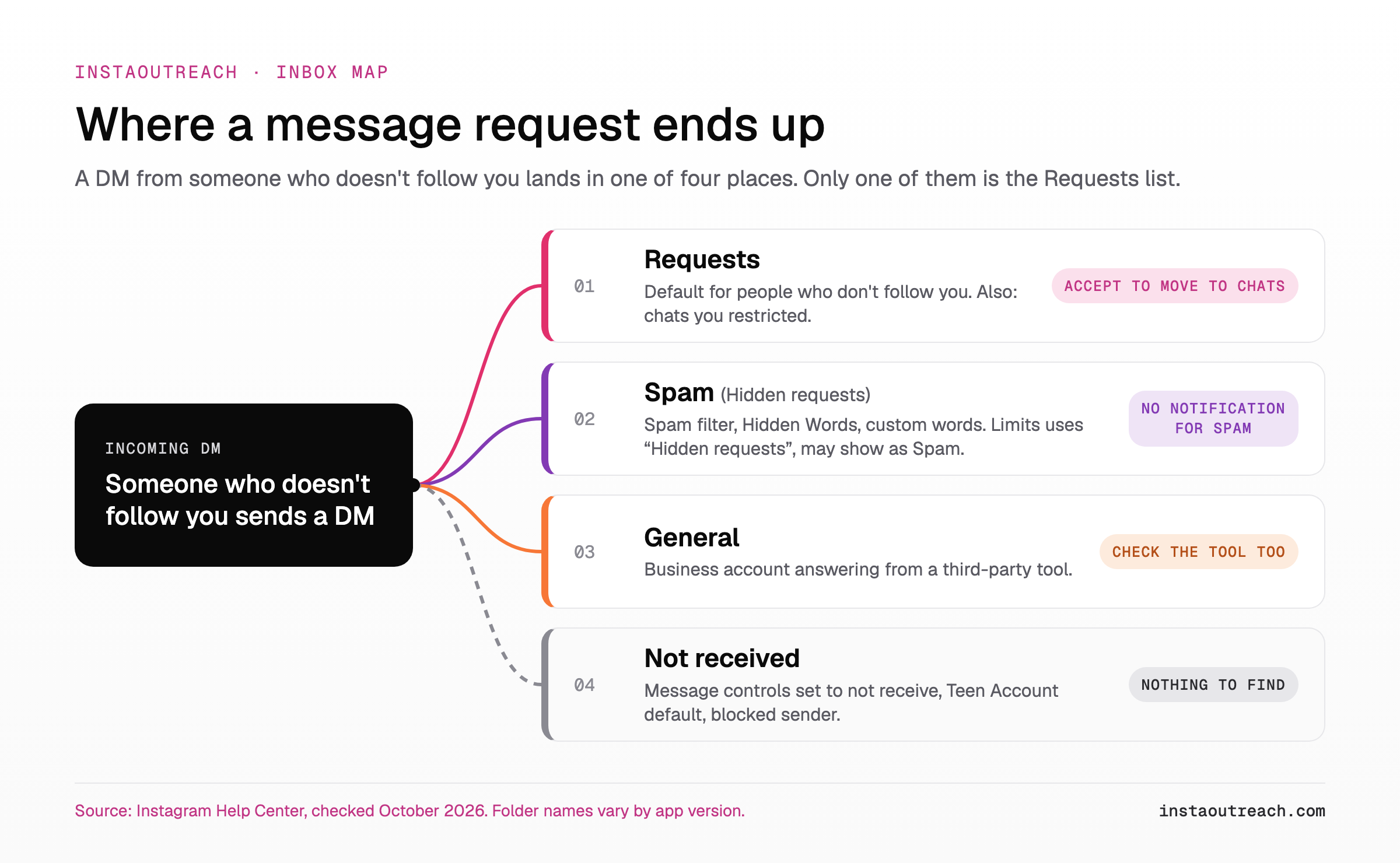
If an Instagram message request is not showing, it almost always ended up in one of four places: Requests itself, under a sort or filter you did not expect; Spam (formerly Hidden requests), through the spam filter, Hidden Words or Limits; General, when a business tool answers your DMs; or nowhere, because message controls, a block or a Teen Account default stopped it. A request the sender unsent is simply gone.
A badge with nothing behind it has a shorter list: a request filtered into Spam, which never notifies you, a message the sender unsent, an alert from another account logged in on the same phone, or an app bug like the one dozens of users reported in March 2026. Each case is below, with Instagram's own Help Center rules, followed by what it means for cold DM senders.
Why is my Instagram message request not showing?
The routing rule: if someone who doesn't follow you sends a message, "depending on their settings, it may appear as a message request" (Instagram Help). You have to accept a request before it appears in your Chats list, and messages from people you follow go straight to Chats (Instagram Help).
If it is not in your Requests list, it is in one of these places, or it never arrived:
- Spam (Hidden requests). Requests that "may be offensive, unwanted, contain spam" or match your Hidden Words land in Spam, with no notifications (Instagram Help). Limits sends new chats from groups you limited to the "Hidden requests" folder in Message requests (Instagram Help).
- General, or a third-party inbox. Requests a business answers from a connected tool move to General (Instagram Help).
- Not received. Message controls can be set to not receive requests at all (Instagram Help). Messages from someone you blocked never arrive, even after you unblock (Instagram Help). Teen Accounts by default only receive messages from accounts they follow or have connected with (Instagram Help).
One reverse case lands in Requests: a chat with someone you restricted moves from Chats into Message Requests, and so do their future messages (Instagram Help).
Spam or Hidden requests? Instagram's own pages disagree on the name (Spam vs Hidden requests): look for either, since menus also vary by app version.
How to see message requests on Instagram (app, web and iPad)
On iPhone, tap Messages at the bottom, then Requests in the top right, then Spam for the filtered ones. On a computer, click Messages on the left, then requests next to Messages, then Spam (Instagram Help). On the web, instagram.com/direct/requests/ opens Requests directly (Pallyy).
Accepting moves the conversation to your main messages folder. Careful with Edit, then Delete all in Spam: it deletes every hidden request at once, so scan the list first.
The web shows the folders but not every setting: the spam filter and custom words for requests (Instagram Help), Limits (Instagram Help), locked chats (Instagram Help) and read receipts (Instagram Help) are app-only. Missing on the laptop? Check the phone, and the other way around.
| Where | Open Requests | Open Spam | Not available here |
|---|---|---|---|
| Phone app (iPhone; Android is similar) | Messages, then Requests in the top right | Requests, then Spam | Nothing: every setting lives here |
| instagram.com on a computer | Messages, then requests (or instagram.com/direct/requests/) | requests, then Spam | Spam filter, custom words for requests, Limits, locked chats, read receipts |
| iPad | Like the phone app: Messages, then Requests | Requests, then Spam | Locked chats (Android and iPhone only) |
Instagram says I have a message request but nothing is there
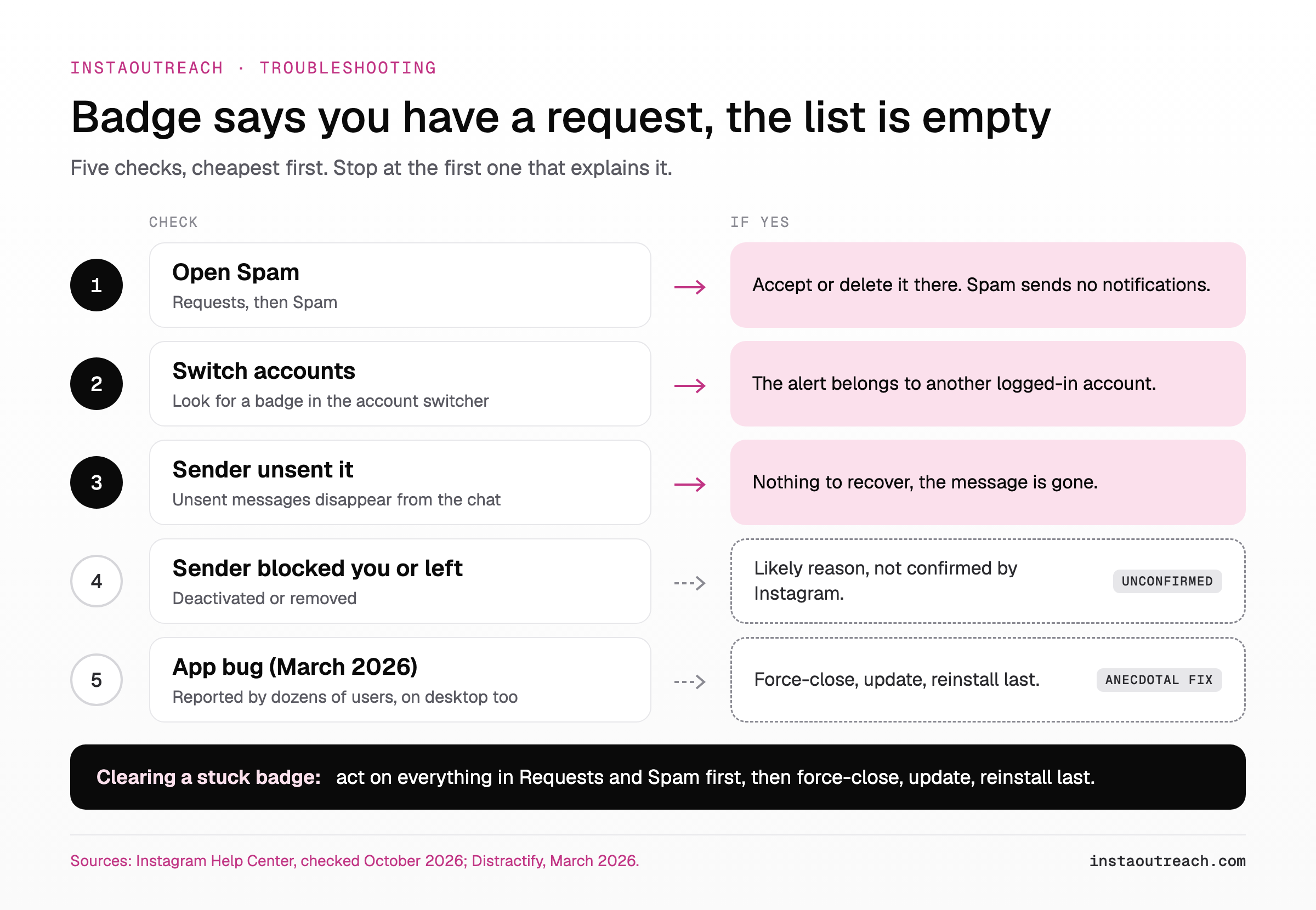
A message request notification but no message: a number on the badge, an empty list. Work through five checks, cheapest first.
One shortcut first, our tip rather than anything Instagram documents: search the sender's username in the Messages search bar, which may surface a thread sitting in a folder you have not opened.
- Open Spam. Filtered requests sit there, and Instagram sends no notifications for spam (Instagram Help).
- Switch accounts. Getting someone else's push notifications usually means another account was logged in on your phone (Instagram Help). The same can happen with your own second account: look for a badge in the account switcher.
- The sender unsent it. An unsent message is no longer visible to the people in the chat (Instagram Help). A likely reason for the leftover badge, though undocumented: the alert arrived before the unsend.
- The sender blocked you, deactivated or was removed. We found no official statement on pending requests in that case, so treat it as a likely reason only.
- It is a bug. In mid-March 2026, dozens of users reported pending request counts with an empty list, on desktop too (Distractify). One user said reinstalling the app cleared it; another said offloading did not (anecdotal). Instagram made no public statement we could find.
To clear a stuck badge: act on anything in Requests and Spam, force-close, update, and reinstall last. Note which folder the request was in before you accept it, because accepting moves it to your main messages folder (Instagram Help).
Do not change filters while you search. Turning Hidden Words filters on hides existing requests too, and turning them off restores them (Instagram Help), so a request can move while you search. Find it first.
Which settings hide message requests on Instagram?
Eight settings decide whether a request lands in Requests, Spam, General or nowhere. Message controls and Limits matter most for "my requests are empty", because both can hide every request from a stranger. The message controls option is called Message requests on iPhone and Message controls on a computer (Instagram Help).
The Hidden Words filter is off by default on standard accounts, and the sender never learns a message was hidden (Instagram Help).
| Setting | Where the request goes | Default | Where to change it |
|---|---|---|---|
| Message controls | Requests folder, or not received at all | Your choice | Profile, Menu, Messages and story replies |
| Hide unwanted message requests | Spam: possible scams and offensive words or emojis | Off on standard accounts, on for Teen Accounts | Messages and story replies, in the app only |
| Custom words and phrases | Spam, for requests that contain your words | Your choice | Hidden Words, in the app only |
| Limits | Hidden requests, for new chats from Recent followers (followed you in the last week), everyone but Close Friends, or accounts that don't follow you; older threads stay visible | Your choice, up to four weeks at a time, extendable | Limits in the phone app; no computer version |
| Restrict | Message Requests, including future messages | Your choice | Per person |
| Block | Not received, and not delivered later if you unblock | Your choice | Per account; if they have several, you may need to block each one |
| Teen Account | Not received unless the teen follows or has connected with the sender | Automatic for Teen Accounts | Under 16, Hidden Words changes need a parent's or guardian's permission |
| Third-party inbox tool | General; at high volume, new chats from requests leave the Instagram inbox | Applies whenever a connected tool answers | The connected tool |
Table sources, Instagram Help Center: Restrict, block, Teen Accounts, third-party tools, plus the pages above.
Business accounts: if you answer DMs from a connected inbox tool, check General and the tool itself before you assume a request is lost. A large volume can also get General disabled, and Instagram gives no number for "large".
Instagram message request not loading (spinner, blank list, error)
"Not showing" is a folder or a setting. "Not loading" is the app, the connection or Instagram itself: the screen spins, stays blank or errors. Outages can make people "think that the problems are unique to them," and Instagram won't send a notification for every one (About Instagram). Check Downdetector before you reinstall anything.
Stop at the step where Requests loads. If it loads but stays empty despite a badge, see step 5 of the badge checks.
| Step | What it rules out | If it works |
|---|---|---|
| 1. Switch from Wi-Fi to mobile data, or back | Your network | It was your network |
| 2. Force-close and reopen the app | A stuck app session | It was a stuck session; if it recurs, update |
| 3. Update the app | An outdated version | It was an old version; turn on auto-update |
| 4. Open instagram.com/direct/requests/ on a computer | Your phone | It is the phone app: go to step 6 |
| 5. Check an outage tracker | A wider outage | Wait; reinstalling will not help |
| 6. Clear the cache (Android) or reinstall (iPhone) | Bad local app data | It was local app data (offloading did not clear the March 2026 badge for one user) |
Does Instagram sort message requests by follower count?
Yes for some accounts, and it is still changing. In November 2024 Instagram added a Sort and Filter option to the requests inbox: sort by recency or follower count, and filter by verified accounts, businesses, creators or subscribers (TechCrunch). Social Media Today described it as filters for creators and quoted Adam Mosseri: "When you go to the requests inbox, sometimes it can be really overwhelming." (Social Media Today)
The 2026 changes are sightings, not launches. SocialBee's log records a "10K followers" DM filter in January 2026 and, in April 2026, two Requests filters in test on iOS, "Most followers" and "Most recent" (SocialBee). Both entries credit Radu Oncescu, who posts Instagram feature sightings on Threads; his April 17, 2026 post is the source for the April test. A test means not every account has it, and Instagram publishes nothing on who does.
If you have the filter, check which sort is on: a request from a small account can sit at the bottom of "Most followers", which looks a lot like "not showing".
As a sender, the sort works against you: if the prospect sorts by most followers, a new account with a few hundred followers sinks toward the bottom. Work through the sending-profile audit before you add volume, and read what the Verified filter means for senders before you pay for a check mark. Nobody publishes how many people use these sorts: treat it as a risk, not a measured loss.
What this means if you send cold DMs
Every cause above happens on the prospect's phone, out of your sight. A delivered DM can sit in Requests, sit in Spam with no notification (Instagram Help), hide behind Limits set to "Accounts that don't follow you" (Instagram Help), sink toward the bottom of a follower sort, or never arrive because of message controls or a Teen Account default.
A missing "Seen" proves nothing either: recipients can manage read receipts for all chats (Instagram Help). Judge a campaign by replies.
You can influence whether the request reads as worth opening and whether filters flag it: read why cold DMs end up in Spam and how to seed-test placement. If the send fails on your own screen, that is a different problem: see when the send itself fails on your screen.
| On their side | Can you influence it? | What to do |
|---|---|---|
| Requests (the default for people who don't follow you) | Partly | A profile that reads as real and a first line worth opening: the sending-profile audit. |
| Spam filter or Hidden Words | Partly | No links or scam-like wording in message one (when a link belongs in a cold DM); vary the text (why variation alone does not hide a template). |
| Limits on accounts that don't follow them | No | Use a second channel for leads who never open requests, or comment-to-DM and story replies as a warm entry. |
| Message controls set to not receive requests | No | Same as above: the DM never arrives. |
| Teen Account | No | Remove minors from your lists: by default they never receive the DM. |
| Follower sort on their side | Partly | Profile quality and account age; verified only where it pays. |
| Read receipts off | No | Judge by replies, not by Seen. |
Be clear about the risk too: automating cold DMs breaks Instagram's Terms of Use, which ban accessing information "in an automated way without our express permission" (Instagram Terms of Use). InstaOutreach can like or comment on a lead's recent post before the DM, spaces the two apart and varies each opener; none of that changes a prospect's own filters.
FAQ
Why can't I see my message requests on Instagram?
Most often they are in Spam, not Requests. Instagram moves requests that may be offensive, unwanted or spam, or that match your Hidden Words, into a separate Spam folder and sends no notifications for it (Instagram Help). If Spam is empty too, check message controls, which can be set to not receive requests at all (Instagram Help), and Limits (Instagram Help). Teen Accounts do not receive messages from strangers by default. On a computer, Spam is under Messages, then requests, but its filter settings are app-only.
Where is the Hidden Requests folder on Instagram now?
Instagram's Help Center now calls it Spam, inside Requests. In the phone app, tap Messages, then Requests in the top right, then Spam. On a computer, click Messages, then requests next to Messages, then Spam (Instagram Help). The old name survives on the Limits page, which still sends limited chats to the "Hidden requests" folder (Instagram Help). Look for either label, since menu names also vary by app version.
Why does Instagram say I have a message request when there is none?
Check four things. Spam: filtered requests sit there without a notification. Another account: someone else's alerts usually mean another account was logged in on your phone (Instagram Help); your own second profile can do the same. An unsend: the message disappears, and the badge may outlast it (our inference). A bug: in March 2026 dozens of users reported request counts with an empty list, and one said reinstalling fixed it (Distractify).
Do you get notified about message requests on Instagram?
Not for Spam: Instagram says you won't receive notifications for spam (Instagram Help). For regular requests, it depends on your settings. In the app, open Notifications below "How you use Instagram" and check whether push notifications are paused or a notification type is turned off (Instagram Help). Labels vary by app version. If notifications are on and a request still never appears, check message controls and Limits: a request that was never received cannot notify you.
Can a blocked person's messages arrive after I unblock them?
No. If someone you blocked sends you messages, you won't receive them, and Instagram says they won't be delivered later if you unblock them (Instagram Help). Unblocking does not bring back an old request, so ask the person to send it again. They may still reach you from another account: if the person has several Instagram or Facebook accounts, you may need to block each one (same page). After you unblock, their new messages follow your message controls like any other sender's.
Sources
- Instagram Help Center: spam folder, message requests and controls, who you can message, Hidden Words, Limits, Restrict, block, Teen Accounts, third-party tools, unsend, someone else's push notifications, locked chats, read receipts, push notifications, all checked October 2026.
- Instagram: outages and Account Status, updated October 2025; Terms of Use, effective January 2025.
- TechCrunch: DM upgrades for creators, November 2024.
- Social Media Today: DM filters for creators, November 2024.
- SocialBee: Instagram updates log, updated September 2026; Radu Oncescu, Threads, April 2026.
- Distractify: message requests but nothing there, March 2026.