Instagram Failed to Send Message: Every Cause and the Fix
Failed to send to everyone, to one person, or only to people you never messaged? Each pattern points to a different cause. Here is the triage, the fixes, and the signs that mean stop sending.
Here is a typical case. A setter runs a warmed account, replies to existing leads all morning without trouble, then every new opener shows the red "Failed to send" under the bubble. Retrying gives the same result, and the rest of the app works fine.
The "Instagram failed to send message" error is generic, not a diagnosis. In practice it has five causes: your connection or the app, the recipient, message request rules for non-followers, the content (usually a link or a repeated text), or a limit on your own account. Which one you have depends on who it fails for: everyone, one person, only new contacts, or only messages with a link.
The verdict matters more than the fix. If sends fail for everyone, troubleshoot your phone. If they fail only for people you never talked to, or also fail on the web and a second network, treat it as a restriction signal and stop sending openers. Retrying in a loop is what turns a warning into a longer limit.
Why does Instagram say "failed to send message"?
We found no Instagram Help Center page that explains the red "Failed to send" text itself. Instagram does document the rules that make a send fail, in five families:
- Connection, app or outage. Instagram says outages can make people "think that the problems are unique to them," and that it won't send a notification for every outage (About Instagram).
- The recipient. A block stops your messages (Instagram Help). Teen Accounts are set by default to only receive messages from accounts they follow or have connected with (Instagram Help). Anyone can set their message controls to not receive requests at all (Instagram Help).
- Message request rules. If the person does not follow you, your message may land as a request (Instagram Help). Requests are limited to text until accepted (Meta). At launch in 2023, Meta also allowed only one invite at a time until accepted (Meta, 2023 version via Web Archive; TechCrunch); its page, updated in November 2024, no longer mentions that limit.
- Content. Meta's spam policy names repetitive content and deceptive or misleading links as spam signals (Meta Community Standards).
- Your account. Instagram limits DMs "to stop direct messages that people may not want to get, like spam," and if you were warned and keep going, "you may not be able to send more direct messages for a period of time" (Instagram Help).
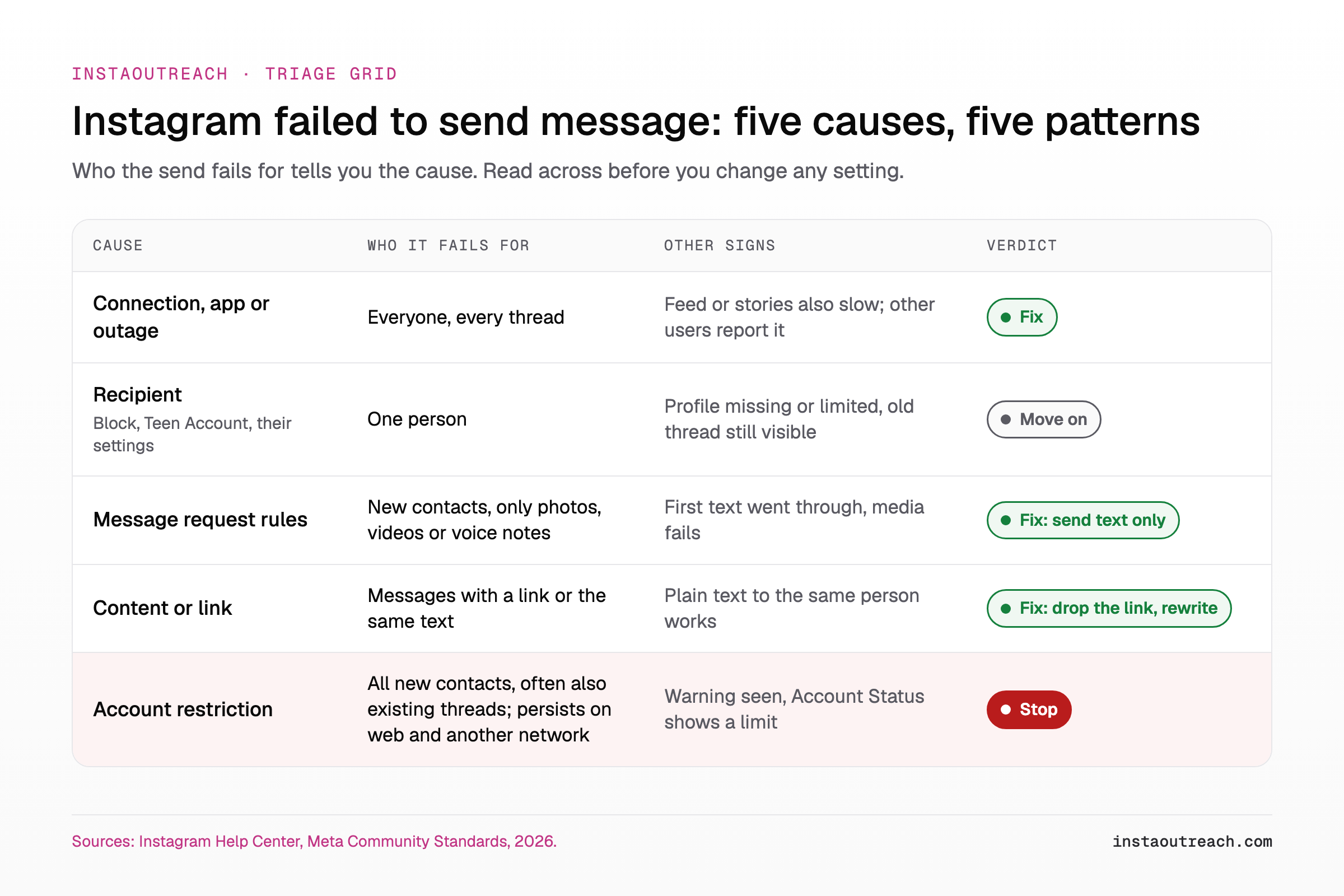
The grid maps each cause to the pattern you will see. Use it before you touch any setting. Then answer these five questions in order and stop at the first yes:
- Does it fail in every thread, old and new? See the connection section.
- Does it fail only for one person? See the one-person section.
- Does it fail only for people you never messaged? See the outreach case.
- Does it fail only when the message has a link or your template? See the link section.
- Does it still fail on the web, on another network and on an updated app, or did you see a warning? Stop sending: see the restriction section.
Instagram messages failed to send to everyone: connection, app or outage
If you get failed to send message on Instagram in every thread, old and new, start with your device. Work through the steps in order; stop at the first fix.
| Step | What it rules out | If it works |
|---|---|---|
| 1. Switch Wi-Fi to mobile data (or the reverse) | A dropped or filtered network | Your network was the problem |
| 2. Force-close and reopen the app | A stuck session | A one-off glitch |
| 3. Update the app | A bug in an old version | Keep auto-update on |
| 4. Log out and back in | A stale login token | Session issue, nothing to fix on the account |
| 5. Send from instagram.com in a browser | Your phone and app | The app is at fault, go to step 6 or 8 |
| 6. Check Downdetector for a spike in reports | A wider outage | Wait it out, do not resend in a loop |
| 7. Send text only | A media file problem | If text sends and a photo or video fails in an accepted thread, resize or re-export the file |
| 8. Clear cache (Android) or offload the app (iPhone), reinstall last | Corrupted local data | The local install was broken |
Turn off any VPN for the test. On an outreach account, a changing IP can look like a new device logging in: see proxies for outreach accounts for one stable connection per account.
If nothing works, report it under Settings, Help, Report a problem (names vary by version). If sends still fail on the web, on a second network and on an updated app, stop troubleshooting the phone. The problem is on the account side: skip to the restriction section.
Instagram failed to send message to one person
When the send works for everyone except one person, the cause sits with that person. There are four candidates.
They blocked you. Instagram's block page is written from the blocker's side: the old thread stays in the inbox, but no new messages can go through, and messages sent by the blocked person "won't be delivered later" even after an unblock (Instagram Help). Read from the sender's side, a block looks like a thread you can still see but cannot send into, and nobody notifies you.
They restricted you: this does not cause the error, though it is often listed as one. Your chat simply moves to their Message Requests, where they can read your messages without you seeing it (Instagram Help). So "delivered, never seen" is the restrict pattern. "Failed to send" is not.
Their settings or account type. Anyone can choose to not receive message requests at all (Instagram Help). Teen Accounts are set by default to only receive messages from accounts they follow or have connected with (Instagram Help). Meta first announced this message default in January 2024 for teens under 16, or under 18 in some countries (Meta), and it now ships with Teen Accounts. Or the account was deactivated or deleted.
| What you see | Most likely | Source |
|---|---|---|
| Thread still visible, cannot send, profile shows no posts or "User not found" | A block, or the account is gone | Instagram Help: block |
| Message sends, never shows "Seen", no reply | They restricted you, or the request is unread | Instagram Help: restrict |
| First text sent, a photo, video or voice note fails | Message request rules | Meta, 2023 |
| Send fails and the recipient is a Teen Account | Teen message defaults | Instagram Help: Teen Accounts |
There is no fix on your side. Do not resend, and do not message the same person from a second account: Meta's spam policy lets it restrict accounts acting at lower frequencies when "posting repetitive content" is present (Meta Community Standards). Mark the lead dead and move on.
Instagram DMs fail only to new people while old chats work (the outreach case)
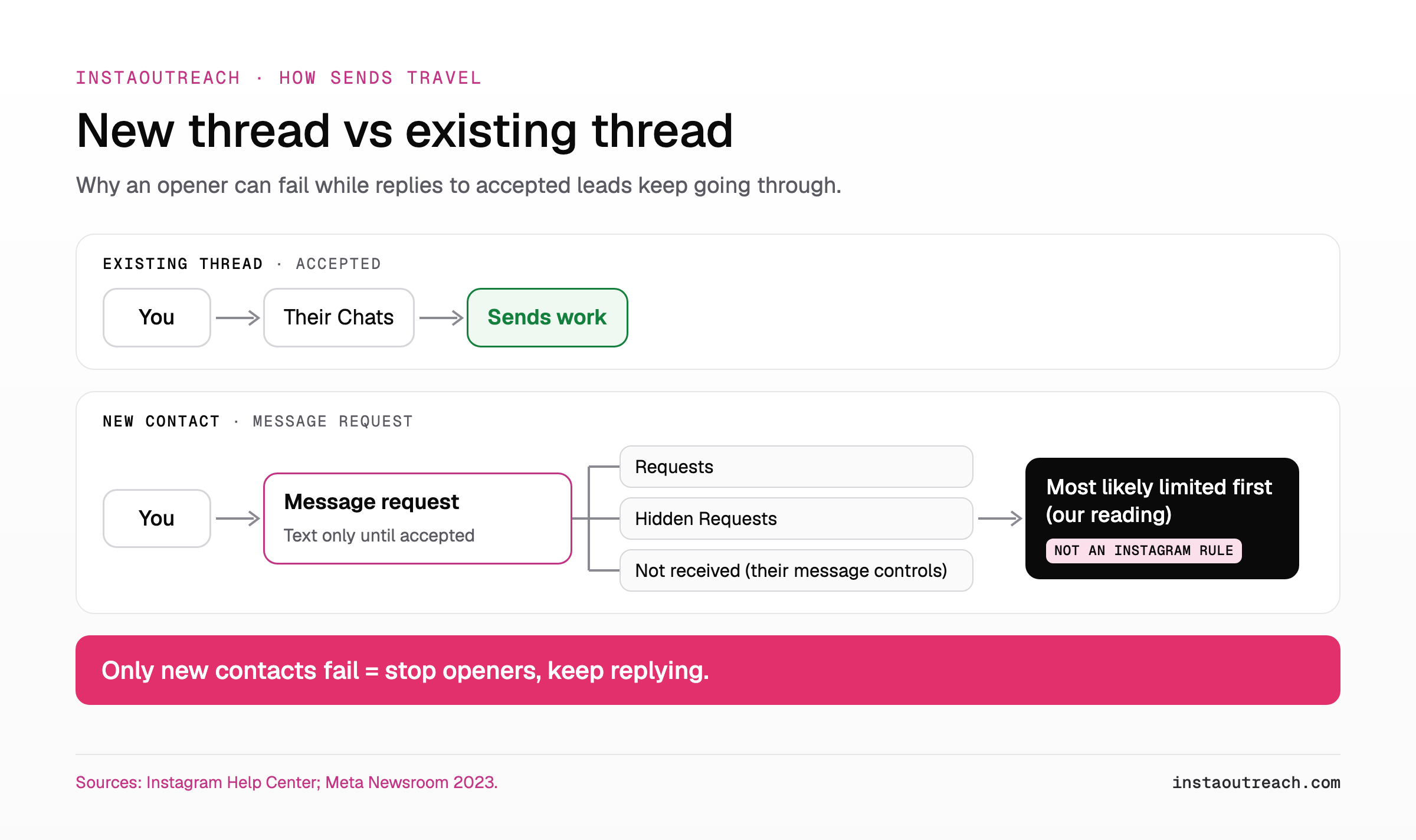
This is the pattern no fix list explains: existing threads work, every new contact fails. A message to someone who does not follow you may arrive as a message request, while a request that was accepted means "your future messages will go directly to their inbox" (Instagram Help).
Instagram's DM limits target exactly this traffic: "direct messages that people may not want to get, like spam" (Instagram Help). Our reading: when only new-contact sends fail, Instagram has most likely limited new conversations while leaving accepted threads alone. That is the first rung of a restriction, not a bug.
Confirm it with one plain-text opener, no link or media, to a fresh test account you own that does not follow you. If that text fails while replies in accepted threads go through, it is not the request rule but a limit on new conversations.
Even a request that goes through may sit in Hidden Requests: see where delivered cold DMs actually land.
Treat it as a restriction: follow the stop list in the next section.
Instagram's Terms of Use prohibit accessing or collecting information "in an automated way without our express permission" (Instagram Terms of Use), which covers automated cold DMs. For re-warmup, see the action block recovery playbook; for the limit mechanics, how Instagram rate-limits DMs.
Is "failed to send" a restriction? Signs and what to stop doing
Not always. These signs, strongest first, say it is:
- You saw a warning about sending too many messages (Instagram Help).
- Account Status lists "certain features you can no longer use" (Instagram Help).
- Failures persist on the web, on another network and on an updated app.
- Failures started right after a burst of openers or a repeated text.
- Other actions, like follows or comments, also fail.
Stop signal: any one of the first three signs means stop sending openers now. Instagram says continuing after a warning means "you may not be able to send more direct messages for a period of time" (Instagram Help).
Instagram gives no length for that period. Figures online, from 24 hours or 7 days (AirDroid) to "two hours to two weeks" (Distractify, 2022), come from third-party pages with no source.
| Do | Don't |
|---|---|
| Pause all new openers from the account | Retry failed bubbles |
| Answer existing conversations by hand | Reinstall in a loop or log in from new devices |
| Check Account Status (on a computer: More, then Settings, then Account Status; names vary by app version) | Change IP or VPN to get around the limit |
| Open Features you can't use in Account Status, and if it offers a way to resolve or appeal, use it | Move the same list and text to another account |
| Write down when it started and what you sent before it | Send links while the account is limited |
Instagram DM failed to send with a link or the same text
If plain-text messages go through but anything with a URL or your standard template fails, the content is the cause. Meta's spam policy prohibits "deceptive or misleading URLs," including cloaking and "deceptive redirect behavior," and repetitive content can trigger restrictions at low volume (Meta Community Standards).
One automation vendor's help center says that, for API-based sending by third-party tools, "Meta limits how many DMs with raw URLs you can send" and the excess "is skipped rather than delivered" (Inrō Help Center). It gives no number, says an occasional manual link is usually fine, and is a vendor claim, not an Instagram rule.
Isolate the cause with a second account you own as the recipient. Run it only when there are no restriction signs, and have that account accept your first message (or follow you) so all four cells travel the same accepted path. This isolates content filtering, not request rules.
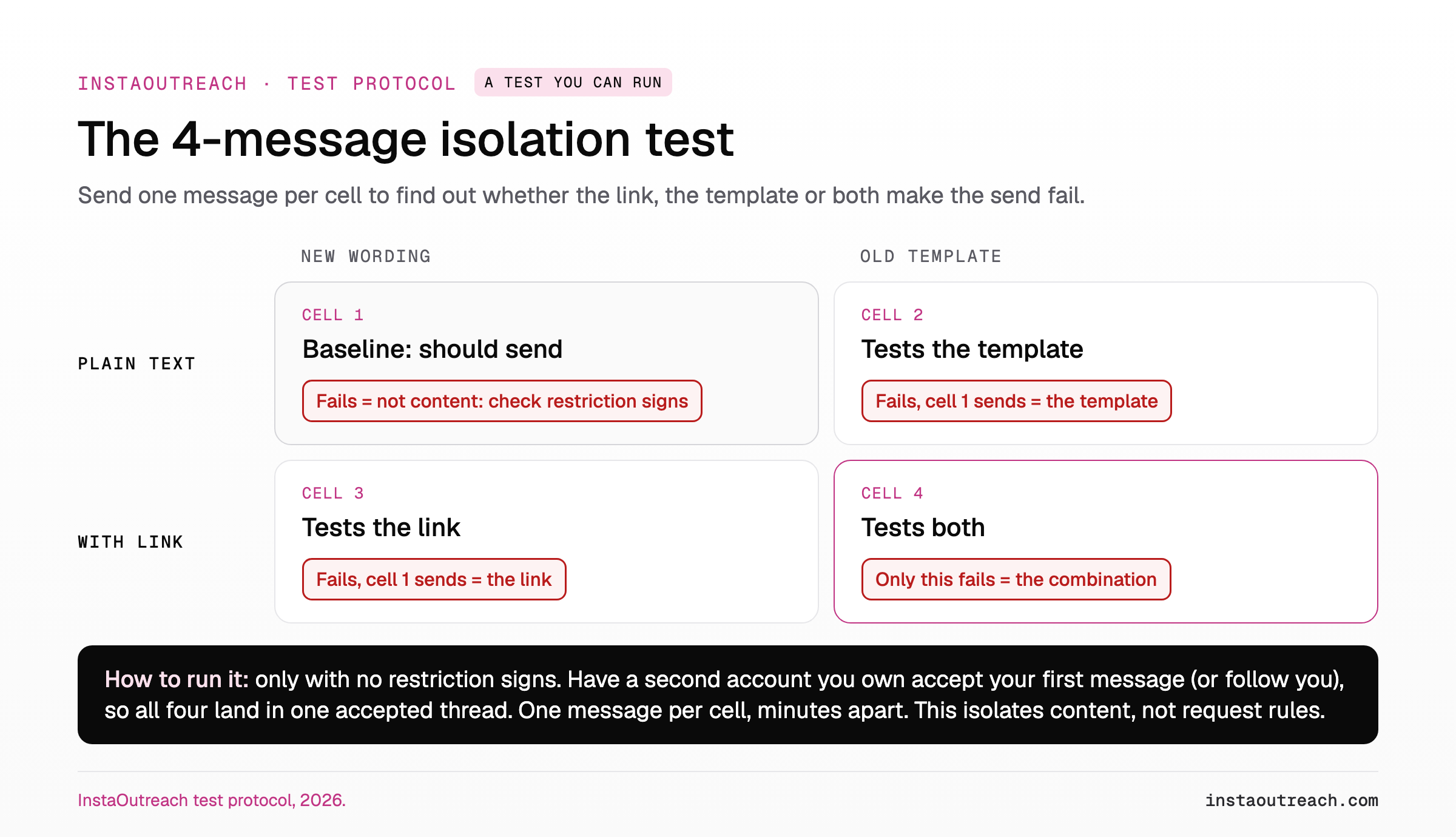
If cell 1, the plain new text, also fails, the content is not the cause: go to the restriction signs above. If both link cells fail and both plain cells send, it is the link: remove it from openers and send it only after a reply. Avoid shorteners and redirect chains: Meta's policy names "deceptive redirect behavior", and a shortener hides the destination domain (our caution, not a named rule). See when a link belongs in a cold DM for the safer order.
If the old template fails in both rows, it is the text. Rewrite openers so they are not identical across leads, and read why message variation alone does not hide a template before you reach for spintax.
How to get an outreach account sending again
- Confirm the cause with the triage grid above. A phone problem and a restriction need opposite fixes.
- If it is a restriction, follow the Do/Don't list above until sends work again, including Account Status.
- When sends work again, restart new contacts slowly, with rewritten, link-free openers. Ramp up like the day-by-day warmup schedule, and use the action block recovery playbook if the limit comes back.
- Keep the account on one stable IP and device.
Prevention checklist for every outreach account:
- Send one opener and wait for an accept.
- Keep openers text-only before the accept: no photos, voice notes or videos (why voice notes work as a second touch, not an opener).
- Never put a link in the first message.
- Vary the opener per lead so no two messages are the same text.
- Stop at the first warning, not the third failure.
- Separate accounts by device and IP.
- Remove Teen Accounts from cold lists.
- Log new-thread and existing-thread failures separately every day, with the numbers to log for a cold DM campaign.
| Day-to-day check | Healthy | Act now |
|---|---|---|
| New-contact send failures | Rare, and they clear on a second network | Every new opener fails while old threads work |
| Existing-thread failures | None, or only to one person | Replies to accepted leads fail too |
| Warnings seen | None | Any warning about sending too many messages |
| Account Status | No features listed as limited | A feature listed as limited, or content flagged |
If you run outreach through a tool, InstaOutreach builds this stop rule in: per-account rate caps and spacing, warmup before the first DM, Instagram's response saved on every failed send so you can see the reason, and a refusal such as feedback_required quarantines the account for a human instead of retrying.
FAQ
Does "failed to send" mean someone blocked you on Instagram?
Only if it fails for that one person and works for everyone else. Instagram's block page says a blocker's old thread stays in their inbox, that they can no longer message the blocked person, and that messages sent during a block "won't be delivered later" even after an unblock. From the sender's side, that most likely looks like a thread you can still see but cannot send into. Restrict does not cause the error. Their message settings, a Teen Account or a deleted account look the same: treat the lead as unreachable.
How long does an Instagram message block last?
Instagram does not say. Its Help Center only states that if you were warned and kept sending, "you may not be able to send more direct messages for a period of time" (Instagram Help). Figures online, from 24 hours to two weeks, are unsourced. Stop sending openers at the first warning, keep manual replies to existing threads, and check Account Status for any listed limit before you restart slowly.
Why can I message my followers but not new people on Instagram?
Because they are two kinds of message. Accepted threads go straight to the chat, while a message to someone who does not follow you may arrive as a request (Instagram Help). Requests are text-only until accepted. At launch in 2023 Meta also limited them to one invite at a time, but its current page, updated in 2024, no longer mentions that limit. If plain-text openers fail while old threads work, suspect a limit on new conversations: stop openers and check Account Status.
Why does my Instagram DM fail only when it has a link?
Meta's spam policy prohibits deceptive or misleading URLs and redirects, and repetitive content can trigger restrictions even at low volume (Meta Community Standards). One automation vendor's help center also says Meta limits DMs with raw URLs for automated, API-based sending and skips the rest, without giving a number. To confirm, send the same text with and without the link to a second account you own that already accepted your messages. If only the link version fails, send links only after a reply.
What does "failed to send and cannot be retried" mean on Instagram?
Instagram has no public definition for this message in its Help Center. Our reading: a send the app will not let you retry is a refusal, not a dropped connection, so treat it as a possible restriction. Stop retrying, pause new openers from the account, and check Account Status for any limited feature. A warning about too many messages before it appeared confirms the restriction branch.
Sources
- Instagram Help Center: DM limits, who you can message, message requests, Teen Accounts, block, restrict, Account Status, all read October 2026.
- Instagram: Terms of Use, effective January 2025; outages and Account Status, updated October 2025.
- Meta: text-only message requests, June 2023, message-request section updated November 2024 (2023 version via Web Archive); teen message settings, January 2024; Community Standards: Spam, last changed June 2024.
- TechCrunch: one message per request at launch, August 2023.
- Inrō Help Center: messages with links, September 2026 (vendor claim, API-based sending).