Instagram Broadcast Channel: How to Create One for Business
Instagram lets public accounts with more than 1,000 followers start a broadcast channel. The official setup, what members can and cannot do, and where a channel fits next to cold DMs.
Here is a typical case. An agency owner runs cold DMs from two sender accounts, while her brand account has 3,000 followers and sits idle. Prospects who followed it after a reply never hear from it again. She sees "Create channel" in the compose menu and wonders whether an Instagram broadcast channel could reach the leads who never answered.
An Instagram broadcast channel is a public, one-to-many chat in your inbox. Only you and the people you invite to help can post; members react, vote, reply when you allow it, and get notified when you post (Instagram Help Center, About Instagram). The Help Center now calls the feature "channels"; most people still say broadcast channel. Same feature.
To create one you need a public account with more than 1,000 followers; then tap Messages, Compose, Create channel (Instagram Help Center). The catch: a channel only reaches people who follow you and choose to join. It nurtures warm followers. It does not message strangers.
What is an Instagram broadcast channel?
Instagram launched it on February 16, 2023 as "a public, one-to-many messaging tool for creators to directly engage with their followers at scale". It rolled out to most countries on June 15, 2023 and reached the UK that September (About Instagram). At launch, members could only react and vote. Replies arrived later as an admin setting (Social Media Today, 2024).
Your channels sit under Messages, then Channels at the top. Joining and admin controls work only in the Android, iPhone and iPad app (join, admin), so do channel work on your phone.
Channels are public by design: "discoverable by anyone on Instagram", unlike group chats (Instagram Help Center). Member replies and poll answers are visible to anyone too (Instagram Help Center). For Instagram's other official messaging options, see what Instagram's official tools can and cannot send.
| Broadcast channel | 1:1 DM | Group chat | Story | |
|---|---|---|---|---|
| Who posts | Admin, collaborators, moderators | Both people | Every member | You |
| Who receives | Followers who joined | One person | Group members | Story viewers |
| Public? | Yes, discoverable by anyone | No | No | Per account setting |
| Audience replies | Only if admin turns replies on | Yes | Yes | As a private DM to you |
| Notifications | One-time invite to all followers, then members only | Per message | Per message | Story ring |
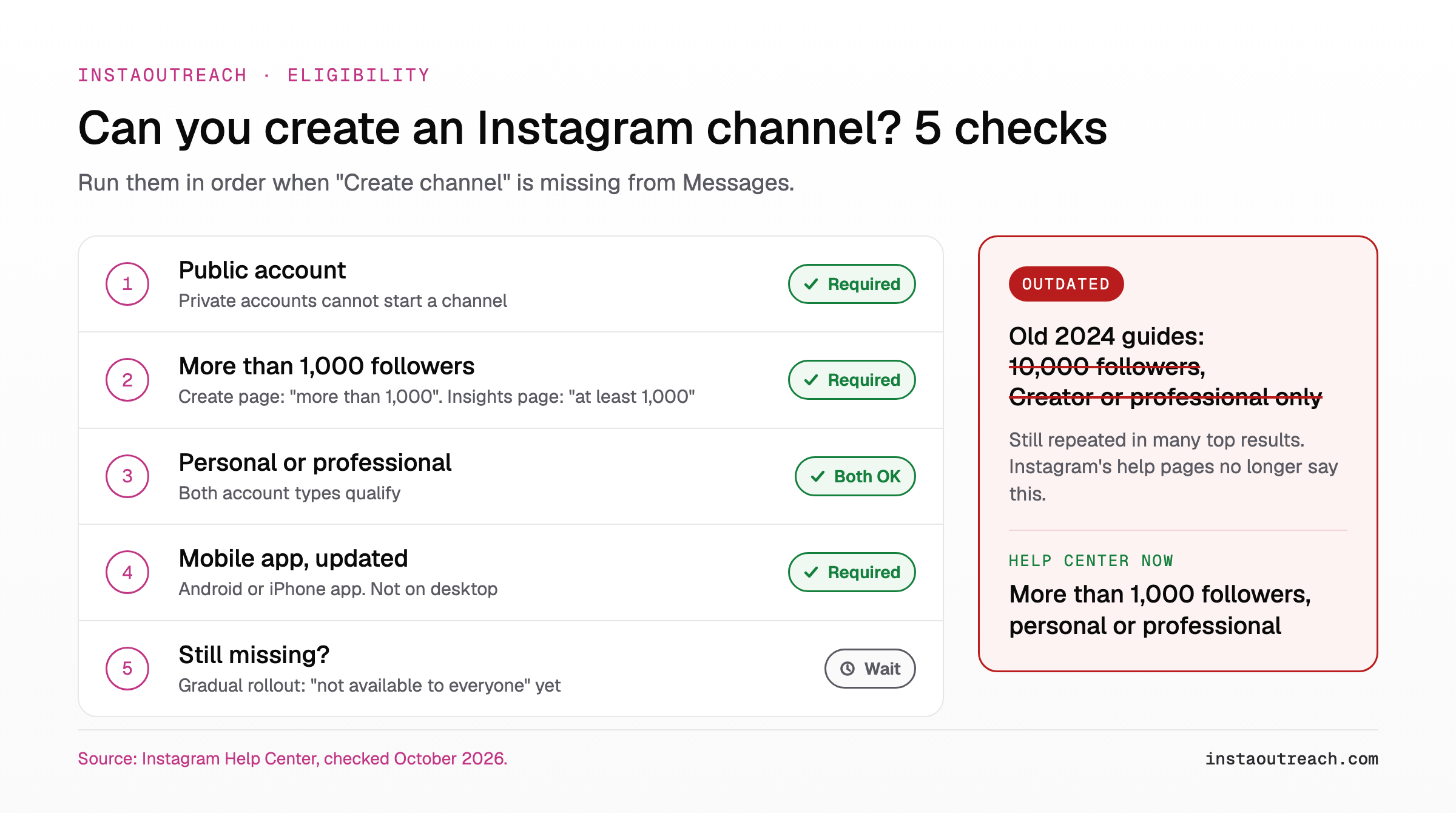
Instagram broadcast channel requirements: who can create one?
The create page says: "Channels can be started by a public account with more than 1,000 followers" (Instagram Help Center). The insights page says "public (personal or professional) Instagram account with at least 1,000 followers" (Instagram Help Center). "More than" versus "at least": treat 1,000 as the floor and aim above it.
Personal and professional accounts both qualify if public. The one account-type rule Instagram states is for branded content, which needs the paid partnership tool and a professional account (Instagram Help Center). Instagram also warns that channels "aren't available to everyone at this time", so meeting the rules does not guarantee the button.
Myth check: 2024 guides cite a 10,000-follower minimum, some for Creator or professional accounts only (Buffer, Hootsuite). The Help Center now says 1,000, personal or professional. So yes, you can start a channel without 10k followers.
"Create channel" not showing? Check in order:
- Public account? Private accounts cannot start one.
- More than 1,000 followers? Check the exact count.
- Mobile app? Admin controls are not on desktop.
- App updated? Update and reopen Messages.
- Still missing? Gradual rollout. No setting unlocks it.
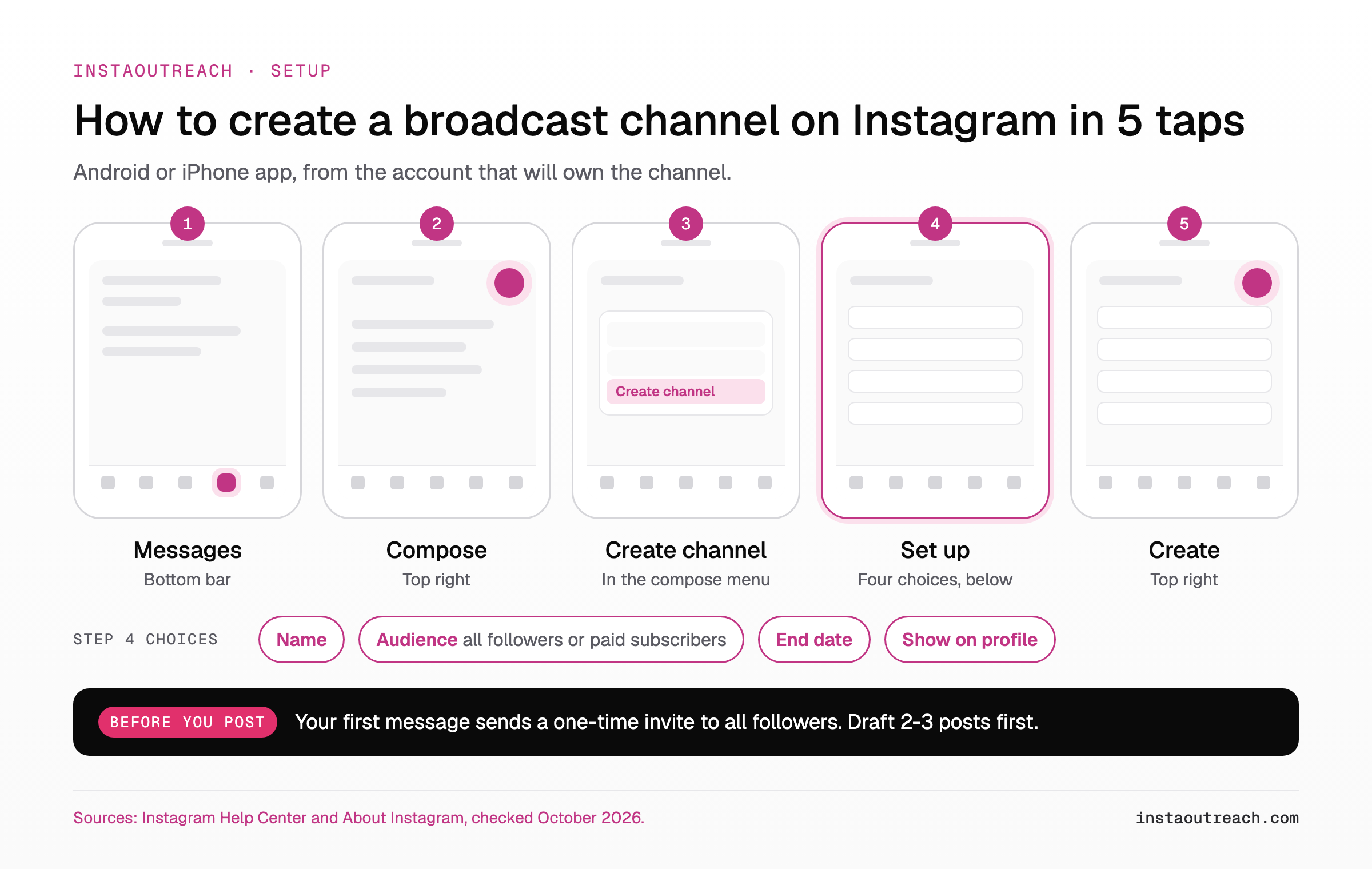
How to create a broadcast channel on Instagram, step by step
Instagram's steps on Android and iPhone (Instagram Help Center):
- Tap Messages at the bottom.
- Tap Compose in the top right.
- Tap Create channel.
- Set name, audience, end date and whether it shows on your profile.
- Tap Create.
The four choices in step 4:
- Name: what members get, not your slogan. "Weekly outreach teardown" beats "Brand X Community".
- Audience: all followers for a business. With Subscriptions you can limit it to paid subscribers (About Instagram).
- End date: set one for a launch or cohort; leave it open for ongoing nurture.
- Show on profile: on. The profile link keeps bringing members after launch day.
Then slow down. "When you send the first message in your channel, all of your followers will receive a notification inviting them to join" (same page), and that happens once. Draft your first two or three posts before sending the welcome message, so day-one members find a reason to stay.
How do you join a broadcast channel on Instagram?
People open the notification or link, see the channel and tap Join; it then sits in their inbox (Instagram Help Center). Non-followers are prompted to follow you first (About Instagram). Joining works only in the mobile app. Others may see who is a member, and replies are public, so say both in your welcome post.
After the first notification, "only followers who have joined will receive subsequent notifications" (About Instagram). After that, new members come from the routes below. The routes below come from Instagram's create, join and privacy pages and the 2023 announcement; the "When to use it" column is our advice.
| Invite route | Reaches | When to use it |
|---|---|---|
| One-time notification | All followers, once | Launch day, posts drafted |
| Invite link (can be reset, not turned off) | Anyone you send it to | In a DM after "send me more" |
| Story or "join channel" sticker | Story viewers | Weekly, with a teaser |
| Channel message shared to Story | Story viewers | After a post gets strong reactions |
| QR code | People in the room | Events, webinar last slide |
| Link on profile | Profile visitors | Always, for prospects who check you out after a DM |
What can you do in a broadcast channel, and what can't you?
Most top-ranking guides still say members can only react and vote. Instagram has since added a replies toggle, 24-hour prompts, member-only live, up to 4 moderators and insights. Current controls and limits, each linked to Instagram's page:
| You can | You cannot, or watch out |
|---|---|
| Post text, photos, videos, voice notes, polls (source) | Members cannot start messages (source) |
| Turn member replies on or off; replies open under each message (source) | Replies off: only admin and moderators see old replies (source) |
| Prompts members can answer for 24 hours (source) | No notifications to non-followers: the invite goes to followers, updates only to members (source) |
| Member-only live, archived 30 days (source) | Channel stays public and joinable even if your account goes private (source) |
| Rename, theme, unsend, delete, invite collaborators (source) | Blocked people can stay in your channel (source) |
| Up to 4 moderators (source) | Branded content needs the paid partnership label (source) |
| Insights (data from October 10, 2024 on), custom ranges within the past 90 days (source) | No published member cap (source) |
For agencies, moderators matter most: they can send and remove messages, manage collaborators, reset invite links and hide reactions (Instagram Help Center). A setter can run the channel from their own account; see giving a setter a role without sharing the password.
Privacy: Channels are public. Never post client names, lead names, DM screenshots or anything you would not put on your profile.
Can you use a broadcast channel for outreach? The honest answer
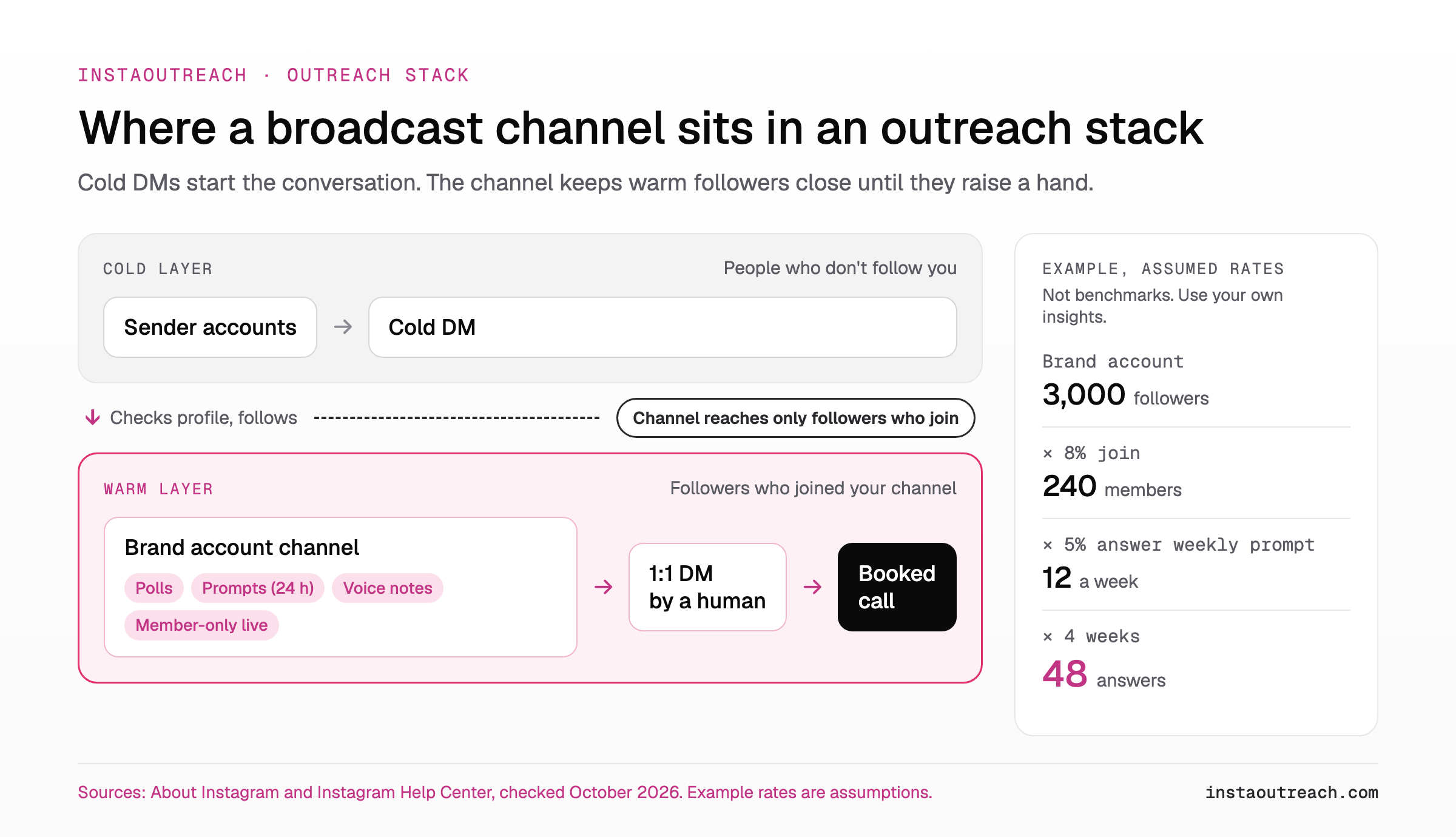
Not for cold outreach. The launch invite goes only to your followers, and later updates reach only people who joined (About Instagram). A stranger can find and join a public channel, but nothing pushes your channel into their inbox. Cold DMs go to people who don't follow you yet: the opposite audience. Most guides that list the features stop at the channel itself; the useful question for an outreach operator is who it can and cannot reach.
Sender accounts rule it out too. They are usually new, kept separate from the brand (keeping sender accounts separate from your brand account), and rarely near 1,000 followers, so they cannot open a channel. The channel lives on the brand account.
Automating Instagram DMs is against Instagram's Terms of Use. A channel is a native feature you run by hand, so that rule is not what limits it; reach is.
Its place is the warm layer between touches:
- First touch: a cold DM, or comment-to-DM and story replies as a warm entry.
- The prospect follows the brand account, either from a bio mention on the sender profile or because you send the brand handle or channel invite link once they reply (what a sending profile needs to show).
- They join via profile link, Story or invite link.
- Polls and prompts show who is interested now.
- A human opens a 1:1 DM with the hand-raisers.
A channel post is not a follow-up; it keeps you visible. For the 1:1 side, see how many 1:1 follow-ups to send and when and reactivating prospects who replied and went quiet.
Worked example (assumed rates, not benchmarks). Brand account, 3,000 followers. Assume 8% join after the invite: 3,000 × 0.08 = 240 members. Assume 5% answer a weekly prompt: 240 × 0.05 = 12 a week. Over 4 weeks, 12 × 4 = 48 answers, some from the same people, each one a thread to open 1:1 without a cold message. Replace the rates with your own from channel insights after month one.
Instagram broadcast channel ideas: a 4-week plan for a service business
For an agency, consultant or coach with replies on. Each week: two posts, one poll or prompt, one goal.
| Week | Post 1 | Post 2 | Poll or prompt | Goal |
|---|---|---|---|---|
| 1 | Welcome (sends invite) | One insight | Poll: biggest problem | Members, pain points |
| 2 | Voice note: common mistake | Short case breakdown | Prompt: niche they dropped | First replies |
| 3 | Behind the scenes | Live Q&A announcement | Poll: live topic | Trust, live attendance |
| 4 | Recap of best answers | Offer that invites a DM | Prompt: what to fix first | Hand-raisers to 1:1 DMs |
Templates to copy and edit. Fill the brackets; never invent a result. For 1:1 voice notes after someone raises a hand, see voice notes and video DMs as a second touch.
- Welcome: "Each week I share what's working in [service]: breakdowns, polls and an occasional live. Replies here are public, so keep client details out. First breakdown right after this."
- Poll: "What's harder right now? A) Getting replies B) Turning replies into calls C) Getting people to show up"
- Voice note (under 60 seconds): "The mistake I see most this month is [mistake]. It costs you [cost]. I do [fix] instead. Reply with your version and I'll say what I'd change."
- Prompt (open 24 hours): "What's one niche you've stopped targeting, and why? Best answers go in next week's recap."
- Behind the scenes: "This is [process step] on a Tuesday. Three things I check first: [1], [2], [3]."
- Live announcement: "Members-only Q&A here on [day] at [time]. Vote below on the topic."
- Recap: "Your answers this month: [answer 1], [answer 2], [answer 3]. The pattern: [takeaway]."
- Offer: "I'm doing [number] free [audits] for people in here. Reply 'audit' and I'll send you a DM." Replies off? Use "Send me a DM with 'audit'."
Answer every reply to post 8 with a 1:1 DM the same day (why reply speed decides whether replies turn into calls).
To measure, tap the channel name, then Channel performance, then See all, and pick a custom timeframe within the past 90 days (Instagram Help Center). Members can leave or mute anytime (About Instagram); if members drop after a salesy post, go back to insight posts.
The channel warms people who already follow you; the cold side, reaching people who don't, is what tools like InstaOutreach run from separate sender accounts. Either way, the call gets booked in a 1:1 DM.
FAQ
How many followers do you need for a broadcast channel on Instagram?
You need a public account with more than 1,000 followers. Instagram's create page says "more than 1,000 followers" (Instagram Help Center) and its insights page says "at least 1,000" (Instagram Help Center). Many 2024 guides still say 10,000 (Buffer); Instagram's current pages say 1,000. The feature is also rolling out gradually, so some eligible accounts do not see it yet. Aim to be clearly above 1,000 and check the exact count on your profile.
Why can't I create a broadcast channel on Instagram?
The usual causes: a private account, 1,000 followers or fewer, or the gradual rollout, since channels "aren't available to everyone at this time" (Instagram Help Center). Another is using a computer: admin controls live in the Android, iPhone and iPad app (Instagram Help Center). Go public, confirm your count, update the app and check Messages, then Compose. If it is still missing, no setting unlocks it; wait for the rollout.
How do I join a broadcast channel on Instagram?
Open the channel from the notification, an invite link, a QR code or a shared Story, then tap Join at the bottom. It then appears in your inbox (Instagram Help Center). If you do not follow the creator yet, Instagram prompts you to follow first (About Instagram). Joining works only in the mobile app. Your reactions, replies and poll answers are visible to anyone on Instagram, and others may see that you are a member.
Can people reply in an Instagram broadcast channel?
Yes, if the admin allows it. Under Channel controls, the toggle "Allow members to reply to messages" turns replies on or off, and replies show separately: you tap Reply under a message to see them (Instagram Help Center). Members still cannot start their own messages; they react, reply and vote (Instagram Help Center). The channel creator can also post prompts, which members can answer for up to 24 hours (Instagram Help Center). With replies off, only the admin and moderators see existing replies.
Can a business account create a broadcast channel?
Yes. Instagram requires "a public (personal or professional) Instagram account with at least 1,000 followers" (Instagram Help Center). A business account is a professional account, so it qualifies when public and above the threshold. The "Creator accounts only" claim comes from older guides. Account type does matter for branded content: you must use the paid partnership tool, which only professional accounts have (Instagram Help Center).
Can I send a broadcast channel message to people who don't follow me?
No. The first message's invite goes to your followers, and later updates reach only followers who joined (About Instagram). A non-follower can find the channel and is prompted to follow you when joining (About Instagram), but Instagram never delivers your posts to someone who has not joined. The channel is public and discoverable (Instagram Help Center), but that is visibility, not delivery: nothing lands in a stranger's inbox. Reaching people who don't follow you yet takes a 1:1 message, and the channel becomes useful once they follow and join.
Sources
Instagram Help Center: create, insights, join, admins, moderators, replies, prompts, live, privacy, channels hub. About Instagram: Introducing Broadcast Channels (2023). Social Media Today: replies (2024). Instagram: Terms of Use. Checked October 9, 2026.