Instagram Not Sending SMS Code? Fixes That Actually Work
No text, or a try-again-later loop every time? The official fix order, the six reasons Instagram codes never arrive, and the backup routes that work when SMS will not.
A setter logs into a fresh sender account on a new phone over the office Wi-Fi, and Instagram asks for the 6-digit code it just texted. Nothing arrives. They tap resend five times, and the app starts telling them to try again in a few minutes. If Instagram is not sending your SMS code, you are in the most common version of this problem, and the resend button usually makes it worse.
Usually the text is stopped on the way (a filter on your phone or at your carrier), going to an old number, refused because of the number type, or held back because you asked too many times. Check the phone first, then the number on the account, then stop resending.
If no text comes, you may not need SMS at all: Instagram supports backup codes, login requests on a logged-in device, WhatsApp and authenticator apps. Without those, the official recovery flow is the route. (DMs failing to go out is a different problem: see why Instagram fails to send messages.)
Why is Instagram not sending my SMS code?
Instagram texts "a special 6-digit security code each time someone tries logging into your Instagram account from a device we don't recognize" (Instagram). So the code shows up on new phones, new browsers, reinstalls and after clearing app data, because each can look like an unknown device.
First, rule out the obvious: ask someone to text you. If that text fails too, the problem is your line (airplane mode, no signal, an inactive prepaid SIM, roaming, or the other SIM on a dual-SIM phone), not Instagram.
When the code never lands, it is usually one of six things:
- Your phone filtered it. iPhone's Screen Unknown Senders and Google Messages spam protection both move texts out of your inbox.
- Wrong or outdated number. The code goes to the number confirmed on the account, not the one in your hand (Instagram).
- Your carrier filtered it. Carrier filters "block abusive traffic" before a text reaches the phone (Twilio).
- The number type. SMS senders can detect virtual and VoIP numbers (Twilio).
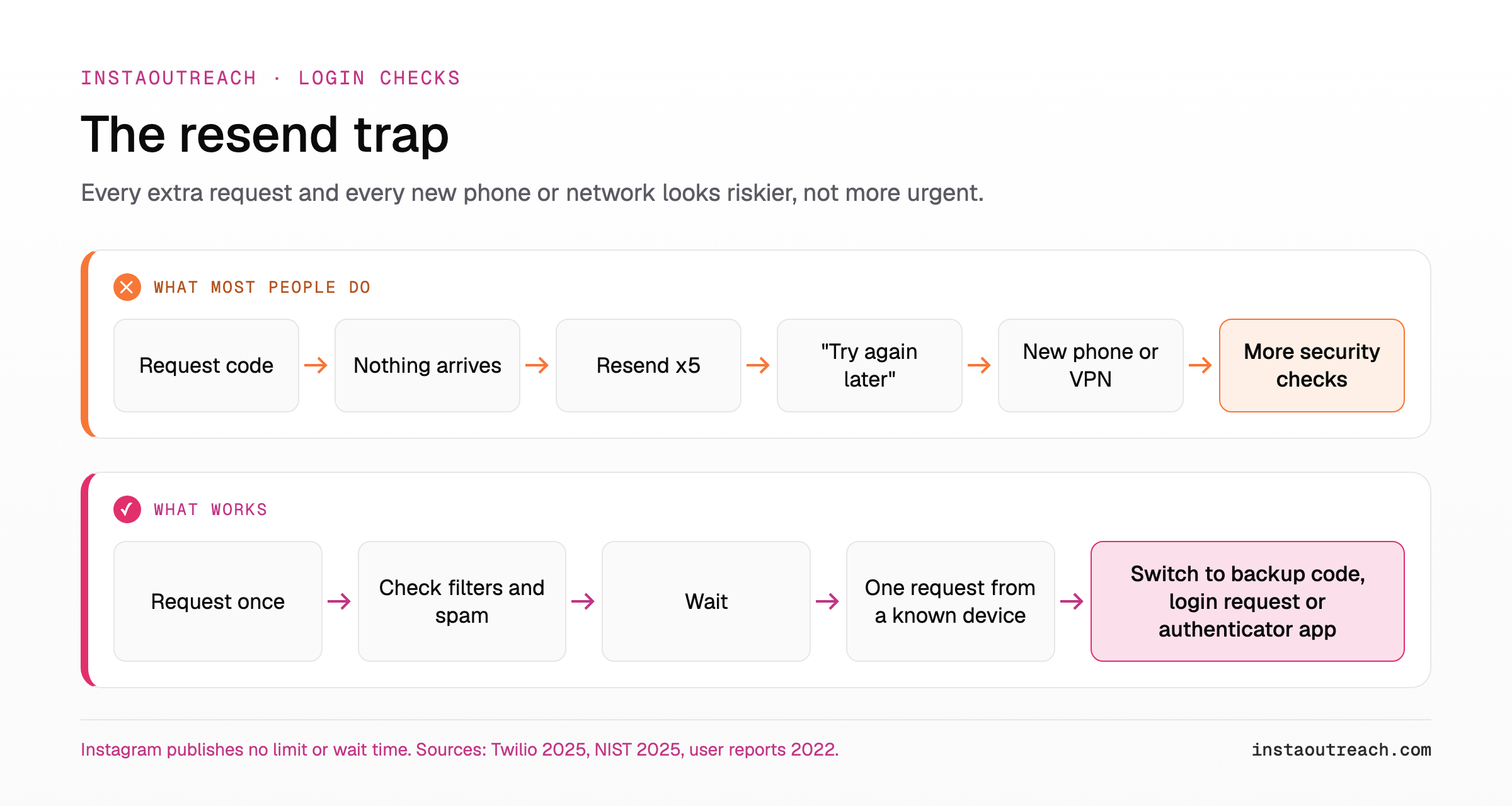
- Too many requests. The app tells you to try again in a few minutes, as users reported during a 2022 outage.
- A risk check on the login. NIST lists "device swap, SIM change, number porting" as signals to weigh before sending a phone code (NIST SP 800-63B).
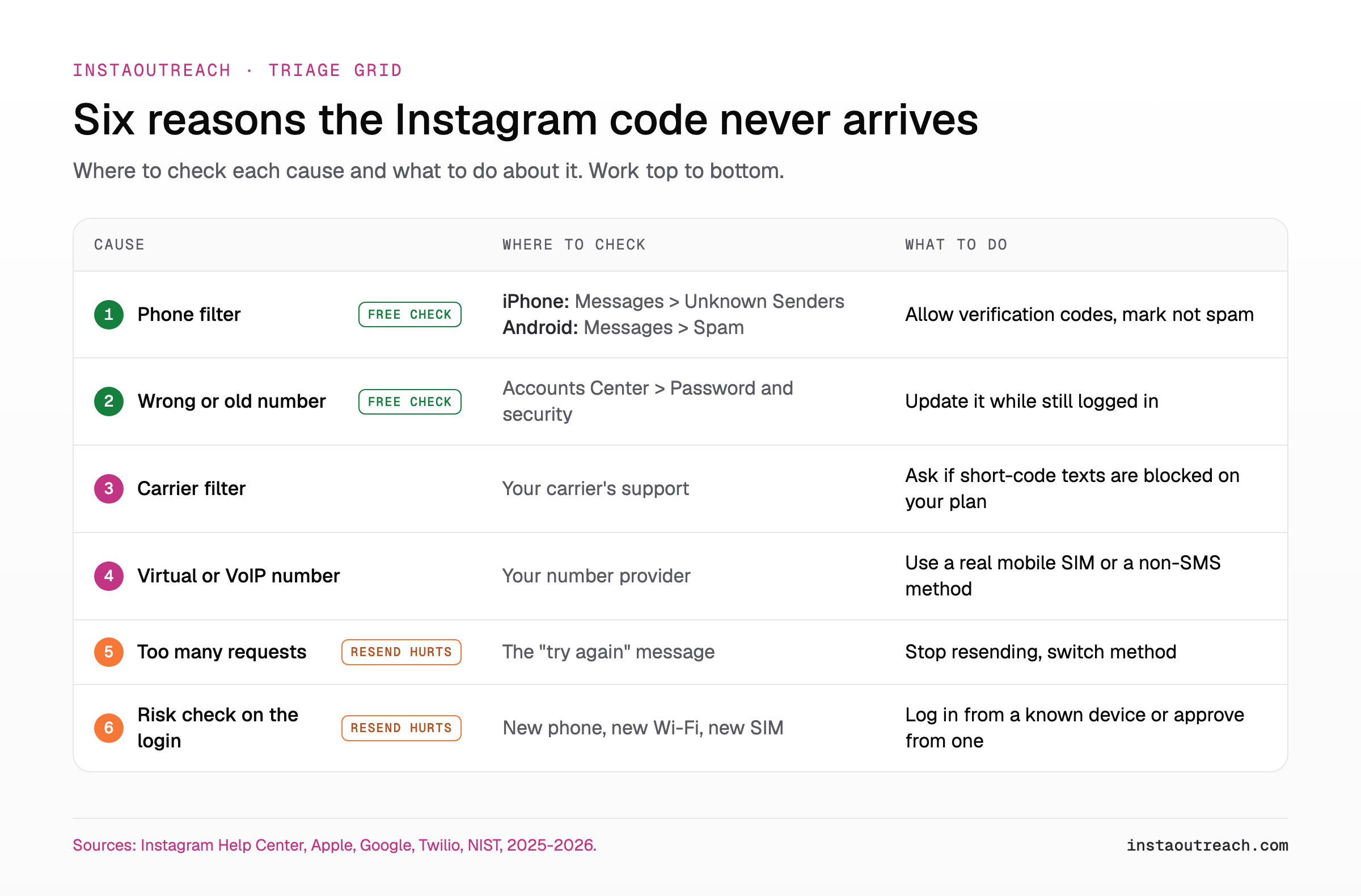
Start here: Causes 1 and 2 cost nothing to check. Causes 5 and 6 get worse every time you tap resend.
Instagram verification code not sending: the official fixes first
Still logged in on any phone or browser? Do steps 1-3 there first. Fully locked out? Skip to step 3. Either way, check before you request another Instagram verification code: every request feeds cause 5.
- Confirm the number on file. Accounts Center > Password and security > Two-factor authentication > your account > "Use different phone number" (Instagram). Fallback path: Profile > Menu > Security. Only possible while logged in. Locked out? If the code screen shows the end of the number, compare it with the SIM in your hand.
- Make sure it is confirmed. SMS two-factor needs "a confirmed telephone number" (Instagram), and Instagram may ask you to re-confirm one after time has passed (Instagram).
- Approve from a logged-in device. If an old phone or laptop browser still has the account open, "you can approve or deny the request immediately" (Instagram). Push notifications may need to be on.
- Use a backup code. Instagram's own answer when "a code can't be sent due to connectivity or delivery issues" (Instagram). The catch: you had to save them earlier.
- Switch to WhatsApp. Only if it was set up, which requires SMS to be on first (Instagram).
- None apply? Use the I Can't Log In hub or instagram.com/hacked, which Instagram recommends when you are "unable to log into your account" (Instagram).
| Your situation | Do this first | Then |
|---|---|---|
| Logged in somewhere | Check or change the number, turn on an authenticator app | Request one code |
| Locked out, another device logged in | Approve the login request | Save backup codes from that device |
| Locked out, backup codes saved | Enter one | Set up an authenticator app |
| Locked out, nothing prepared | I Can't Log In hub | Video selfie if asked |
| Many users failing at once | Check Downdetector once | Wait |
Is your phone or carrier blocking Instagram's texts?
On iPhone, Screen Unknown Senders files texts from unknown senders into another folder without notifying you, and Text Message Filter can sort them into Transactions and Promotions (Apple). Your code may be sitting there. Open Messages, tap the filter button, then Unknown Senders or Transactions. Apple's fix: turn on Allow Notifications for time-sensitive messages, which covers verification codes (options vary by country), and mark the sender as known.
On Android, Google Messages spam protection is on by default and can "hide spam in the spam folder" (Google). Open the code text there and tap "Report not spam," then check blocked numbers.
Instagram does not publish its sender number. Android Authority says the sender number Instagram texts from "used to be 32665" and has since changed (Android Authority); Meta confirms neither. Scan your block list for any 5- or 6-digit sender and anything labelled Facebook, Instagram or Meta.
Carrier filters act before your phone sees anything, blocking abusive traffic and enforcing rules on what messaging a network allows (Twilio). The number Android Authority names is a short code (a 5- or 6-digit sender), so ask your carrier one specific question: are short-code SMS blocked on my line?
Scam warning: Never forward a code to anyone who asks for it. Instagram's phishing guide warns scam messages may claim your account will be banned or deleted if you do not act.
| Device | Where codes hide | Fix |
|---|---|---|
| iPhone | Unknown Senders or Transactions | Allow Notifications, mark sender as known |
| Android | Spam and blocked | Report not spam, unblock |
| Carrier | Before the phone | Ask about short-code SMS |
| Spam folder | Allow @instagram.com |
Do virtual and VoIP numbers get Instagram codes?
Instagram does not publish which number types it accepts. Anyone saying "Instagram never texts VoIP numbers" is guessing.
What is documented is how SMS senders behave. A sender can look up a number's line type before texting. Twilio defines a non-fixed VoIP number as "a virtual phone number obtained online without requiring a physical device," such as Google Voice (Twilio). Its fraud guidance for one-time codes recommends texting only mobile numbers, because fraudsters abuse phone-number fields to run up SMS charges, a scheme called SMS pumping (Twilio).
The US federal guideline no longer bans VoIP for codes: NIST's 2025 revision "removes the prohibition on the use of VoIP phone numbers" (NIST). Rejecting them is a provider's choice.
Our practical rule: if the number came from an app, a website or a "receive SMS online" service, rule it out first. Move the account to a real mobile SIM you control, or to a method that needs no SMS.
| Number type | Example (Twilio) | Receives SMS? | For Instagram (our read) |
|---|---|---|---|
| Mobile | Carrier SIM | Generally yes | Best bet |
| Fixed VoIP | Comcast, Vonage | Not stated | Unreliable |
| Non-fixed VoIP | Google Voice | Not stated | Rule out first |
| Landline | Home line | Generally no | No |
Mobile and landline wording from Twilio Lookup docs, checked 2026; Twilio does not state SMS receipt for VoIP.
Instagram says try again later? What too many code requests do
Tap resend again and again, and the app says to try again in a few minutes. Users reported the same message during the 2022 outage (PiunikaWeb).
Platforms throttle code requests because texts cost money. Twilio describes the fraud signature as codes sent with no completed verification (Twilio). Five resends with no code entered likely looks similar from the sender's side, so expect more friction, not a faster text.
So stop requesting. Do not reinstall in a loop, hop networks or switch phones to "reset" the counter: each new device or SIM is a risk signal NIST lists for phone codes (NIST), and hopping networks adds more abnormal behavior. Wait, then try once from a device or network the account used before. Instagram publishes no wait time, so ignore unsourced "24 hours" advice.
Meanwhile, use a non-SMS route from the next section. If the account is also hitting checkpoints, see the recovery playbook for blocks and checkpoints.
Can't get the code at all? Backup codes, WhatsApp, authenticator app or identity check
The routes, roughly fastest first:
- Backup codes, saved earlier under Two-factor authentication > Additional methods (Instagram).
- A login request approved on another logged-in device (Instagram).
- WhatsApp codes, if set up after SMS (Instagram).
- An authenticator app, Instagram's recommended method (Instagram). Codes are generated on your device, so no text has to arrive. Setup only works in the Android or iPhone app (Instagram) while logged in (Instagram), on up to five devices (Instagram).
- Email or Facebook reset: check spam, or reset through Facebook if linked (Instagram).
- Identity confirmation by video selfie. During review "you will not have access to your account," and if you pass, Instagram may email a reset link to your secure email address (Instagram). Do it honestly, as the real owner.
Set up the authenticator app even if SMS works. CISA advises "Do not use SMS as a second factor for authentication," mainly for highly targeted people (CISA), and NIST calls phone codes its one "restricted" authenticator (NIST).
The hard truth: lose access to the registered email without a linked Facebook account, and Instagram says "we're unable to give you access to the account" (Instagram). Some operators weigh what Meta Verified buys an outreach account for its live-chat support.
| Route | Must be set up before lockout? | Where to find it | Speed |
|---|---|---|---|
| Backup codes | Yes, saved while logged in | Wherever you saved them | Instant |
| Login request | Another device still logged in | Alert on that device | Instant |
| Yes, added after SMS | Fast | ||
| Authenticator app | Yes, in the mobile app | The app itself | Instant |
| Email or Facebook reset | Reachable email or linked Facebook | Inbox and spam folder | Minutes |
| Video selfie | Secure email on file | Prompt during login | Slow, no access during review |
Why new outreach sender accounts hit SMS code walls (and the setup that avoids it)
Sender accounts hit code walls far more than personal ones:
- Everything is new at once. Codes trigger on "a device we don't recognize" (Instagram), and NIST's risk signals are device swap, SIM change and number porting (NIST). A fresh sender is often all three on day one.
- Meta screens new accounts hard. Meta's Facebook enforcement report says its systems "block millions of attempts to create fake accounts every day and detect millions more, often within minutes after creation," many "used in spam campaigns" (Meta). A new account messaging strangers likely looks like that risk until it has history.
- Shared contact info. One email can sit on up to 5 Instagram accounts (Instagram); no phone cap is published. Still, one number behind many accounts means one SIM problem locks out the fleet.
- Bought or handed-over accounts. The confirmed number belongs to someone else, so the code goes to them. The Terms require "accurate and up to date information" and forbid creating an account for someone else without permission (Instagram Terms).
Plainly: automating Instagram DMs breaks the Terms of Use, which forbid "creating accounts or accessing or collecting information in an automated way without our express permission" (Instagram Terms). No tool makes an account immune to verification.
What you control is how stable and reachable each account looks: new accounts need history before volume (day-by-day warmup schedule for new accounts), a fleet needs structure (running several sender accounts without a ban wave), and lockouts cost money (what a locked-out sender seat really costs).
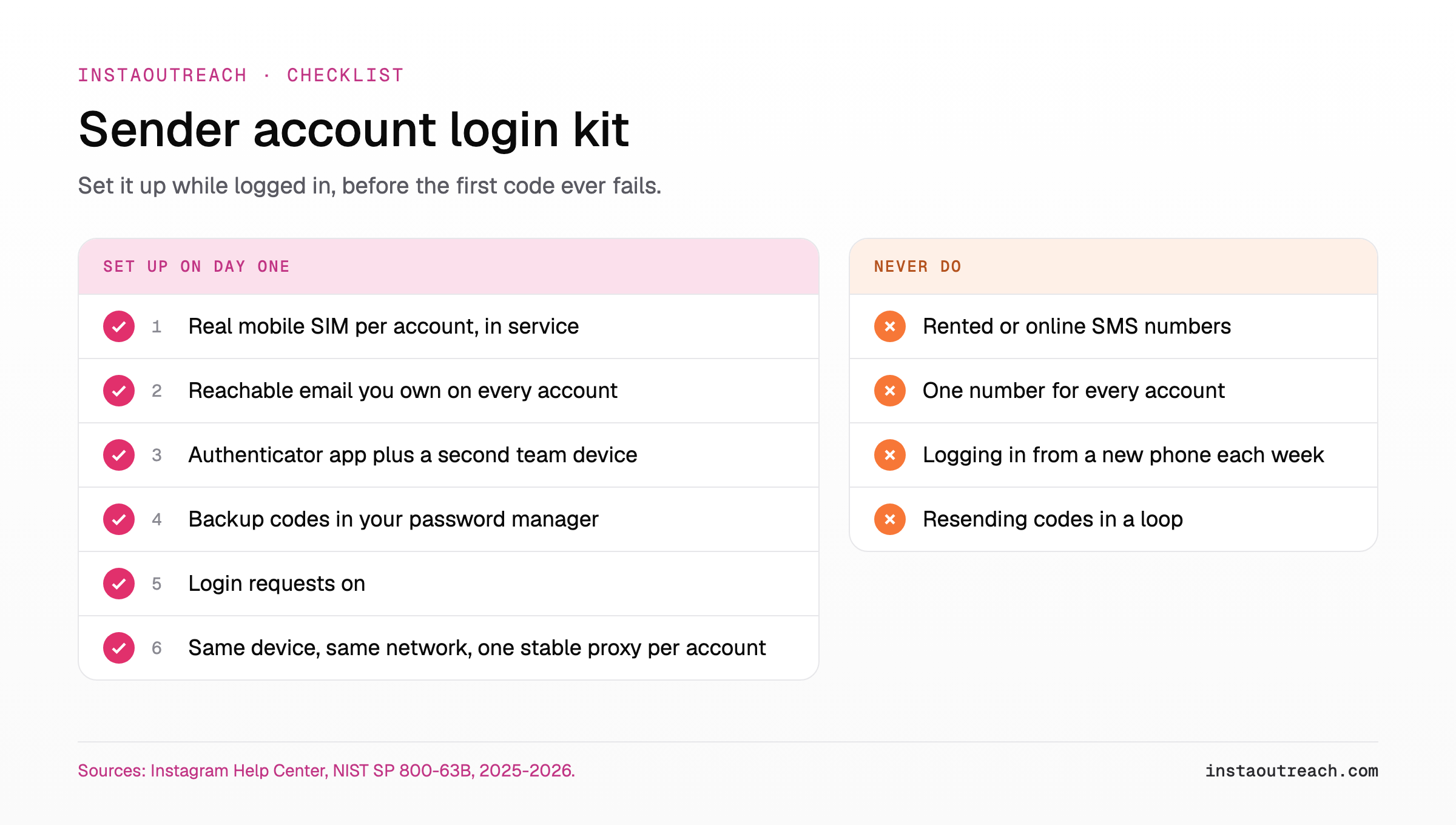
The full kit:
| # | Do this | Why |
|---|---|---|
| 1 | Real mobile SIM per account, team-controlled, kept in service | A lapsed SIM is a lost account |
| 2 | Reachable email you own, never disposable | Recovery links may arrive by email |
| 3 | Authenticator app plus a second team device | Up to five devices |
| 4 | Backup codes in your password manager | Fix for undelivered codes |
| 5 | Login requests on | Approve from a logged-in device |
| 6 | Same device and network, one stable proxy per account | Fewer unknown-device triggers |
| 7 | Never rotate phones, numbers or IPs to pass a check | Each change is a risk signal |
For the network side, see one sticky proxy per account and how sending stacks keep one stable device. If you run senders on InstaOutreach, each account keeps one sticky proxy and one frozen device, reuses its saved session instead of logging in fresh whenever it can, and is quarantined for a human the moment Instagram raises a security check, rather than retried.
FAQ
How do I get Instagram to send the code again?
Request the code once, then check Unknown Senders on iPhone or Spam and blocked on Android before asking again. Then request one more time from a device or network the account has used before. If it still fails, stop resending and switch method: a backup code, a login request on another logged-in device, or WhatsApp or an authenticator app if set up. Instagram publishes no wait time.
Can I log in to Instagram without a verification code?
Yes, if you prepared. You can finish a two-factor login with a backup code, by approving a login request on a device that is still logged in, or with an authenticator app that needs no SMS. Without any of these, use Instagram's I Can't Log In flow, which may ask for a video selfie. No legitimate way to skip verification exists.
Can I get my Instagram code by WhatsApp instead of SMS?
Yes, but only if WhatsApp was already turned on as a security method. Instagram requires the text message method first, and then you can add WhatsApp to get login codes there (Instagram). You can only change these settings while logged in, under Two-factor authentication. If you are locked out and never set it up, use a backup code, a login request or the recovery flow instead.
Does Instagram send codes to Google Voice or other virtual numbers?
Instagram does not say; it publishes no list of accepted number types. SMS senders can look up a number's line type, and Twilio classes Google Voice as non-fixed VoIP (Twilio). Fraud guidance for one-time codes recommends texting only mobile numbers (Twilio), though NIST no longer prohibits VoIP for codes. If your code never arrives on a virtual number, rule it out first and move to a real mobile SIM or an authenticator app.
Why does Instagram keep asking for a code on every login?
Because it sees each login as coming from a device or browser it does not recognize, which is when two-factor authentication asks for a code (Instagram). Clearing cookies, private browsing, reinstalls and new phones all reset that recognition. On your own device, tap "Trust this device" after logging in, but Instagram says not to on a public or shared device. Then keep logging in from the same device and network.
Why is Instagram not sending a confirmation code when I sign up?
At sign-up, Instagram sends the confirmation code to the email address or mobile number you entered (Instagram), so check it for a wrong digit or a missing country code. Then look in Unknown Senders on iPhone, Spam on Android, or your email spam folder. If the screen offers email instead, try it. Do not cycle numbers, devices or networks to force a code. Meta's Facebook enforcement report says it blocks millions of fake-account attempts every day and often detects others within minutes of creation (Meta), so a new account that keeps changing details likely looks riskier.
Sources
- Instagram Help Center (checked October 2026): 2FA, SMS, change number, backup codes, authentication app, multiple devices, login requests, contact info, lost access, login info reuse, video selfie, I Can't Log In, create an account, reset email, phishing, hacked, Terms of Use.
- Meta Transparency Center: fake accounts enforcement report, through Q2 2026.
- Apple: Screen and filter text messages on iPhone.
- Google: Google Messages spam protection.
- Twilio: error 30007, message filtered, Line Type Intelligence, SMS pumping fraud (2025).
- NIST: SP 800-63B, revision 4 (2025).
- CISA: Mobile Communications Best Practice Guidance (December 2024).
- Android Authority: Instagram not sending SMS code (2025). Downdetector: Instagram status. PiunikaWeb: Instagram 2FA code outage reports (2022, updated 2023).