How to DM on Threads (and Whether Threads DMs Work for Outreach)
Threads got standalone DMs in July 2025. Here is how to send one on mobile and web, who you are allowed to message, and an honest look at whether Threads DMs are usable for cold outreach.
Yes, you can DM on Threads. The app got its own standalone inbox in July 2025, so learning how to DM on Threads now means tapping the message icon, picking a handle, and sending text, images, links, or a GIF on mobile, and one-to-one text conversations plus post-sharing on the web since May 2026 (TechCrunch, July 1, 2025; 9to5Mac, May 5, 2026).
The harder question for anyone running outreach is whether those DMs are worth building a cold campaign on. The short answer is mostly no, and the rest of this piece shows both the clean how-to and the reasons the outreach case is weak.
Can you DM on Threads?
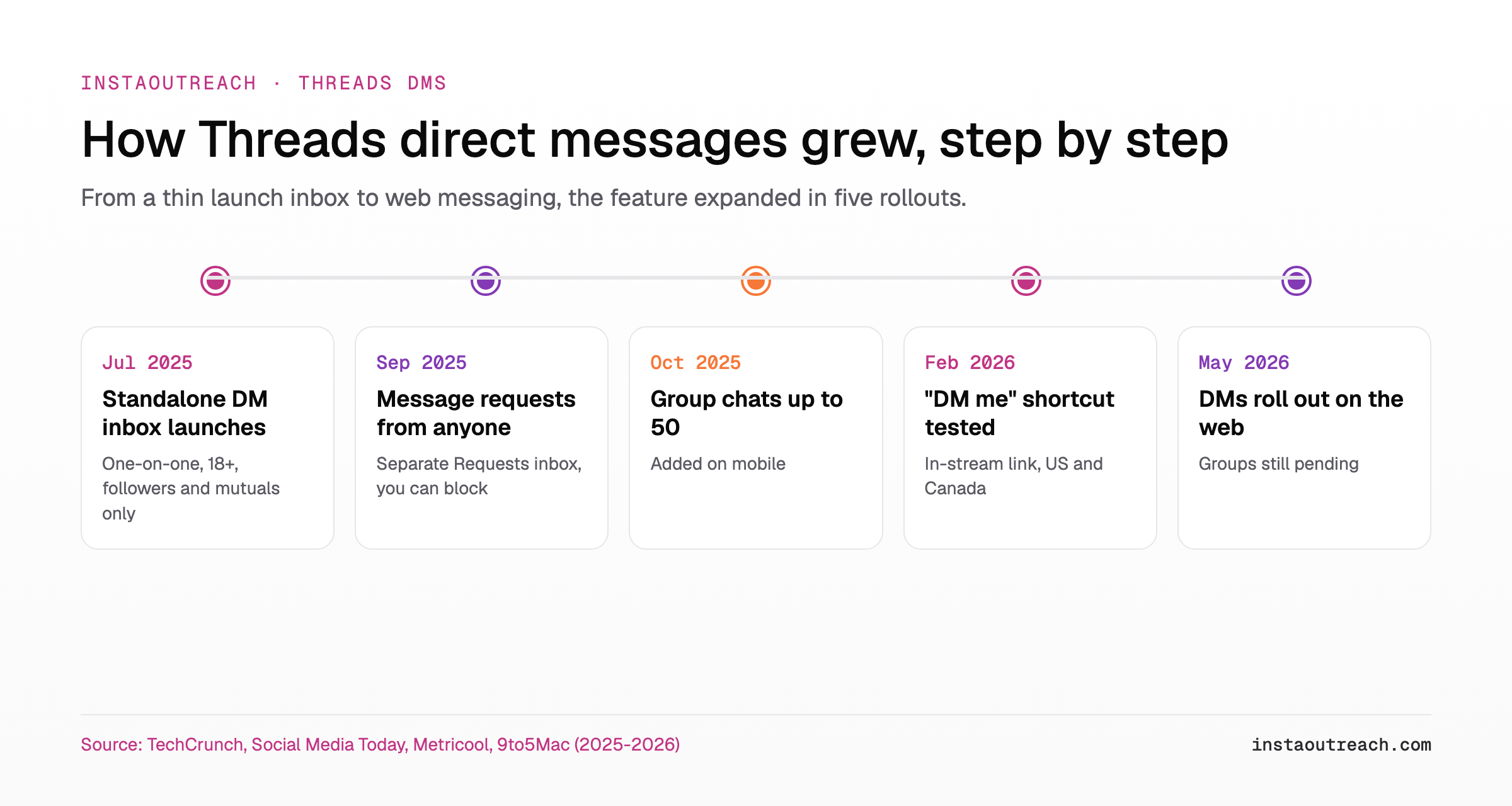
Yes. Before July 2025, Threads had no messaging of its own: any DM conversation bounced you back into Instagram. On July 1, 2025 the app launched a standalone inbox, which TechCrunch described as Threads users' "most-requested feature to date." It arrived deliberately thin. At launch it supported one-on-one chats, preset emoji reactions, the ability to report spam, and mute, with group messaging and inbox filters promised for later.
Since then the feature set has grown in clear steps, so where you are depends on which rollout reached your account.
How to DM someone on Threads (step by step)
The flow is short. On mobile you open the inbox from the message icon in the lower bar, start a conversation, and send. Metricool lays out the same three moves: access your inbox from the new-message icon in the lower function bar, search for a Threads connection or a mutual Instagram follower and send your message (text, images, links, GIFs and more), then use the inbox to mute, pin, or delete conversations.
Web messaging landed in May 2026. 9to5Mac reported that the official Threads account confirmed DMs on the web, where you can start one-to-one conversations, with group chats set to follow later, and share posts through DMs by tapping the share button then "Send to."
| Step | On mobile | On the web (since May 2026) |
|---|---|---|
| 1. Open the inbox | Tap the message / new-message icon in the lower function bar | Open threads.com while signed in and go to the messages area |
| 2. Start a chat | Tap the new-message / compose icon | Start a new one-to-one conversation |
| 3. Pick a recipient | Search for a Threads connection or a mutual Instagram follower | Search the same way; group chats are not available on the web yet |
| 4. Send | Type text, or attach images, links, or a GIF, then send | Send text, or share a post with the share button and "Send to" |
| 5. Manage | Mute, pin, or delete from the inbox | Restrict, block, or report using the same privacy settings |
If you cannot see the feature at all, the cause is almost always eligibility rather than a bug. More on that in the FAQ.
Who can you DM on Threads? Followers, mutuals, and message requests
This is where outreach dreams meet the wall. At launch, Threads only allowed DMs between your Threads followers or mutual followers from Instagram, aged 18 and older (Social Media Today, Sep 17, 2025, recapping the July rule). You could not message a cold stranger, and you could not block a follower or mutual from messaging you inside Threads alone; control over who reached you came down to whether or not you followed them (TechCrunch).
In September 2025 Threads loosened this. It added a setting to accept message requests from anyone, plus a separate DM requests inbox to manage them, so in principle anybody in the app can now send anybody else a message (Social Media Today). The catch is that it is opt-in on the receiver's side: the setting offers "Only people you follow" or "Anyone," and messages from people you do not follow land in a dedicated Requests folder (Metricool). Spam can collect there, but the receiver stays in control and can block anyone (Social Media Today).
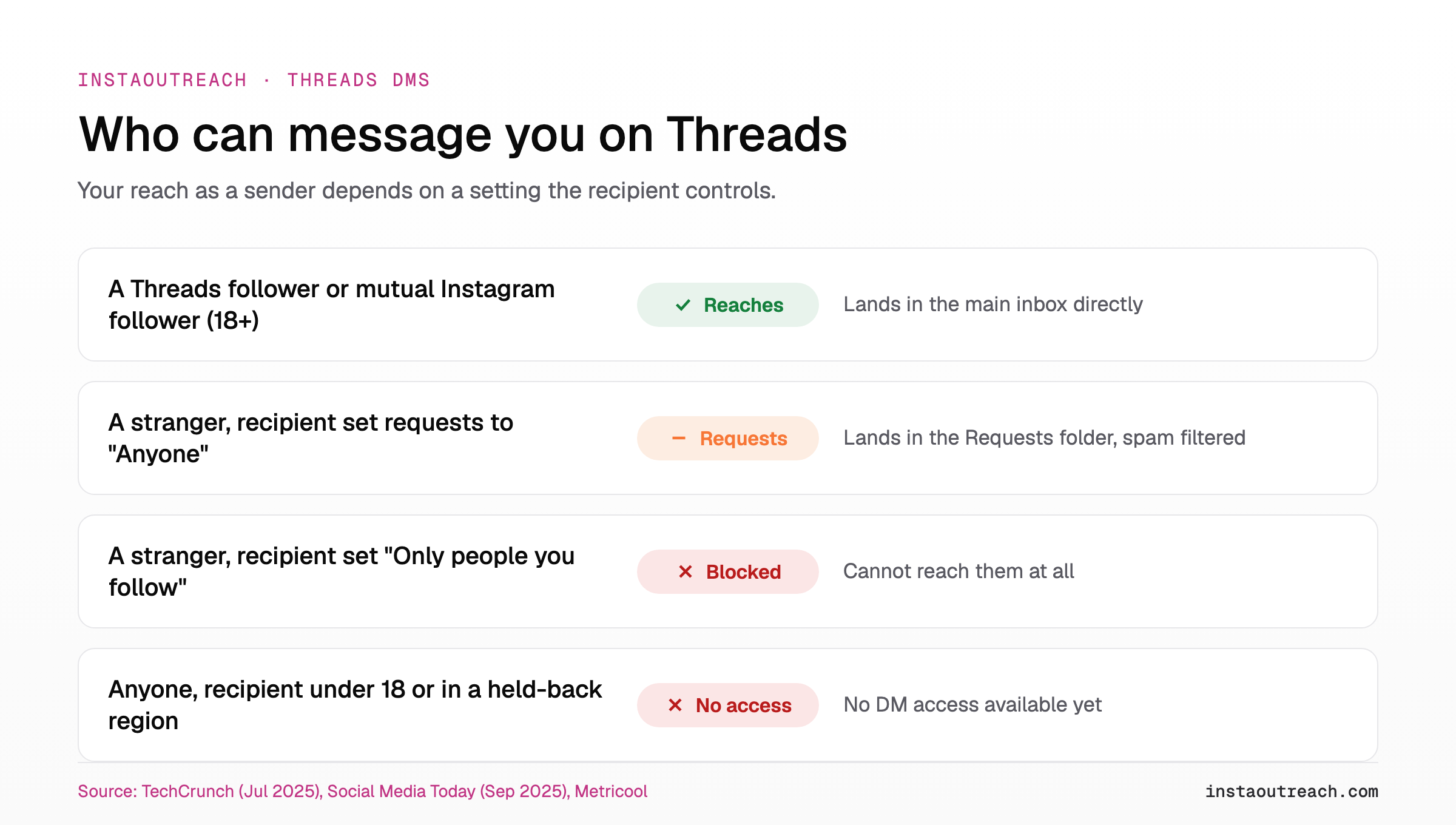
Read that matrix as a sender, not a receiver, and the problem is obvious: your reach depends on a setting the other person controls, and even when it is on, you land in a separate side folder the recipient can ignore.
What you can send in a Threads DM, and the limits
The toolkit is modest and still filling in. These are the pieces that have a public source behind them today.
| Feature | Status | Source |
|---|---|---|
| Text, images, links, GIFs | Available | Metricool |
| Preset emoji reactions, report spam, mute | Available since launch | TechCrunch, Jul 2025 |
| One-on-one chats | Available since launch | TechCrunch, Jul 2025 |
| Group chats up to 50 people | Added Oct 2025 (mobile); web pending | Metricool / 9to5Mac |
| Sharing a post through a DM on the web | Added May 2026, via share then "Send to" | 9to5Mac |
| End-to-end encryption | Not encrypted | TechCrunch, Jul 2025 |
The encryption point is worth knowing before you send anything sensitive. "We're not encrypting our DMs," Threads VP of Product Emily Dalton Smith told TechCrunch, framing the inbox as a lightweight way to talk about what is happening now rather than a private channel.
Can you use Threads DMs for cold outreach?
Mostly no, at least today. The mechanics that make Instagram survivable for cold DM operators are missing or working against you on Threads.
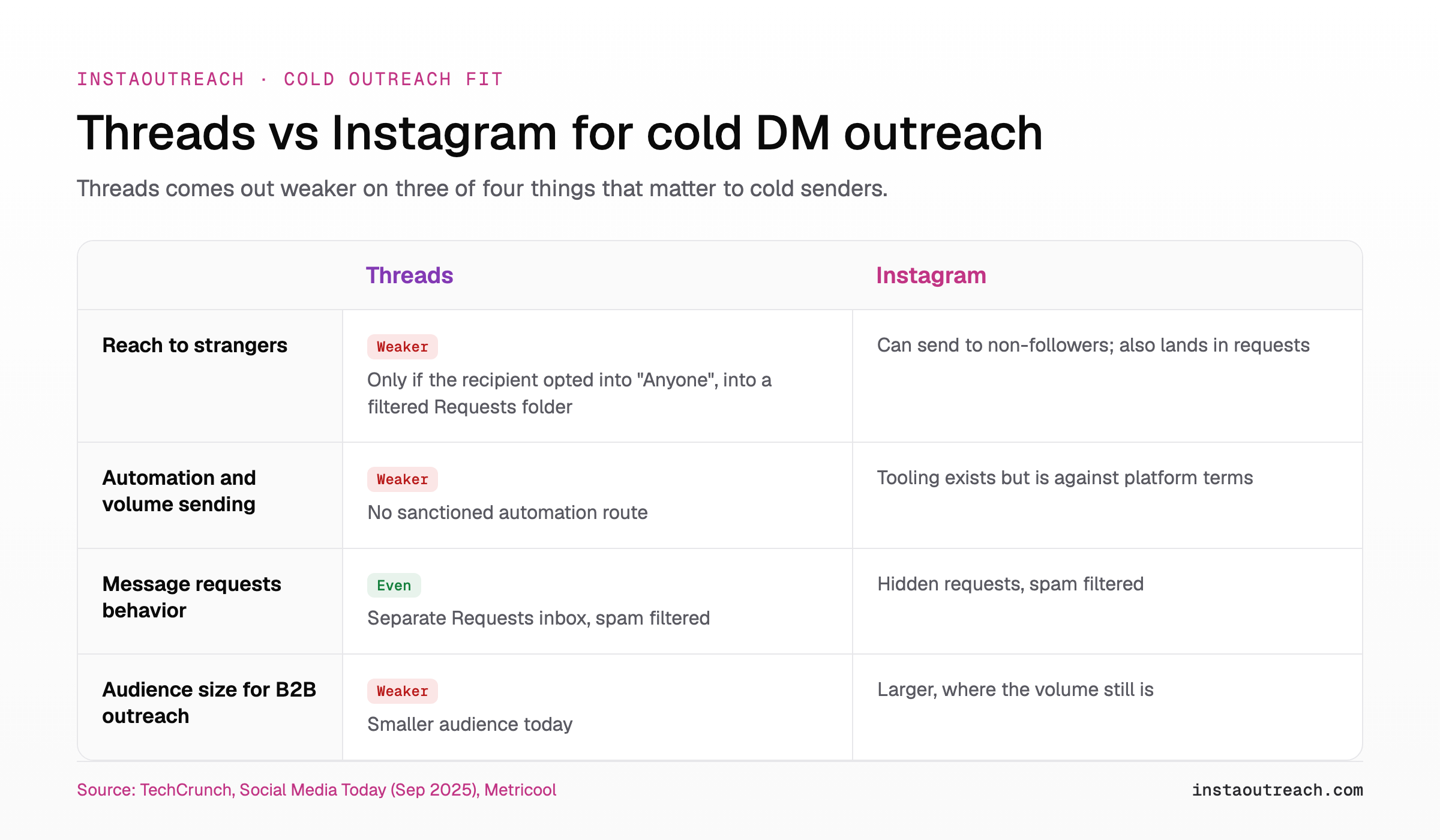
Start with reach. Your default audience is your Threads followers and your mutual Instagram followers (Social Media Today). To message anyone else you depend on that person having switched their requests setting to "Anyone," and even then your message sits in a separate Requests folder (Metricool). That is the same failure mode cold senders already fight on Instagram, where messages from strangers die unseen in hidden requests, covered in how cold DMs die in hidden requests.
Next, automation. There is no sanctioned way to send Threads DMs at volume, and any automation would run straight into the platform-terms problem that already applies to Instagram cold DM automation. The official messaging route is not a cold-outreach tool either, the same trap we break down in why the official API cannot send cold DMs. Add the 18-and-up requirement at launch (TechCrunch) and a smaller audience than Instagram, and the cold case gets thin fast.
Even the newest feature points inbound, not outbound. The "DM me" shortcut tested in the US and Canada in February 2026 lets someone type "DM me" or "message me" in a post, which becomes a quick link into the DM flow (Social Media Today, Feb 26, 2026). Social Media Today tied the move to steadily declining feed posting and rising messaging activity. That is a tool for letting interested people start a chat with you, which is the opposite of cold.
Where Threads fits in an outreach plan (and where Instagram still wins)
Threads is not useless for outreach. It is useful warm, not cold. Put "DM me" style prompts on posts, reply to people who already engage with you, and let the inbound shortcut do what it is built for. Keep your cold sending volume on Instagram, where the audience and the setter workflows still live, and decide your channel mix with the help of where your booked calls actually come from. The same split applies when you weigh any second platform: see what ports from Instagram to another platform.
Rule of thumb: warm and inbound belongs on Threads; cold volume belongs on Instagram. If the prospect has to start the chat, Threads can carry it. If you are starting it, you are fighting the Requests folder.
On the Instagram side of that plan, InstaOutreach runs the cold DM work as a Chrome extension or Mac app inside your own browser session with configurable daily sending limits, which is where the outreach volume still is. If you are choosing between tools, start with how Instagram outreach tools compare and what an Instagram cold DM tool costs.
FAQ
Can you DM someone on Threads who does not follow you?
Only if that person turned on message requests from anyone. By default Threads allows DMs between followers and mutual Instagram followers, so a stranger cannot reach you unless you opened your settings to "Anyone" (Social Media Today, Sep 17, 2025). When requests are open, messages from people you do not follow land in a separate Requests folder where spam can collect and that the recipient controls by blocking (Metricool; Social Media Today). So it is possible, but your message waits in a side inbox the recipient may never open.
Are Threads DMs available on desktop or web?
Yes. The web rollout began in May 2026. The official Threads account confirmed DMs on the web, where you can start one-to-one conversations and share posts through the share button then "Send to," while group chats are set to follow at an unspecified later date (9to5Mac, May 5, 2026). The same privacy settings from the in-app system carry over, including who can message you and the options to restrict, block, or report.
Are Threads DMs the same as Instagram DMs?
No. Threads has its own standalone inbox, separate from Instagram, since July 2025, even though you still sign in with your Instagram account (TechCrunch, July 1, 2025). Before that, messaging on Threads sent you back into Instagram. Today the two inboxes are distinct, which is part of how Threads has been distancing itself from the main app.
Why can't I DM on Threads, or see the feature?
The usual reason is eligibility, not a bug. At launch, DMs were limited to users 18 and up in most markets where Threads is available, with Japan, Australia, the UK, and the EU excluded at the start (TechCrunch, July 1, 2025). Rollouts have been staggered, so your account, region, or age setting can leave you without the feature. Updating the app is the first thing to try.
Are Threads DMs encrypted?
No. Threads DMs are not end-to-end encrypted. "We're not encrypting our DMs," Threads VP of Product Emily Dalton Smith told TechCrunch, describing the inbox as a way to talk directly about what is happening now rather than a private messaging channel (TechCrunch, July 1, 2025). Treat anything you send there as you would a visible message, not a secure one.
Is there a message limit before someone accepts a request?
Threads has not published a public numeric cap, so treat any specific number you see as a claim rather than a fact. What is documented is the structure: messages from people you do not follow sit in a separate Requests folder until the recipient accepts, where spam can collect and the recipient keeps control and can block (Social Media Today, Sep 17, 2025). The practical limit is attention: unaccepted requests can stay unseen indefinitely.
Sources
- TechCrunch, "Threads gets its own DMs as app distances itself from Instagram," July 1, 2025. https://techcrunch.com/2025/07/01/threads-gets-its-own-dms-as-app-distances-itself-from-instagram/
- Meta Newsroom, "Introducing Messaging and Highlighted Perspectives on Threads," July 2025. https://about.fb.com/news/2025/07/introducing-messaging-highlighted-perspectives-threads/
- Social Media Today, "Threads Expands DM Connection To Send Anyone a Message," September 17, 2025. https://www.socialmediatoday.com/news/threads-expands-dm-connection-send-anyone-message/760434/
- Social Media Today, "Threads Tests Simplified DM Connection In-Stream," February 26, 2026. https://www.socialmediatoday.com/news/threads-tests-simplified-dm-connection-in-stream/813324/
- 9to5Mac, "Threads starts rolling out DMs on the web, but there are a few catches," May 5, 2026. https://9to5mac.com/2026/05/05/threads-starts-rolling-out-dms-on-the-web-but-there-are-a-few-catches/
- Metricool, "How to DM Someone on Threads." https://metricool.com/threads-dms/
Date checked: 2026-10-18.