Instagram Message Requests by Most Followers: What Small Senders Lose
Instagram lets some users sort message requests by follower count, and 2026 tests added a Most followers sort and a 10K filter. Here is what that does to cold DMs from small accounts.

Yes, for some accounts: since November 2024 Instagram has let users sort their message requests by follower count (TechCrunch). In 2026, SocialBee reported a "Most followers" sort and a "10K followers" filter in testing; Instagram has not announced either. If a prospect sorts their Instagram message requests by most followers, a cold DM from an account with a few hundred followers drops to the bottom of the list, or out of a 10K-filtered view entirely.
The DM is still delivered. What changes is the order your prospect sees, and whether a busy prospect scrolls far enough to reach you. The fix is not "get 10,000 followers by Friday". It is three things: make your sending profile worth opening, pick prospects who are unlikely to sort at all, and give every important lead a second way to hear from you.
This guide is written from the sender's side. If you are the recipient and want the tap path to the Sort & Filter menu, read how to open Sort & Filter in Requests instead.
Does Instagram sort message requests by most followers?
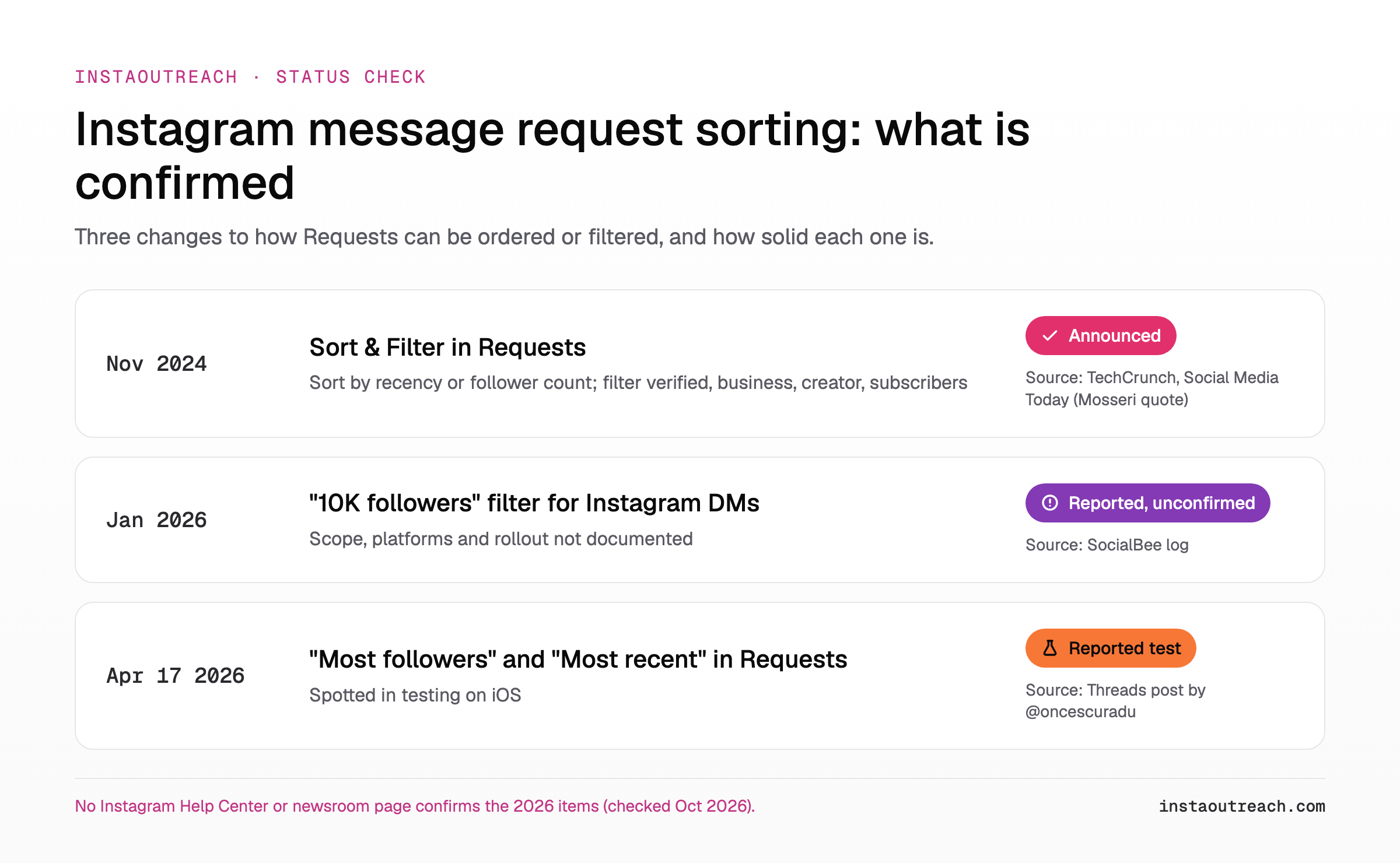
Part of this is confirmed and part of it is not. Here is the honest status of each change, as of October 2026.
November 2024: Sort & Filter in Requests (announced). Instagram added a "Sort & Filter" option to the Requests inbox. According to TechCrunch, users can "sort and filter these message requests by follower count, verified accounts, brands, creators, and other factors." The sort options are recency or follower count, and the filters cover verified, business, creator and subscriber accounts. Adam Mosseri, Head of Instagram, explained the reason in a quote published by Social Media Today: "When you go to the requests inbox, sometimes it can be really overwhelming, and I've heard this a lot from creators I've talked to around the world."
January 2026: a "10K followers" filter (reported, details undocumented). SocialBee's running log of Instagram changes says: "Instagram added a '10K followers' filter for Instagram DMs" (SocialBee). The entry credits a Threads post we could not trace to an Instagram source. Nothing public says whether this applies to Requests or to the main inbox, which platforms have it, or whether it was a test.
April 2026: "Most followers" and "Most recent" in Requests (reported test on iOS). On April 17, 2026, Radu Oncescu, a Threads user who posts Instagram feature sightings, wrote: "Instagram is testing on iOS two new filters for private messages shown in the 'Requests' section, 'Most followers' and 'Most recent'" (Threads post).
Status check: We found no Instagram newsroom post or Help Center article confirming the 2026 "Most followers" sort or the "10K followers" filter. Instagram's message requests help page covers where requests go and how to accept them, not how to sort them. Treat both 2026 items as reported tests that some of your prospects may have and others may not.
Who actually sorts their requests by follower count?
Mosseri framed the feature as a fix for request overload, and he named creators as the people asking for it (Social Media Today). That tells you who is most likely to use it: people whose Requests folder fills faster than they can read it.
Instagram publishes no eligibility list for the feature, and the launch coverage gives no rollout detail (TechCrunch). So the table below is our estimate, built from the reason Instagram gave, not from usage data.
| Prospect type | Likely request volume | Likely exposure to the sort (our estimate) | What it means for you |
|---|---|---|---|
| Creators and influencers with large audiences | High, daily | High: the feature was built for them | Assume you are ranked by followers. A small account needs a warm thread first. |
| Consumer brands and e-commerce stores | Medium to high | Medium: the filters include business and creator accounts | Your profile must look like a real business before your DM is opened. |
| Popular coaches and course sellers | Medium to high | Medium to high | Engage with their content before you DM so you are not a stranger. |
| Agencies and B2B service firms | Medium | Low to medium | Order matters less than relevance. Add email as a second channel. |
| Local businesses (salons, gyms, clinics, trades) | Low, a few a week | Low: few requests means little reason to sort | Most recent order likely still works. Timing your send matters more. |
The follower sort hurts most where outreach already struggles: cold DMs to big accounts. If your offer fits local businesses or smaller brands, the sort probably never touches most of your list.
What happens to a cold DM from a small account in a "Most followers" view?
A sort changes the order of the list, not delivery. Your message still lands in Requests either way. The difference is how far down your prospect has to scroll.
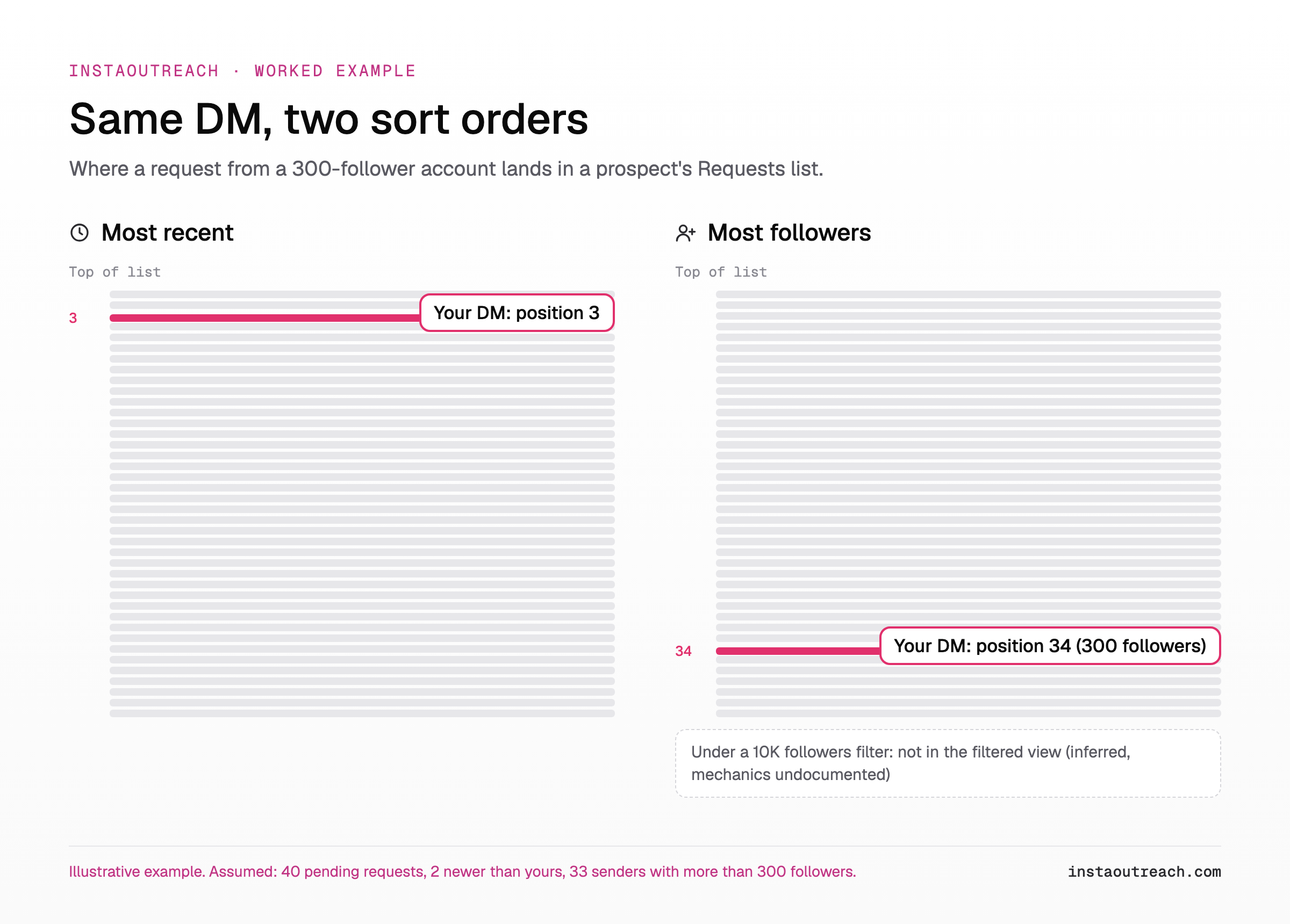
Worked example (illustrative, all inputs assumed):
- Your prospect has 40 pending message requests.
- Your sending account has 300 followers.
- You sent your DM this morning. Two requests arrived after yours.
- Of the other 39 senders, 33 have more than 300 followers and 6 have fewer.
Under Most recent, only the 2 newer requests sit above you, so you are in position 3 (2 + 1). Under Most followers, all 33 larger accounts sit above you, so you are in position 34 (33 + 1). Same message, same moment, 31 places lower.
Now the 10K filter. Going by the filter's name alone, a sender under 10,000 followers would not appear in that filtered view. The mechanics are not documented (SocialBee gives one line), so treat this as an inference. It does fit what a filter does: it hides what does not match until the user clears it.
What this does not mean: A low follower count does not send your DM to hidden requests or block delivery. Hidden requests and failed sends have other causes, covered in why cold DMs end up in hidden requests. The sort is a visibility problem inside a folder you already reached.
Can you beat the follower sort? What moves and what doesn't
Most of the usual deliverability levers do nothing to your position in a Most followers list, because that list ranks one number. Here is how each one plays out, ranked by how much it actually helps.
- Account age and real activity. It does not change your rank, but a prospect who sees your request after scrolling decides in seconds whether you are real. An account with a history of posts and comments passes that check.
- A complete, credible profile. Same logic: it does not move you up, it makes the open worth something. Use the checklist to audit your sending profile before a campaign.
- Meta Verified. Verified is one of the filters in the 2024 Sort & Filter menu (TechCrunch). It helps only when the prospect filters by verified. We found no source saying it boosts rank in a follower sort. See what Meta Verified does for an outreach account before paying for it.
- Organic follower growth. This is the only lever that moves your rank, and it is slow. Worked example with assumed numbers: growing a sender account from 300 to 10,000 followers at 50 net new followers a week takes 9,700 / 50 = 194 weeks, close to 4 years.
- Buying followers. We do not recommend it. A prospect who opens your request looks at your profile, and an account with thousands of followers and no real engagement fails that look faster than a small honest account does.
| Lever | Helps in Most recent | Helps in Most followers | Helps under a 10K filter | Time to effect |
|---|---|---|---|---|
| Send inside the prospect's active hours | Yes | No | No | Immediate |
| Complete, credible profile | Helps the open | Helps the open | No | 1 to 2 days |
| Account age and real activity | Helps the open | Helps the open | No | Weeks |
| Meta Verified | Only if they filter by verified | Only if they filter by verified | No | Days |
| Prospect follows you first | Skips Requests | Skips Requests | Skips Requests | Days of engagement |
| Organic follower growth | No | Yes, slowly | Only past 10,000 | Months to years |
| Buying followers | No | Not recommended | Not recommended | n/a |
One line on risk: automating Instagram DMs is against Instagram's Terms of Use, and no tactic or tool guarantees where your message appears in someone's inbox.
How to get your DM read when prospects sort by followers
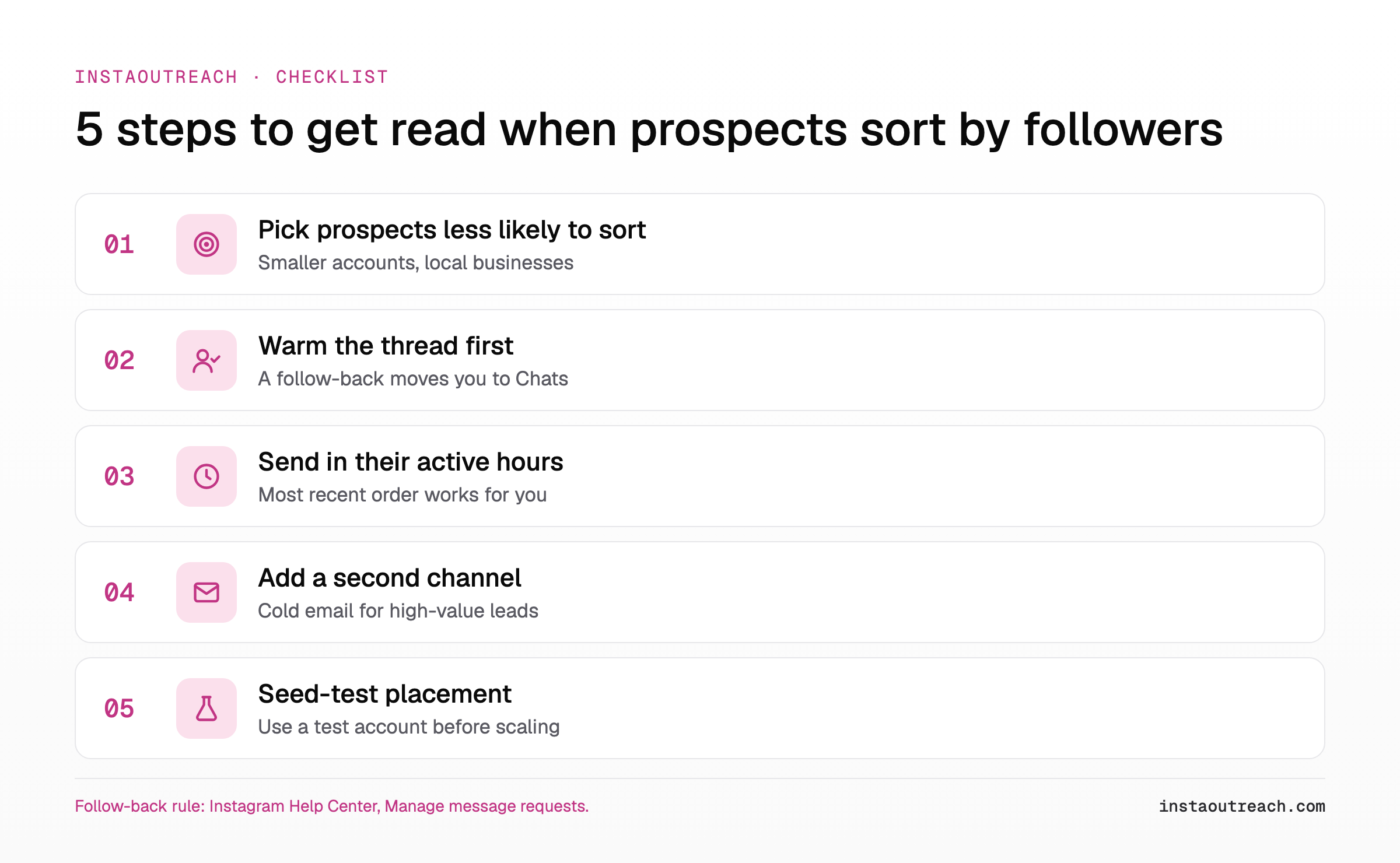
You cannot control how a prospect sorts. You can control who you message, when, and whether you are a stranger when you do. Run this checklist before each campaign.
The 5-step checklist
- Pick prospects who are less likely to sort. Favor smaller accounts and local businesses with light request volume (see the table above). For big creator accounts, assume a follower sort and warm up the thread first (step 2).
- Warm the thread before the DM. Follow, then leave a few genuine comments over several days. If the prospect follows you back, your message skips Requests: Instagram's help page says "Messages from people you follow on Instagram will appear in your Chats list" (Instagram Help Center). That is the only route that sidesteps the sort entirely.
- Send inside their active hours. Under Most recent, which is most likely still the default for prospects who never open Sort & Filter, a DM sent just before they open the app sits near the top. Check when they post and reply to comments, and schedule around it.
- Add a second channel. For high-value prospects, find a business email and pair the DM with a cold email. If your DM is 34th in a sorted list, the email can be first in a different inbox.
- Seed-test placement. Send to a test account you control with a known setup, and confirm where your message lands before you scale. The method is in the hidden requests guide.
Tip: Keep a column in your lead sheet for "likely sorts: yes / no" based on the prospect type. It takes seconds per lead and tells you which prospects need the warm-thread step and which can get a direct DM.
Does the follower sort change your tool or account setup?
Adding sending accounts does not fix a sort that ranks every small account low. Ten accounts with 300 followers each all land at position 34 in the worked example above. Spreading volume across accounts still makes sense for daily limits, but fix the profile on each account first; the setup is covered in running several sending accounts.
| Problem | Do more sending accounts fix it? | What does |
|---|---|---|
| DM ranked low in a Most followers sort | No, every small account ranks low | Warm the thread, target prospects who do not sort |
| Not in a 10K followers filtered view | No | Follow-back to reach Chats, or a second channel |
| Prospect opens request, ignores it | No | Complete profile, specific first line |
| Daily send volume capped per account | Yes | More accounts, each warmed up |
| DMs landing in hidden requests | Rarely | Fix the sending profile and message content |
If you are choosing a tool for this kind of targeted outreach, compare Instagram DM tools side by side on how they source leads and where they run. Cost scales per account, so check per-account pricing before adding senders: InstaOutreach lists $29 a month for the first account and $14.50 a month for each extra one. InstaOutreach runs in your own browser as a Chrome extension or as a Mac app, not in the cloud, and pauses when the browser is closed. It can also source leads from a competitor's followers, so you choose prospects instead of hoping they never sort.
FAQ
Can I see who has the most followers in my Instagram message requests?
If your account has it, yes. Since November 2024, Instagram's Requests inbox has a Sort & Filter option that can order requests by recency or by follower count, plus filters for verified, business, creator and subscriber accounts, according to TechCrunch. Instagram has not published who gets it, and the 2024 launch was framed around creators. In April 2026 a separate "Most followers" option was reported in testing on iOS. For the exact tap path and what to do if you do not see the menu, follow the steps in our message requests troubleshooting guide.
Does Instagram hide message requests from accounts under 10K followers?
Not by default. SocialBee's update log reports that in January 2026 "Instagram added a '10K followers' filter for Instagram DMs" (SocialBee), but no Instagram announcement or Help Center page documents it. A filter is something the recipient chooses to turn on; it narrows their view and does not delete or block anything. If a prospect applies such a filter, a sender under 10,000 followers would most likely not appear in that view until the filter is cleared. Your message is still in their inbox.
Is the "Most followers" sort available to everyone?
There is no sign that it is. The April 2026 "Most followers" and "Most recent" options in Requests were reported as a test on iOS in a Threads post by @oncescuradu. Instagram has not announced a rollout, and its message requests help page does not describe sorting. Separately, the follower-count sort from November 2024 exists, but Instagram published no eligibility list for it. Plan as if some prospects have it, especially creators with busy inboxes, and others do not.
Do Meta Verified accounts rank higher in message requests?
We found no source saying they do. What is documented is that "verified accounts" is one of the filter options in the Sort & Filter menu launched in November 2024 (TechCrunch). So a verified sender shows up when a prospect filters by verified, and a non-verified sender does not. In a sort by follower count, the ranking is by followers, and nothing public suggests verification changes that order. Whether Meta Verified is worth paying for on a sending account depends on your prospects; our Meta Verified guide for outreach accounts weighs it.
Does a small follower count stop my DM from being delivered?
No. Sorting and filtering change the order and the view your prospect sees, not whether your message arrives. A DM from a 300-follower account still lands in the recipient's Requests folder; under a follower-count sort it simply sits lower in the list. If your messages are not arriving or end up in the hidden folder, the cause is somewhere else: profile signals, message content, or sending patterns. Those are covered in why cold DMs end up in hidden requests, along with a seed-test method to check where your DMs land.