Business Account DMs Not Seen? Business vs Creator vs Personal
Switching from business to creator or personal will not pull a cold DM out of Requests. What decides where it lands is the recipient's inbox, not your account type. Here is what does change.
Switching between business, creator and personal accounts does not move a cold DM out of Requests: Meta's Instagram Messaging docs say messages from accounts that are not followers of the receiving professional account go to Requests and are not marked Seen until accepted. What decides visibility is the follow relationship and the recipient's inbox, not your account type; creator and business inboxes add a General tab where accepted threads can go quiet.
So if your business account DMs are not seen, the fix is rarely a settings toggle on your side. Operators on r/Entrepreneur describe pitching influencers from a business account and never getting a Seen receipt, then wondering whether a creator or personal account would have landed better. This guide separates what the recipient's inbox does from what your account type actually changes, then gives you a decision table and a pre-send checklist.
Business account DMs not seen: is your account type the cause?
Short version: no official source says the sender's account type changes where a DM is routed. The documented rule is about the relationship between the two accounts. Meta's developer docs say messages from accounts that are not followers of the receiving professional account go to Requests and are not marked Seen until accepted, while new conversations from its followers land in Primary by default (Meta's messaging overview). Third-party guides state the rule from the other side: Socialinsider says "Requests contain messages from users you do not follow", and Inro, a vendor, says a DM to someone who does not follow you lands in Message Requests. Meta's docs phrase the rule from the inbox owner's side and do not mention the sender's account type.
That second part explains most "never seen" complaints. A request can be opened, previewed and ignored, and you still see no Seen label, because Seen cannot appear before acceptance (Meta). After acceptance it depends on the recipient's read-receipt setting, so Seen is never guaranteed. From the sender's side, "unread" and "read and declined to accept" look identical.
Short answer: A cold DM with no follow relationship lands in Requests whether you send it from a business, creator or personal account. Seen cannot appear before they accept, and after that it depends on their read-receipt setting. Your account type changes what they see when they preview the request, not which folder it goes to.
| What your account type changes | What it does not change |
|---|---|
| Whether you can use the Instagram Messaging API (business and creator only, per Meta) | The folder a cold DM lands in for a non-follower (Requests) |
| Whether your own inbox gets Primary, General and Requests tabs | Whether a Seen mark shows before acceptance (it does not) |
| Profile signals the recipient sees when previewing your request (category label, contact options on professional accounts) | The recipient's notification settings for General or Requests |
| Access to insights on your own content (observation) | Any documented daily DM cap (Instagram publishes none) |
Where your DM lands in an influencer's inbox
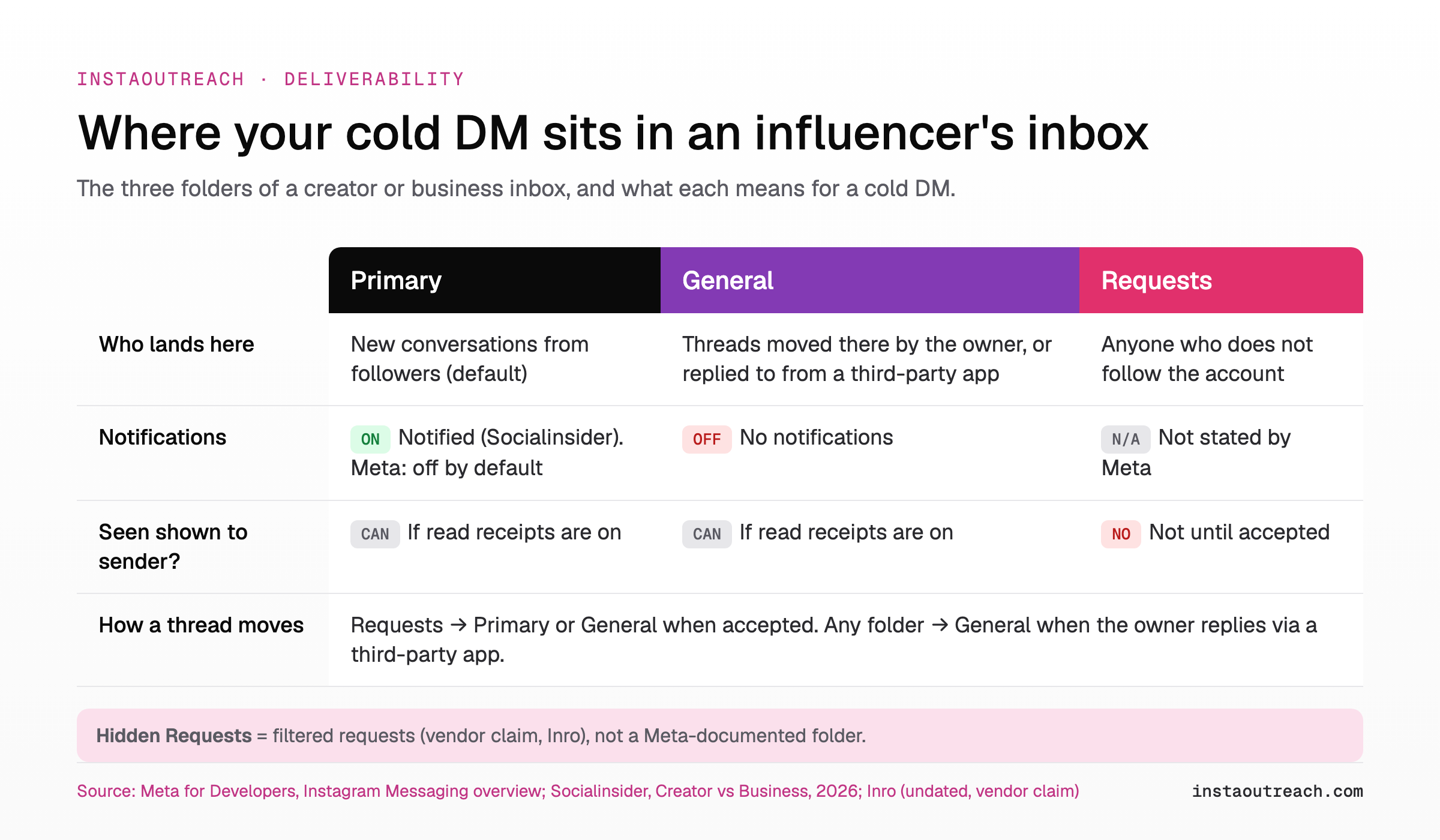
Most influencers you pitch run a creator or business account, and that is where the real sorting happens. Meta documents three folders on a professional inbox: Primary, General and Requests.
Socialinsider's creator vs business guide (updated June 2026) adds how creators use them: Requests holds messages from accounts the creator does not follow, General holds messages they do not get notifications for, and Primary is for messages they are notified about (Meta's doc adds that notifications on a professional inbox are off by default until enabled). Meta's docs say an accepted request can be moved to Primary or General, so an accepted brand pitch can end up in General, where per Socialinsider it no longer pings the phone.
There is one more layer, and it is a vendor claim rather than a Meta statement. Inro, a comment-to-DM automation vendor, says Instagram routes likely spam into Hidden Requests, and that messages tend to land there when there is no prior interaction, the text looks templated, or the sender is messaging many new people in a short time. We cover that filter in detail in why cold DMs end up in Hidden Requests. Large accounts also triage the Requests pile itself, which is why it helps to know how influencers sort requests by most followers.
Business vs creator vs personal account: what actually differs for cold DMs
Here is the side-by-side for the sender. Rows marked "observation" are what you can see in the app yourself, not documented routing rules, so treat them as a description, not a claim about performance.
| For cold DMs | Business | Creator | Personal |
|---|---|---|---|
| Instagram Messaging API access | Yes (Meta) | Yes (Meta) | No |
| Can the API start a conversation with someone who never contacted you? | No: replies only within 24 hours of a user action, up to 7 days after a click-to-DM ad | No: same window | Not applicable |
| Your own inbox tabs (Primary, General, Requests) | Yes (Meta) | Yes (Socialinsider) | Standard inbox (observation) |
| Where your cold DM lands for a non-follower | Requests | Requests | Requests |
| What the recipient sees when previewing (observation) | Category label, contact options, brand-style profile | Category label, creator-style profile | Plain profile, reads as a person |
| Insights on your own posts (observation) | Yes | Yes | No |
The row that matters most is the second one. Meta lists the messaging window as 24 hours after most user actions and up to 7 days after someone sends their first message from a click-to-DM ad, per the Messaging overview. The listed uses are answering customers and sending a private reply to someone who commented. None of them is messaging a stranger who never contacted you, so the API route does not exist for true cold outreach on any account type.
Socialinsider dates business accounts to 2016 and creator accounts to 2018 in the same guide. Both have had years of feature drift, and none of the public comparisons document a placement advantage for one over the other.
Why replying from a tool can bury the thread
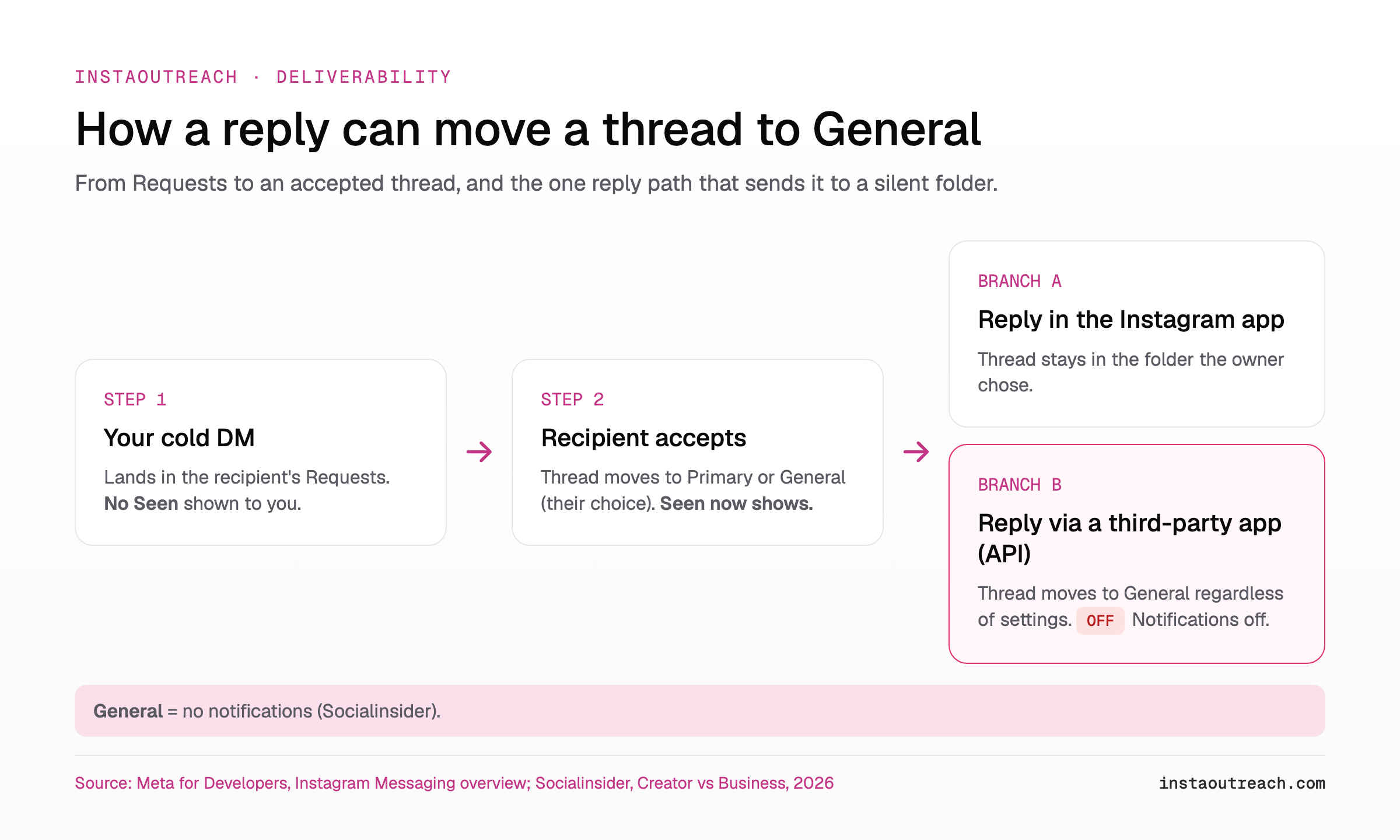
This is the account-type detail agencies miss. Meta's docs state that when a professional account replies to a message through a third-party app, the conversation moves to General regardless of the account's settings. Per Socialinsider, General is the tab that does not send notifications.
Run that through an influencer campaign. An influencer replies to your pitch. You answer from a social inbox tool connected through the API. The thread moves to General on your side, notifications go quiet, and a hot reply sits unseen in your own inbox. The same rule applies on the influencer's side if their manager answers through a tool: your thread drops into their General tab.
Two practical habits follow from this:
- Check General daily if anyone on your team replies through an API-connected inbox tool.
- Ask influencer managers which channel they monitor, and do not assume a silent General thread is a dead one.
A side note on false leads: help pages from social inbox vendors that explain "DMs not seen in our inbox" are about their own connection settings on the receiving side. They do not explain why an influencer never accepted your request.
Browser-based tools that drive the normal Instagram interface are a different mechanism from the Messaging API. Whether a reply sent that way avoids the General move is not documented anywhere we found, so do not count on it.
Which account type to use for influencer outreach and SMB outreach
Since routing is the same for all three types, choose based on what the recipient sees when they open the request preview. The question they are asking in that second is simple: is this a real brand or person I want to talk to?
| Use case | Account type to use | Why (what the recipient sees) |
|---|---|---|
| Agency or brand pitching influencers | Business or creator | Influencers expect brand deals to come from a brand. The profile has to read as the brand, with posts that match the pitch. |
| Solo founder or appointment setter pitching SMBs | Personal, or creator if the profile looks like a person | Owners respond to a person. A face, a name and real posts read better than a logo with no context. |
| Creator pitching another creator for a collab | Creator | Peers recognise the category label and content style, and it matches the ask. |
| Recruiting nano and micro influencers at volume | Business or creator brand account | The recipient checks that the brand exists before accepting. Volume does not change the folder, so the profile has to carry the trust. |
Once you have picked the type, the profile itself does the persuading. We will not repeat it here: use the guide to audit the profile a recipient sees before a campaign. If influencers are the main target, the playbook for recruiting nano and micro influencers by DM covers message structure and follow-ups.
Tool choice does not change the folder either. When you compare outreach tools, look at where they run and how they send, not at promises about inbox placement, because no vendor controls Instagram's routing.
How to get a cold DM seen when account type is not the lever
Every source we checked ties the folder to the follow relationship, not to account type (Meta, Socialinsider), so the lever is the relationship. Run this checklist before you blame your business account.
| # | Before you switch account type, check | Why it matters |
|---|---|---|
| 1 | Has the influencer interacted with you first (story reply, comment reply, follow back)? | Requests hold messages from accounts the recipient does not follow (Socialinsider; Inro, vendor claim). |
| 2 | Have you engaged with their content for a few days before the DM? | Inro says no prior interaction is one trigger for Hidden Requests (vendor claim). |
| 3 | Does the first line name their content specifically? | Templated text is another trigger Inro lists, and the preview line is all they see. |
| 4 | Are you sending a short burst to many new people? | Inro lists high volume to new people in a short time as a third trigger. Spread sends across the day. |
| 5 | Does your profile match the pitch (brand pitch from a brand, personal pitch from a person)? | The preview is the only thing they judge before accepting. |
| 6 | Is there a second channel (email, management contact) if no accept after a week? | A request can sit unopened indefinitely. A second channel reaches them anyway. |
| 7 | Is anyone replying through an API inbox tool? | Those replies move threads to General, where notifications are off. |
| 8 | Are you treating "no Seen" as "not read"? | Requests show no Seen until accepted, so no Seen is not proof they missed it. |
For item 6, a tested structure for pairing DMs with cold email keeps the two channels from repeating each other. If the account you send from is new or has few followers, read about cold DMs from a small account first, because that is a profile problem, not an account-type one.
Worked example (assumptions, not data): you pitch 30 influencers in a week from a business account. If 6 of them follow you back (for example after a story-reply conversation they started), those 6 threads would start in Primary, per Socialinsider's description of Requests as messages from accounts the recipient does not follow; the other 24 start in Requests regardless of whether you send from business, creator or personal. Switching type changes 0 of those 30 placements. Building the follow first changes 6.
Switching account type before a campaign: what to expect
Switching between personal, creator and business is a profile setting, and nothing in Meta's documentation ties the switch to a change in how your messages are routed. We found no sourced timing for any "settling" period after a switch, so ignore advice that says to wait a set number of hours. Switch for the reason in the decision table above, then keep sending the way you were.
What you do lose or gain is concrete. Moving to personal removes Messaging API access (Meta) and, as you can see in the app, insights (observation). Moving to creator or business adds inbox tabs and API access, but the API still cannot start cold conversations.
Risk: Instagram's Terms of Use prohibit accessing or collecting information in automated ways without permission, which covers DM automation, whatever your account type. Changing type does not make automation allowed, and no tool can promise an account will not be restricted.
If you run outreach from a browser tool, InstaOutreach sends from the account you are already logged into in your own Chrome or Mac app, so account type stays your decision; it runs only while that browser or app is open, and plans are on the pricing page.
FAQ
Do messages from business accounts go straight to Requests?
Messages from any account type can go to Requests; the follow relationship decides it. Socialinsider describes Requests as messages from users the recipient does not follow, and Inro, a vendor, says the same. Meta's developer docs phrase it from the inbox owner's side: messages from accounts that are not followers of the receiving professional account go to Requests. None of them single out business accounts. On the Socialinsider reading, if an influencer follows your business account, your DM starts in their Primary folder. If they do not, it starts in Requests, exactly as it would from a creator or personal account. The fastest way out of Requests is an interaction that leads to a follow or an accepted conversation.
Is a creator account better than a business account for DMs?
For placement, neither has a documented advantage. Both are professional accounts, both get Primary, General and Requests tabs, and both have access to the Instagram Messaging API, according to Meta. The difference that matters for outreach is what the recipient sees when they preview your request. A creator account reads as a person who makes content, which suits creator-to-creator collabs. A business account reads as a brand, which suits brand deals. Pick the one that matches who is actually sending the pitch, then put the effort into the profile and the first line.
Why does my DM to an influencer never show as Seen?
Because Seen cannot appear before a request is accepted. Meta's documentation says message requests are not marked Seen until the recipient accepts them, and after acceptance Seen still depends on the recipient's read-receipt setting. An influencer can open the request, read the preview and move on, and you will never get a Seen receipt. So a missing Seen does not prove the request was never read. Treat silence after a week as a cue to try a second channel.
Can I use the Instagram API to send cold DMs from a business account?
No. Meta limits the Instagram Messaging API to business and creator professional accounts, and it only lets you reply inside a messaging window: 24 hours after most user actions, or up to 7 days after someone messages you from a click-to-DM ad. The use cases Meta lists include answering customer messages and sending a private reply to someone who commented on your post. Messaging a person who has never contacted you is not one of them. That applies to business and creator accounts equally, so switching type does not unlock cold outreach through the API.
Should I switch to a personal account for cold outreach?
Only if your outreach is person-to-person, such as a solo founder or setter pitching small business owners, where a human profile reads better than a brand. Switching to personal does not take your DMs out of Requests, because routing depends on the follow relationship, not account type. You also lose Messaging API access and, in the app, insights (observation), which matters if a team answers replies through an inbox tool. For agencies and brands pitching influencers, a business or creator account usually matches what the influencer expects to see from a brand deal.
Does replying through a social inbox tool hide the conversation?
It can move it out of sight. Meta's documentation says that when a professional account replies through a third-party app, the conversation moves to the General folder regardless of settings. Socialinsider describes General as the tab without notifications. So a thread your team answers from an API-connected inbox tool can drop into General and stop alerting anyone. If influencers reply and then go quiet, check General before writing the lead off, and make reviewing that tab part of the daily routine for anyone handling replies.